Datalogger Setup
Note:
Any stored data will be permanently erased when Setup is finished. To enable you to
save data before it is lost, click on ʺCancelʺ and download the data.
Always ensure that the remaining charge in the battery is sufficient to last the complete
duration of your logging exercise. If in doubt, we recommend that you always install a
fresh battery before logging critical data.
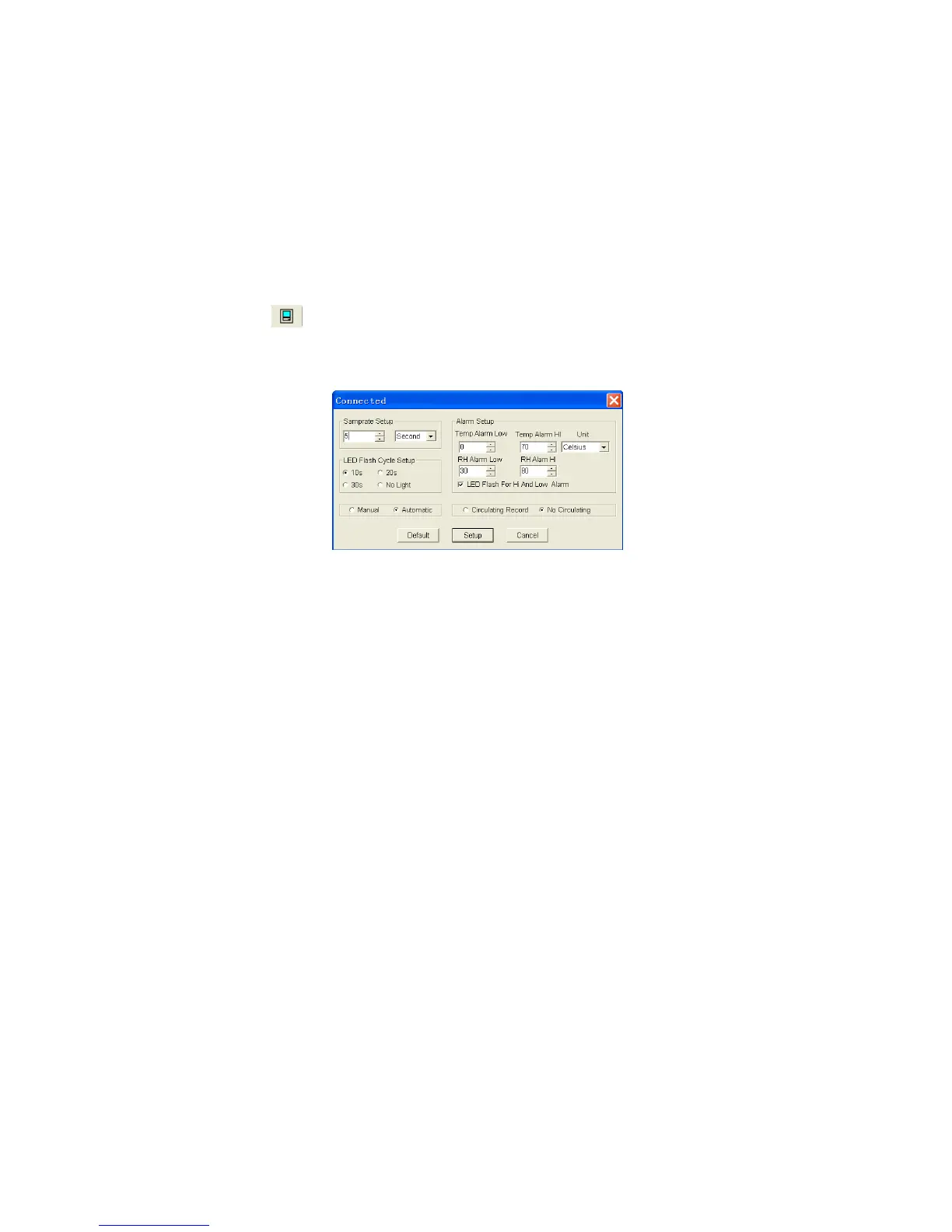
Click on the icon on the menu bar. The Setup window will appear as shown
below; descriptions for each field in the Setup window are listed below the
illustration.
The Samprate Setup field instructs the datalogger to log readings at a specific rate.
You can input specific data at the left Edit box and select the time unit at the right
Combo box.
The LED Flash Cycle Setup field can be set by the user (select ʺNo Lightʺ, LED
will not flash and battery life will last longer).
The Manual and Automatic options allow the user to start datalogging immediately
when the Setup window is exited (automatic) or at a later time (manual).
The Alarm Setup field allows the user to set HIGH and LOW temperature and
relative humidity limits and disables the flashing data logger’s LEDs thereby
conserving the battery energy.
The Circulating Record and No Circulating options instruct the datalogger to
continue logging data to cover the earlier data (Circulating Record) or stop logging
(No Circulating) when the datalogger is full.
Click on ʺSetupʺ to save changes. Click on ʺDefaultʺ to set the logger to factory
default condition. Click on ʺCancelʺ to abort the setup.
5


 To Next Page