sound system. Adjust the center frequency to match this point. For most systems, the best center frequency
adjustment will be between 40-50Hz. Use 45Hz (12 o’clock setting) as a starting point and adjust up or down
• Setting the Boost/Cut: Once you have determined the loudest musical spot or range within the bass range of
your sound system, start cutting until the response is smooth and even. You can also boost low spots within
the musical range, but don’t go crazy with the boost knob. There is a lot of boost available, 12dB, but begin
with a low boost setting (around 3dB) and try to stay below 6dB whenever possible. Remember that for every
3dB of additional boost you dial in, you are asking the amplifi er to double its power output for a given signal
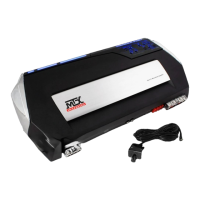
6. Remote Subwoofer Level Control (Remote Gain) – Let’s say the amplifi er’s gain is set at halfway. When the
remote subwoofer level control is plugged in, you have external control of the gain from zero to halfway. The
installation of this level control is NOT necessary to get full power from the amplifi er.
Note: One Remote Subwoofer Level Control can control two or more amplifi ers using a mini plug Y-adapter.
7. Prizm EFX – Now that you have completed adjusting all your amplifi er settings, you can set the lighting effects
• Selecting Colors: You can change the backlit colors simply by turning the dial labeled PRIZM COLOR, located
in the MTX PRIZM EFX section of the control panel, left or right. Starting at the left most position, the colors
range from RED to GREEN, BLUE, and then RED again. You can choose any color in between making the
• Selecting the EFX Feature: You can switch Prizm EFX lighting to “pulsate” with the beat of the music. Simply
depress the button labeled PRIZM EFX located in the in the MTX PRIZM EFX section of the control panel to
turn this feature on or off.
Trouble Shooting
Read this if you want to be a do-it-yourselfer or give us a call at 800-CALLMTX.
No LED indication No +12V at remote connection Supply +12V to terminal
No +12V at Power connection Supply +12V to terminal
Insuffi cient ground connection Verify ground connection
Blown power fuse Replace fuse
LED on, no output Volume on head unit off Increase volume on head unit
Speaker connections not made Make speaker connections
Gain control on amplifi er off Turn up gain
Signal processing units off Apply power to signal processor
All speakers blown Replace speakers
Output distorted Head unit volume set too high Lower head unit volume
Amplifi er gain set too high Lower amplifi er gain
Balance reversed Speakers wired L + R reversed Wire speakers with correct orientation
RCA inputs reversed Reverse RCA input
Bass is weak Speakers wired out Wire with correct of phase
Not using MTX woofers Buy MTX woofers
Blowing fuses Excessive output levels Lower volume
Amplifi er defective Return for service





 To Next Page