1
1. Product Descriptions
1
2
10
8
9
7
3
4
5
6
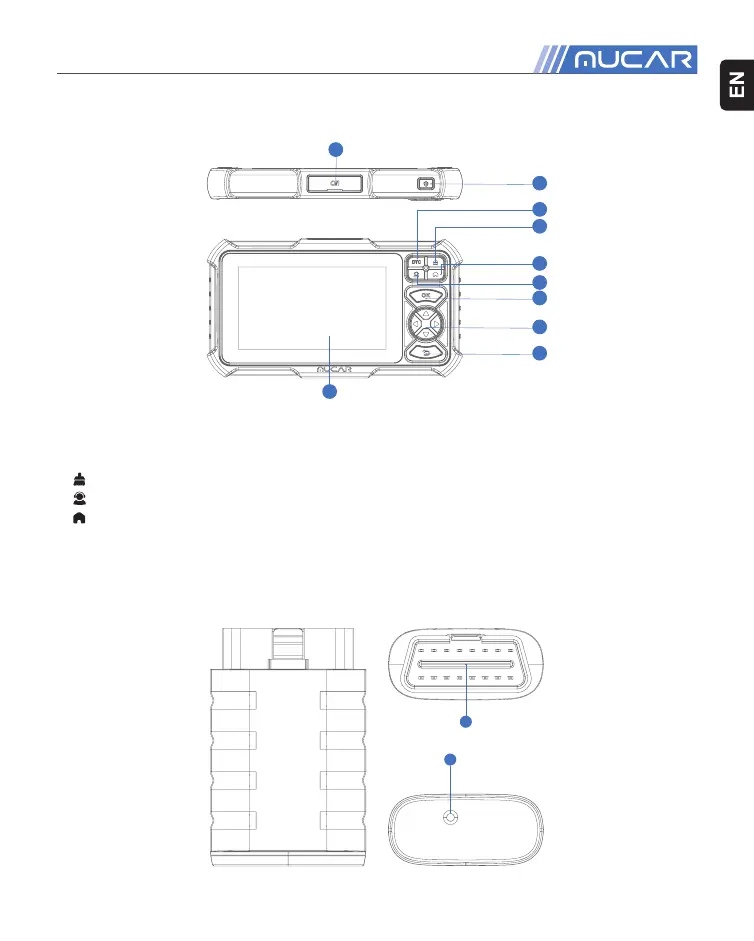
1. Charging Port: TYPE-C charging port & USB debugging port.
2. Power/Screen Lock Button: Long press for 5 seconds to turn on or off .
3. DTC Button: Trouble code query analysis.
4. Button: Clear fault code.
5. Button: Customer service.
6. Button: Back to Home page.
7. OK Button: Confi rm button.
8. Selection Buttons: Up, down, left and right direction selection.
9. Return Button: Return to the previous step.
10.Touch Screen: 7 inches (1024*600 resolution).
1
2



 To Next Page