Need help?
Do you have a question about the Muddy PRO-CAM 24 and is the answer not in the manual?
Details on connecting an external 12V DC power source for the trail camera.
Setting the camera's internal clock for accurate image timestamping.
Configures the camera to operate in photo, video, or time-lapse mode.
Selects the resolution for captured images, affecting detail and storage space.
Determines the video resolution, balancing visual quality with storage requirements.
Sets the duration of recorded video clips, from 5 seconds to 2 minutes.
Specifies the wait time before re-arming the PIR sensor after capture.
Controls the number of photos taken in rapid succession upon detection.
Imprints the ambient temperature onto photo/video files.
Assigns a name to the camera for identification on captured media.
Enables or disables the display of camera information on images/videos.
Activates an LED to help aim the camera and visualize the detection zone.
Resets all camera settings to their factory default values.
Sets the time interval between photos taken in time-lapse mode.
Defines the specific time windows during the day for time-lapse captures.
Determines whether the IR LEDs are used for illumination, affecting day/night capture.
Adjusts the sensitivity of the motion sensor for detecting objects.
Erases all data on the SD card, preparing it for camera use.
Displays the current firmware version installed on the camera.
When enabled, overwrites oldest files when the SD card becomes full.
Explains how the camera automatically prepares to capture images after power-on or inactivity.
Guides on transferring and viewing captured photos and videos from the SD card.
Precautions to prevent water damage and ensure camera integrity in damp conditions.
Guidelines for handling and transporting the camera to avoid damage to internal components.
Recommended temperature ranges for storing and operating the camera.
Steps to resolve issues where the camera fails to power on or turn off.
Troubleshooting steps for SD card recognition problems and recommended formatting.
Explains common causes for blurry or smeared images, like fast motion or low light.
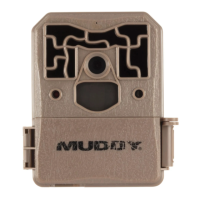
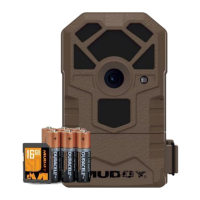
The Muddy Pro-Cam 24 (Model MUD-MTC800) is a trail camera designed for outdoor surveillance and wildlife monitoring. It captures images and videos, offering a range of customizable settings to suit various user needs. The camera comes with essential accessories including a manual, a 5-foot mounting strap, and 6 AA alkaline batteries, along with an SD card for storage.
The primary function of the Pro-Cam 24 is to capture high-resolution images and videos of activity in its detection zone. It operates in three main modes: Camera, Video, and Timelapse. In Camera mode, it takes still photos, while Video mode records video clips with sound. Timelapse mode allows the camera to capture images at fixed intervals, regardless of motion, which is useful for observing long-term changes or activity over a wide area. A unique feature of the Timelapse mode is its ability to still trigger on animal movement based on the current Camera settings, ensuring no activity is missed.
The camera is equipped with 36 invisible flash LEDs for night illumination, providing clear black and white images in low-light conditions without startling wildlife. Its PIR (Passive Infrared) sensor detects motion, triggering the camera to record. The trigger speed is notably fast, at 0.6 seconds, ensuring that fast-moving subjects are captured effectively.
Setting up the Pro-Cam 24 involves installing batteries and an SD card. The camera requires 6 AA alkaline batteries and supports SD storage cards up to 32GB, with Class 10 cards recommended for optimal performance. An external 12V DC power hookup is also available, which takes precedence over the AA batteries if both are connected. The battery indicator will display "EXT" when running on external power.
The camera's settings are accessed via a backlit LCD screen and a set of navigation buttons (M, OK, UP, DOWN, LEFT, RIGHT). Users can customize various parameters, including:
Mounting the camera is made easy with a 5-foot nylon strap that threads through slots on the back of the housing. An additional cable track is provided for cable securing, and a 1/4"-20 mount receiver at the bottom allows for alternative mounting options. A loop in the latch accommodates a padlock for security.
Reviewing images is typically done by inserting the SD card into a computer. Some computers have built-in SD card slots, while others may require an external SD card reader.
The Pro-Cam 24 is designed with a durable, waterproof molded ABS material shell. However, proper care is essential to ensure its longevity and performance.
In case of troubleshooting, if the camera becomes unresponsive, removing the AA battery compartment (or disconnecting external power) for 10 seconds often resolves the issue by resetting the main power supply. If the camera fails to recognize the SD card, replacing it with a new one or a known working card from another Muddy trail camera can help diagnose whether the problem lies with the card or the camera itself. While the camera aims for optimum trigger speed and night photo clarity, extremely fast movement or insufficient light conditions may occasionally result in smearing or blurry images, which is a natural aspect of photography.
 General
| Resolution | 24 MP |
|---|---|
| Video Resolution | 1080p |
| Battery Type | 8 AA batteries |
| Storage | Up to 32GB SD card |
| Flash Type | Infrared |
| Flash Range | 80 feet |
| Detection Range | 80 feet |

 To Next Page