14
1
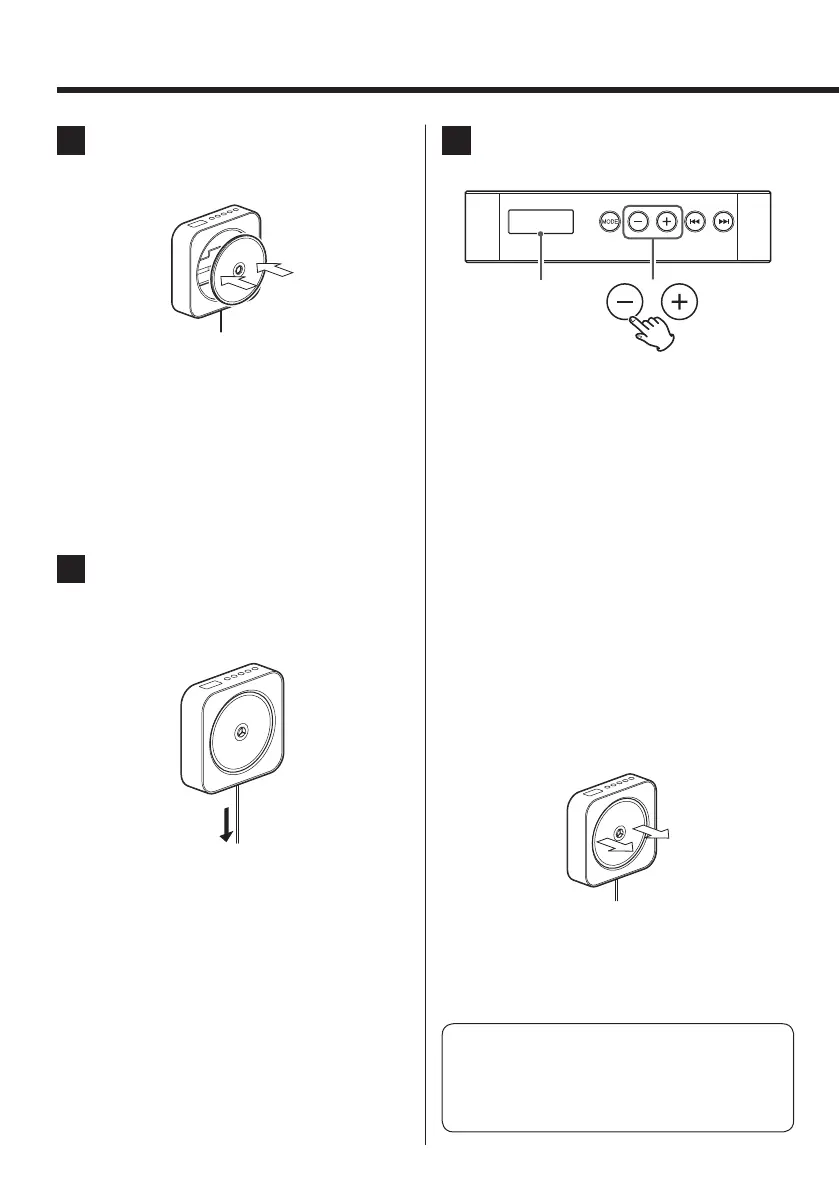
Insert the CD into the unit.
Fix the CD onto the central hub of the unit.
Q
Caution
Fix the CD firmly into the unit until you hear
a click. The CD will spin very fast, so it is
extremely hazardous if the CD is not inserted
correctly into the unit.
< Be careful not to press the CD too hard when you
fix it. Doing so may cause scratches on the CD.
2
Gently pull the DC power cable to
play back the CD.
CD playback will start automatically.
< The play/pause button (y/J) on the remote
control unit can also be used.
< Please do not touch the CD whilst it is spinning/
playing.
3
Press the volume buttons (−,+) to
adjust the volume.
VOL 05
< The volume can be adjusted in a range between
00 and 32. (“MAX” is shown on the display at 32.)
To stop the playback, gently pull the
DC power cable again.
< The stop button (H) on the remote control unit
can also be used.
< 30 minutes after playback finishes, the machine
will automatically enter stand-by mode. To re-
activate from stand-by mode, pull on the power
cable lightly.
Removing the CD
Pull the CD straight outwards to remove it.
< Be careful not to press the CD too hard when you
remove it. Doing so may cause scratches on the
CD.
Caution
Never touch the lens.
Please take care, as any damage or dirt can cause
the CD player to malfunction.
The volume level
is shown.
Listening to a Disc


 To Next Page