16
Listening to the Radio
1
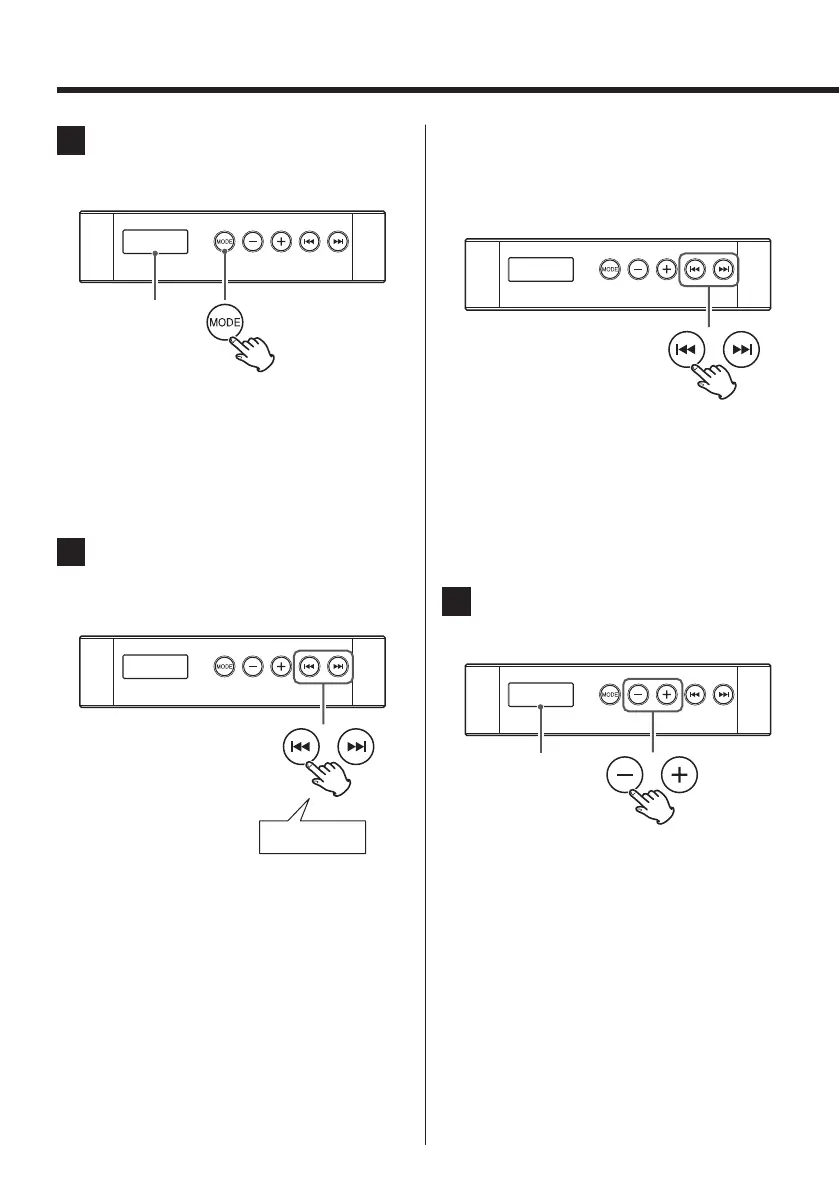
Press the Mode button (MODE).
The source changes to FM.
FM 87.5
< The FM button (FM) on the remote control unit
can also be used.
< When a CD is not inserted into the unit, pulling
the DC power cable will also perform the same
operation.
2
Select the station you want to lis-
ten to.
Automatic selection
FM 87.5
Hold down
Hold the skip button (.//) for more than
2 seconds and release it when the frequency
display starts changing continuously.
A station is tuned in automatically, and the fre-
quency display will stop. Repeat this step until
the station you want to listen to is found.
< To stop the automatic tuning process, press the
skip button (.//) briefly.
Manual selection
To tune in to a station the unit cannot tune in to
automatically, press the skip button (.//)
repeatedly to select the station you want to lis-
ten to.
FM 87.5
< Press the skip button (.//) briefly. The fre-
quency changes by a fixed step (0.1 MHz). Press
repeatedly until the station you want to listen to
is tuned in.
< You can also use the skip buttons (.//) on
the remote control.
3
Press the volume buttons (−,+) to
adjust the volume.
VOL 05
The volume level
is shown.
< The volume can be adjusted in a range between
00 and 32. (“MAX” is shown on the display at 32.)
The frequency is
shown after “FM”
is shown.


 To Next Page