www.element14.com
www.farnell.com
www.newark.com
Page <16> V1.118/06/18
MC-I20 User Manual & Troubleshooting
Specic operation method
a. Auto-home
The user can directly enter the operation option page on the LCD screen, select “Prepare”, and then select “Auto home”.
b. Adjust the distance
After the auto-home is completed, you can directly disconnect the power supply and USB data cable, manually move the nozzle
to change the position of the nozzle on the platform, or you can change the position of the extruder through XY displacement of
the screen or software. Observe three corner positions of the nozzle and platform and adjust the distance.
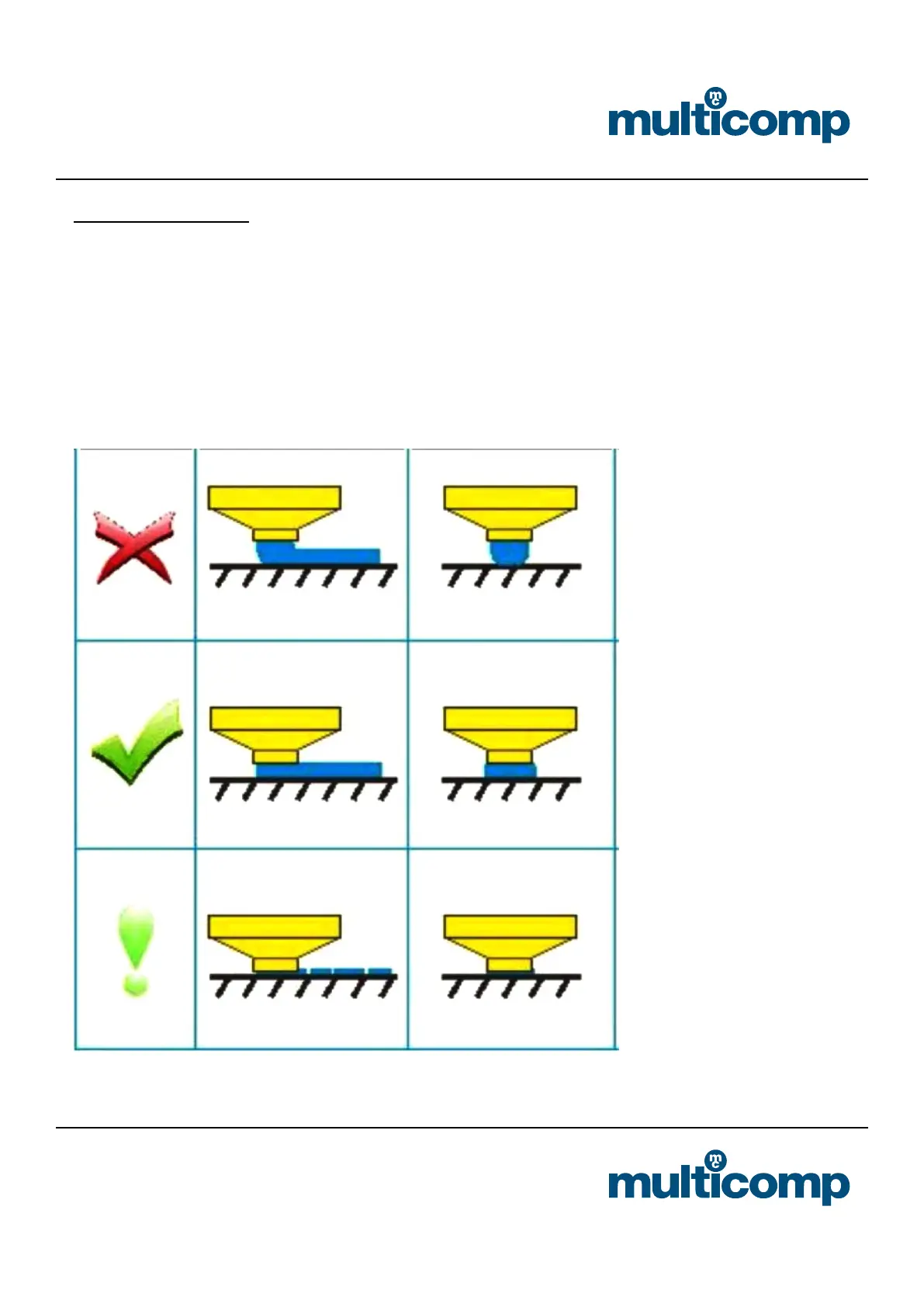
After the machine completes the auto- home, it is possible to further adjust the height of the heating plate by turning the three
screws under the plate. When you adjust each screw, make sure that the distance between the heater plate and the nozzle is
the distance that an A4 paper can travel. You can feel that the nozzle has a little rubbing against the A4 paper, but still can pass
without scratching.
Correct distance between nozzle and base plate:
Start 3D printing after platform debugging


 To Next Page