www.element14.com
www.farnell.com
www.newark.com
Page <13> V1.118/06/18
MC-I20 User Manual & Troubleshooting
Testing Instructions
Before printing, manual unilateral debugging is required to test the normal operation of each component. The inadvertent
assembly and connection problems in previous steps can be tested and resolved in the step-by-step debugging steps.
In general, you need to test the following:
1. Whether the motor is running normally or not
2. Whether the nozzle and hot bed heating are normal
3. Whether the platform is adjusted well, the general platform and the nozzle just make contact and there is a slight scratch
Note: unilateral debugging involves the integrated control of software, hardware and machinery and is the coordinating work
of the entire electromechanical system. If you encounter problems in the debugging process, you need to consult relevant
manuals for analysis and understanding. If you have any difculties, please contact with the customer service.
Step 1: Test the direction of each axis
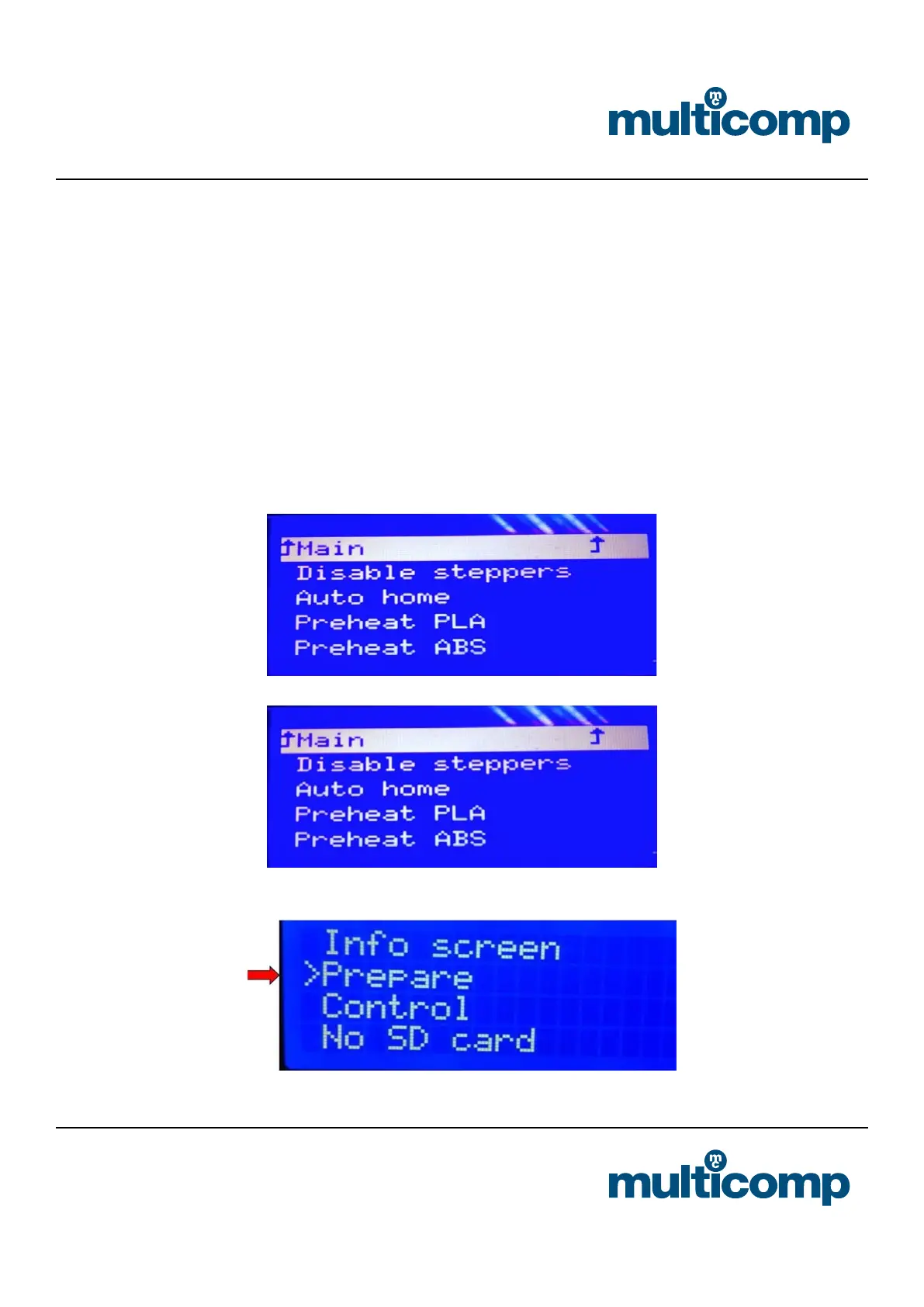
Here is the test of the machine through the LCD screen. First of all, check the LCD screen comments
a. Select “Prepare” “Auto-home”, each axis will return to the origin (lower left corner position), and the limit switch stops,
indicating that the direction is correct.
b. Select “disable steppers”, the motor can rotate freely. After returning to zero, you can manually slide the nozzle to level.
Step 2: Preheat the nozzle


 To Next Page