How to Use How to Use
11
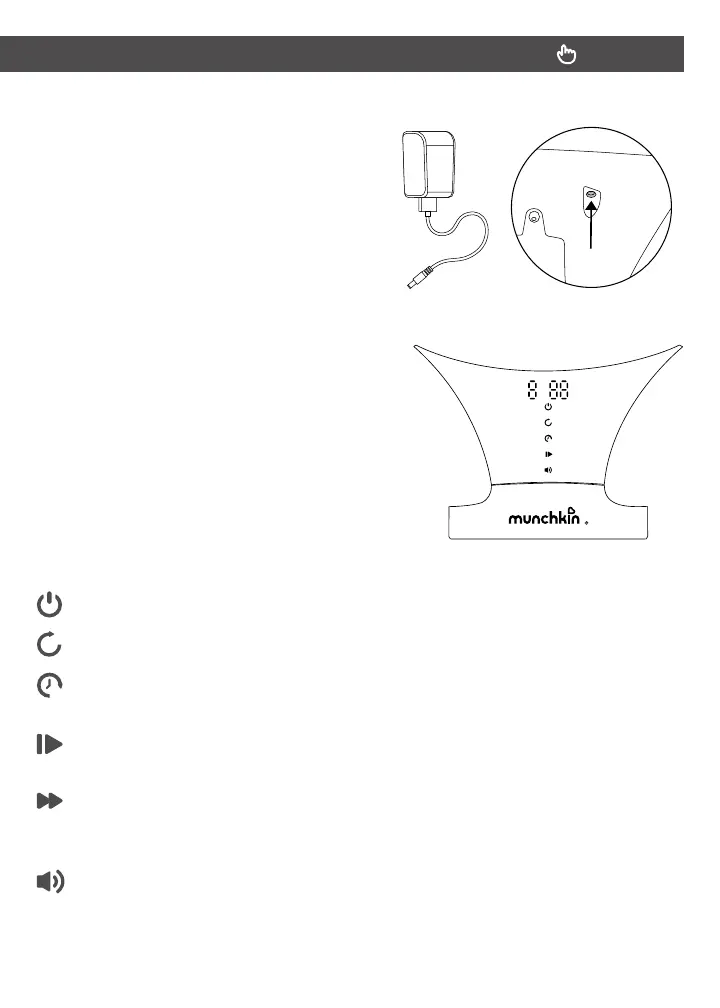
3. Connect the power cord to the port
on the back of the display panel. Then
plug the cord into an electrical outlet.
4. Touch anywhere near the center of the
display panel to activate the screen.
5. Control the unit’s functions with the
buttons indicated below:
POWER: Press to turn power OFF.
SWING: Press to increase speed. Aer 5 levels, speed resets to zero.
TIMER: Press to set time to 8 min, 15 min, 30 min, or cancel. Unit will turn o
automatically when timer nishes.
PLAY/PAUSE: Press to play built-in songs. Press again to choose next song
(12 total). Hold for 2 seconds to pause song.
NEXT SONG INDICATOR: Sounds do not move to the next song but repeat
themselves indenitely/ or Songs play one to two to three to four and cycle back
to song one indenitely or Sounds/Songs follow timer.
VOLUME: Press to increase sound volume. Aer 5 levels, volume resets to zero.


 To Next Page