How to Use
12
CONNECTING VIA BLUETOOTH
The swing has a Bluetooth-enabled speaker that can play music from a mobile device
or smartphone. Simply open your device’s Bluetooth settings and connect to
“MUNCHKIN.” The swing will chime when pairing is successful. To switch back to built-in
sounds, press the swing’s play/pause button. NOTE: The swing must remain within your
device’s Bluetooth range for the connection to stay active.
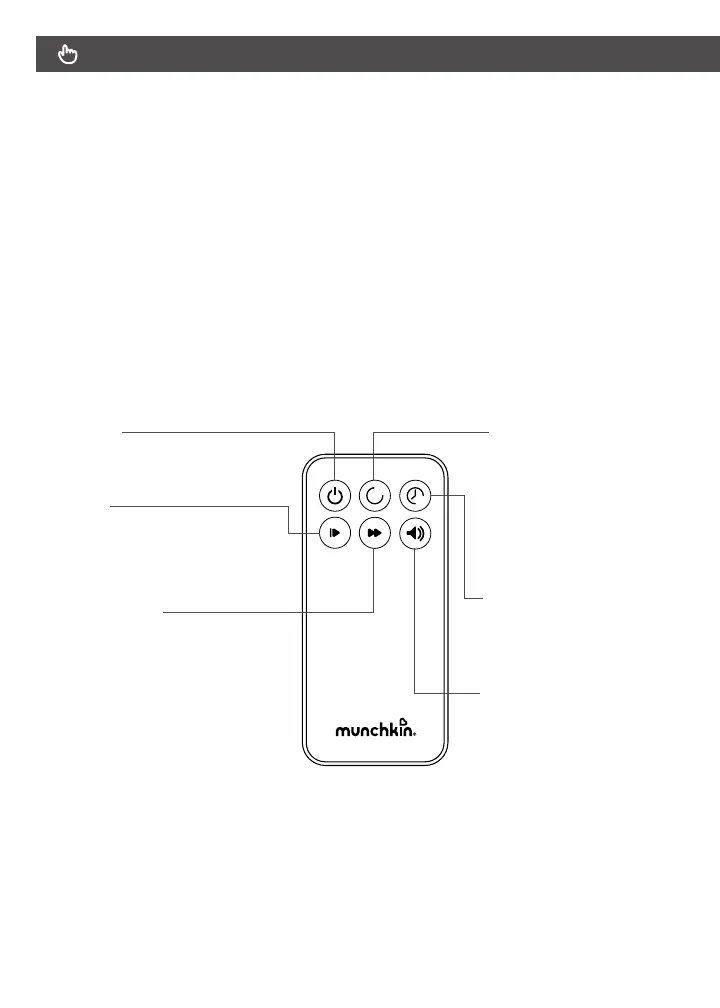
USING THE REMOTE CONTROL
The buttons on the remote control function the same way as the controls on the
display panel.
Power button
Press to turn base unit on
Press again to turn o
Play button
Press once to pause song
or sound. Press again to play
the song or sound at the exact
spot it was paused at.
Next Song Indicator
Press for 1st sound (Ocean Waves)
Press again for 2nd sound (White Noise)
Press again for 3rd sound (Rain)
Press again for 4th sound (Heartbeat)
Press again for 5th sound (Stream)
Press again for 6th sound (Car Ride)
Press again for 7th sound (Birds Chirping)
Press again for 8th sound (Fan)
Press again for 1st song (Bach)
Press again for 2nd song (Beethoven)
Press again for 3rd song (Mozart)
Press again for 4th song (Chopin)
Press again to stop sounds/songs
Press again to start back at rst sound
Sounds do not move to the next song
but repeat themselves indenitely.
Songs play one to two to three to four
and cylce back to song one indennetely
Sounds/Songs follow timer.
Swing button
5 speed settings
Press once starts slowest
speed 1 Press again for speed 2
Press again for speed 3
Press again to turn o swing
feature. Press again for speed 4
Press again for speed 5. Press
again to turn o swing feature.
Timer Set button
Press for 8min, Press again
15min, Press again 30 min
Press again for no timer
Volume Indicator
5 volumes. Volume starts at 3
increases each press.
Press for volume 3
Press again for volume 4
Press again for volume 5
Press again for sound to turn
o or 0. Press again to start
over at volume 1
Press again for volume 2
The volume of each level beeps
to the volume it is at.
When pressed the volume
number replaces timer for 2
seconds at the right placeholder
of the timer screen 0-1-2-3-4-5


 To Next Page