48
ENGLISH
7.2.2. Procedure
The AHU stops automatically when the filter is removed.
So you do not need to switch the device off.
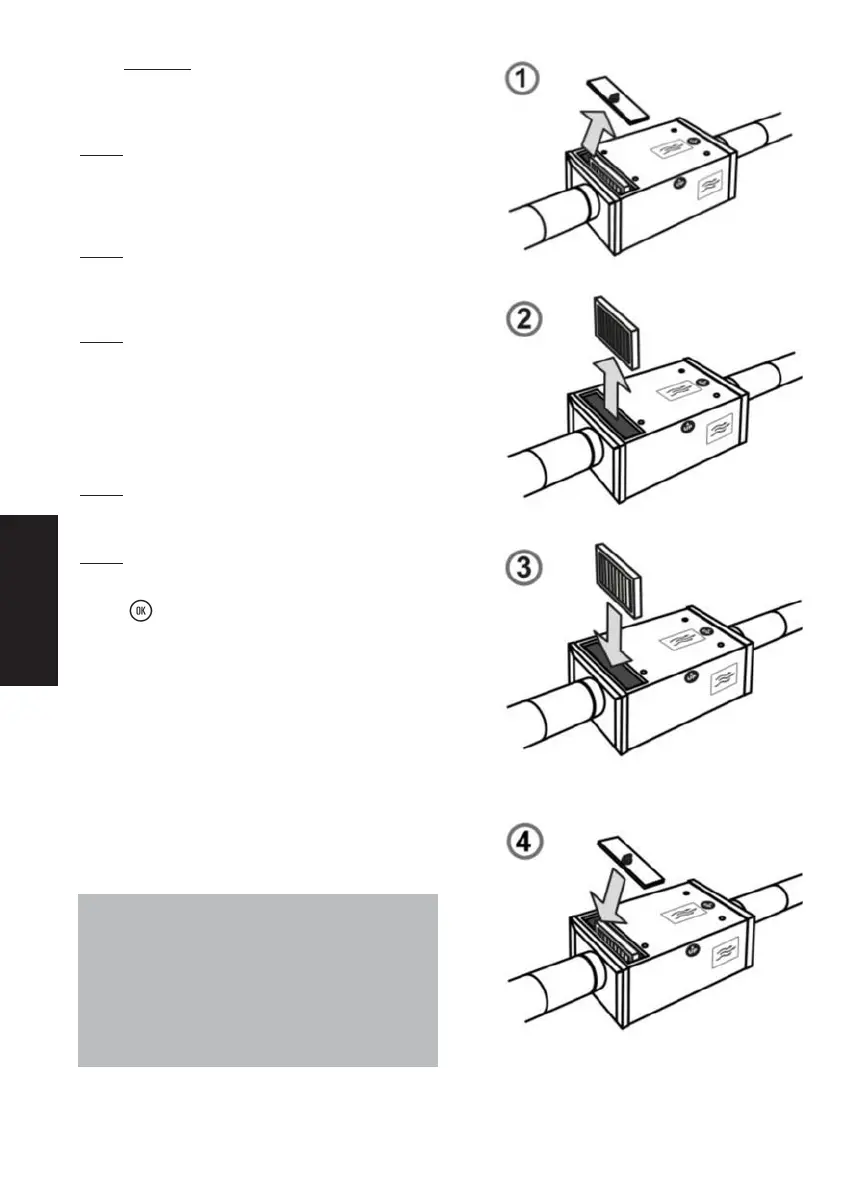
Step 1
:
Release the filter access flap and remove it.
(1/4 turn system)
Step 2
:
Remove hte filter from its housing. It is retained simply in its slot.
Step 3 :
Place the new filter all the way in its housing
(Follow the direction of the arrow) .
Reminder: Use only filters supplied by!
(on pain of cancellation of the warranty)
Step 4
:
Put back the filter access flap and block it with the lock.
Step 5
:
Answer “yes” to the question on your control panel by
pressing .
ATTENTION :
Every time the filter is removed, the control
panel asks you whether you have changed the
filter. Answer YES only if you have put in a
new filter, otherwise you risk disrupting the
AHU completely!


 To Next Page