MAINTENANCE
32
F–040703L
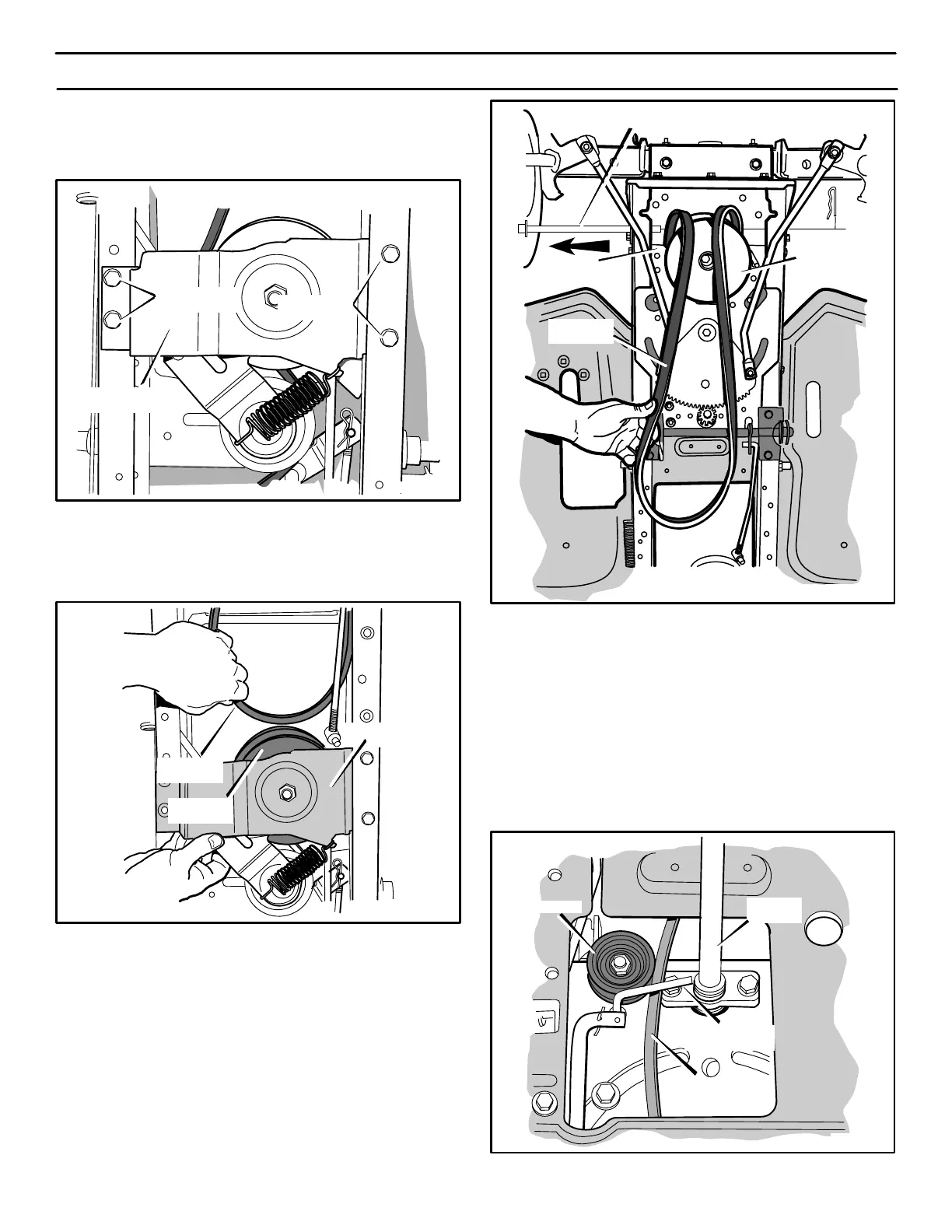
10. REMOVE the two screws on the right side of the variator
assembly bracket (see Figure 35). LOOSEN the two screws
on the left side of the variator assembly bracket.
Figure 35
REMOVE
Two Screws
LOOSEN
Two Screws
Variator Assembly
Bracket
11. Lower the variator assembly bracket and slide the engine
drive belt over the top of the variator pulley (see Figure 36).
Engine
Drive Belt
Figure 36
Variator
Pulley
Variator Assembly
Bracket
12. Remove the belt guide rod (see Figure 37).
13. Slide the engine drive belt toward the front of the unit. When
the rear of the engine drive belt reaches the stack pulley,
slide the rear of the belt between the stack pulley and the
steering plate. (see Figure 37).
NOTE: To slide the engine drive belt between the stack
pulley and the steering plate, the belt must be turned
sideways.
14. A correct replacement belt or assistance is available from an
Authorized Service Center in your area.
Figure 37
Engine
Drive Belt
Stack
Pulley
Steering
Plate
Belt Guide Rod
ENGINE DRIVE BELT INSTALLATION
1. To install the engine drive belt, reverse the above steps.
2. Make sure that the engine drive belt is routed between the two
belt guides located at the stack pulley. Also, make sure the “V”
side of the engine drive belt is against the stack pulley.
3. Check the routing of the engine drive belt at the steering
column (see Figure 38). Make sure that the engine drive belt
is routed to the inside of the small idler and underneath the
L–shaped belt guide. Also, make sure the engine drive belt
is inside of the speed control arm (see Figure 31).
4. Install the mower housing. See the instructions “How To Install
The Mower Housing”.
Steering
Column
Small Idler
L–Shaped Belt
Guide
Figure 38
Engine Drive
Belt



 To Next Page