GB - 3 GB - 4
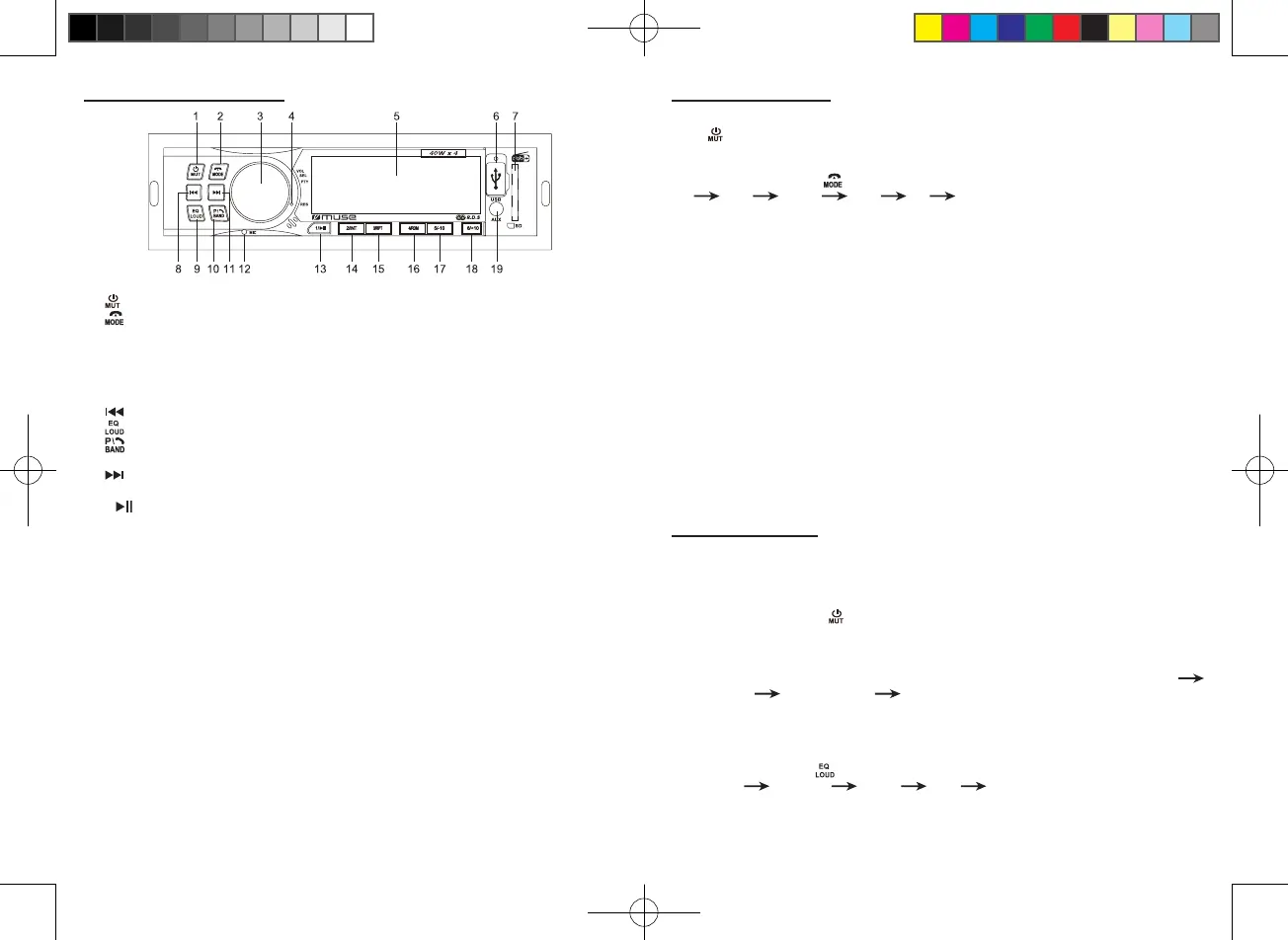
1. Button: To turn unit on/o; To mute or restore sound
2. : To hang up the call; To select function mode
3. VOL/SEL/PTY knob: volume, select, Program type selection knob
4. RES (RESET) button
5. LCD display
6. USB port for MP3 playback
7. SD/MMC card slot
8. skip backward
9. To select desired sound eects: FLAT/ CLASSIC/ ROCK/ JAZZ/ POP; Loudness On/O
10. Preset stations, Automatic storing, Search a track; To answer / redial the phone; To
select band: F1, F2, F3 and DAB1, DAB2, DAB3
11. skip forward
12. Built-in microphone
13. 1/ button: To select preset channel 1 in radio mode; To start or pause playback
14. 2/INT button: To select preset channel 2 in radio mode; To start/ cancel intro playback
15. 3/RPT button: To select preset channel 3 in radio mode; To repeat playback
16. 4/RDM button: To select preset channel 4 in radio mode; To start/ cancel random playback
17. 5/-10 button: To select preset channel 5 in radio mode; To skip backward 10 tracks (mp3 only
18. 6/+10 button: To select preset channel 6 in radio mode; To skip forward 10 tracks (mp3 only)
19. AUX jack
LOCATION OF CONTROLS BASIC OPERATIONS
Turn on/o the unit
Press button to turn on the unit. Press and hold this button again to turn o the unit.
Selecting the mode
When the unit is on, press button repeatedly to select dierent source mode:
FM USB CARD DAB BT AUX
Note: USB, CARD mode can not be selected if no such source was plugged in the unit.
Current time display
Press VOL/SEL/PTY button to display the current time when unit is ON.
Adjust time:
1. When the unit is ON. Press VOL/SEL/PTY button once to display the current time, then press
and hold this button to enter into setting mode. The hour digits will ash.
2. Rotate volume knob anti-clockwise and clockwise to adjust the hour value. Press VOL/SEL/
PTY button again to conrm the hour value.
3. The minute digits will ash, rotate volume knob anti-clockwise and clockwise to adjust the
minute value. Press VOL/SEL/PTY button to conrm.
Noted: It will conrm your setting if no key is pressed within 5 seconds.
Reset the unit
Operating the unit for the rst time or after replacing the car battery, you must reset the unit. To
set the unit to initial status, press RES button on the front panel with a pointed object. When
some errors occur in display, you can also reset the unit, but it will erase the clock setting and
some memorized functions.
SOUND FEATURES
Volume adjusting
To increase or decrease the sound level, rotate VOL/SEL/PTY knob clockwise or anti-clockwise.
Muting the sound
When the unit is ON, press to mute the sound. Press again to restore.
Using VOL/SEL/PTY knob to select sound feature
Repeatedly press VOL/SEL/PTY knob
To select the desired mode for sound setting in the following order: “BAS”(BASS)
“TRE”(Treble) “BAL”(Balance) “FAD”(Fader).
After selecting the desired mode, you can adjust the level by rotating the volume knob.
Preset equalizer (EQ)
When you are listening to pop music, classic music or rock music, use the equalizer to adjust
the sound quality. Press button repeatedly to select dierent equalizer mode in following
order: FLAT CLASSIC ROCK POP EQ o.
AR-3736D IB MUSE 001 REV1.indd 9 2019/10/17 15:17:22


 To Next Page