EasyManua.ls Logo

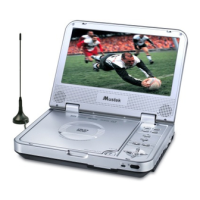
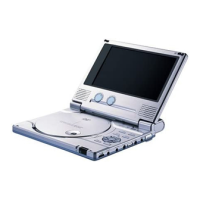
Mustek PL207 - User Manual

Mustek PL207
25 pages
Print Icon
To Next Page IconTo Next Page
Loading...
Portable DVD Player
User Manual
English
82-135-00010

Table of Contents

Questions and Answers

  • B
    Brian MorrisSep 10, 2025
    How to get a 4:3 (16:9) picture on my Mustek PL207 Portable DVD Player?
    • M
      Michael LopezSep 10, 2025
      If your Mustek Portable DVD Player does not display a 4:3 (16:9) picture, choose the correct 'TV DISPLAY' setting that matches the TV set you are using.
  • S
    susan38Aug 22, 2025
    What to do if the Mustek PL207 Portable DVD Player remote control is not working?
    • M
      markperryAug 23, 2025
      If your Mustek Portable DVD Player is not responding to the remote control, first check that the batteries are correctly installed with the proper polarities (+ and –), and replace them if depleted. Ensure that you are pointing the remote control directly at the remote control signal sensor within a 7-meter range, and that there are no obstacles blocking the signal.
  • M
    Morgan CastanedaAug 25, 2025
    Why is there no picture on my Mustek Portable DVD Player?
    • W
      William ThomasAug 25, 2025
      If your Mustek Portable DVD Player is not producing any picture, make sure that all equipment is connected properly and that the input setting for the TV is set to 'Video'. Check if any external equipment is turned on and ensure that the TV is set to the same channel and source as the player. Finally, verify that the LCD screen on the player is on.
  • J
    Joshua MckayAug 26, 2025
    Why is there no sound coming from my Mustek PL207?
    • E
      Elizabeth PerezAug 27, 2025
      If your Mustek Portable DVD Player is not producing any sound, ensure that the equipment is connected properly. If you are using a HiFi amplifier, try another sound source to isolate the problem. Check the Audio Output Setting menu to confirm that Analog Output is selected, and also check the Volume Adjustment to ensure it is not muted or set too low.
  • B
    Bryan JohnsonAug 27, 2025
    What to do if my Mustek PL207 does not start playback?
    • C
      Caitlin ColemanAug 28, 2025
      If your Mustek Portable DVD Player does not start playback when you press PLAY, it could be due to condensation; in that case, allow the player to dry out for 1 to 2 hours. Ensure that the disc is a DVD or audio CD, as the player does not support other disc types. Try another disc to check if the current disc is defective. Also, verify the region code of the disc.
  • L
    lmooreAug 29, 2025
    How to fix a distorted picture on a Mustek PL207?
    • C
      Christopher YoungAug 29, 2025
      If the picture on your Mustek Portable DVD Player is distorted, check the disc for fingerprints and clean it with a soft cloth, wiping from the center to the edge. Keep in mind that a small amount of picture distortion can sometimes occur and does not necessarily indicate a malfunction.
  • B
    bmorrisonSep 18, 2025
    Why can't I change the angle on my Mustek Portable DVD Player?
    • E
      Emily GibbsSep 18, 2025
      The ability to change the viewing angle on your Mustek Portable DVD Player depends on the software availability of the disc. Even if a disc has multiple angles recorded, these angles may only be available for specific scenes.
  • B
    Brooke Price DDSSep 12, 2025
    Why won't my Mustek PL207 start playback even when a title is selected?
    • S
      Stephanie HunterSep 12, 2025
      If PLAY does not start playback on your Mustek Portable DVD Player even when a title is selected, this could be due to the parental lock function being enabled. Confirm the 'PARENTAL' setup in the settings.
  • A
    Anthony NelsonSep 8, 2025
    Why is there no rapid advance or reverse playback on my Mustek PL207?
    • N
      nwilsonSep 8, 2025
      If your Mustek Portable DVD Player does not offer rapid advance or rapid reverse playback, it may be due to restrictions encoded on the disc itself. Some discs have sections that prohibit these functions.
  • K
    Kathy JonesSep 5, 2025
    Why is the picture on my Mustek PL207 completely distorted or has no color?
    • S
      Stephanie WaltersSep 5, 2025
      If your Mustek Portable DVD Player displays a completely distorted picture or no color, the disc format might not be compatible with your TV set's standard (PAL/NTSC).

Summary

FCC and Safety Information

Important Safety Instructions

Precautions for Safe Operation

Selecting TV System for Disc Compatibility

Chapter 1: DVD Playback

1-1 DVD Playback

Basic steps for playing a DVD disc, including loading and starting playback.

Stopping Playback and Returning to Menu

How to stop playback and return to the disc's menu screen if available.

Stopping DVD Playback

Simple instruction to stop the DVD playback.

Chapter 2: Audio CD Playback

2-1 Audio CD Playback

Instructions for playing standard audio CDs, including MP3 discs.

Basic Audio CD Playback

Steps to perform basic playback of audio CDs.

Playing MP3 Music Discs

Guide to playing music files from discs containing MP3 audio.

Stopping Audio CD Playback

How to stop the playback of audio CDs and MP3 discs.

Chapter 3: Setup and Configuration

3-1 Language Setup

Configuring language settings for OSD and disc menus.

On Screen Display Language Setting

Setting the language for on-screen display messages.

Menu Language Setting

Selecting the preferred language for disc menu messages.

Chapter 4: Troubleshooting and Reference

4-1 Troubleshooting Common Issues

Solutions for common problems encountered with the DVD player.

Mustek PL207 Specifications

General IconGeneral
Power SourceAC adapter, Rechargeable battery
DisplayTFT LCD
Resolution480 x 234 pixels
Screen Size7 inches
Playable MediaCD, DVD
ConnectorsAV output, Headphone jack
Supported FormatsMP3, JPEG
Power SupplyAC 100-240V, 50/60Hz

Related product manuals