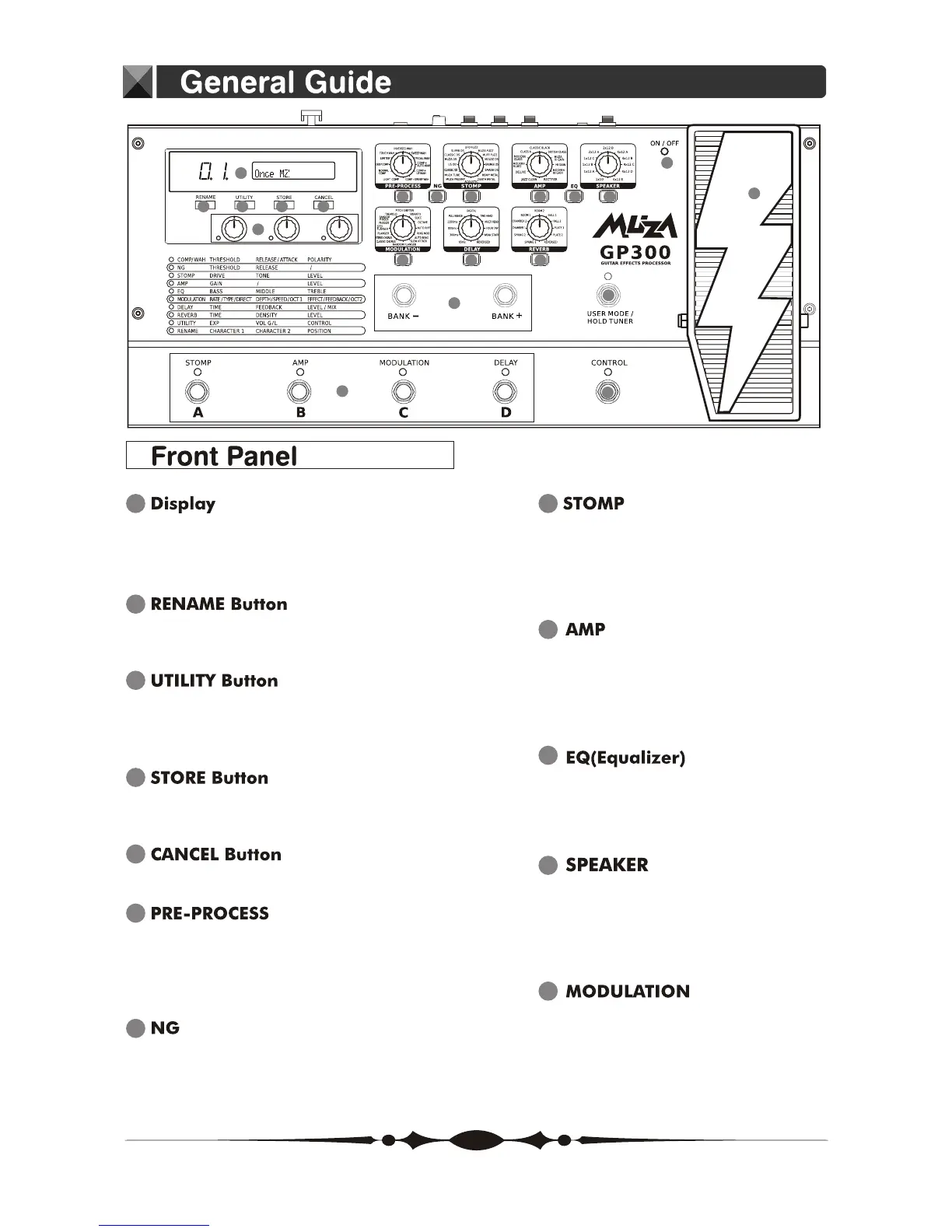
10
EQ(Equalizer) ON/OFF Button
Press to change the equalizer of a
tone.
9
AMP ON/OFF Button
Press to change settings.
Select the amp type.
AMP Knob
A variety of information about the unit
appears here.
The left display shows the bank number.
1
Use for changing the 60 user patches
name.
2
3
Select the PEDAL function, volume
control global or local and the CONTROL
effect.
4
Use to save the settings you have
created.
5
Use this to undo operations.
7
Press to change settings.
NG ON/OFF Button
6
Press to change the settings.
Select the pre-process type.
PRE-PROCESS ON/OFF Button
PRE-PROCESS Knob
8
STOMP ON/OFF Button
Press to change settings.
Select the stomp type.
STOMP Knob
1
2 3 4 5
6 87
10
9
11
20
21
12
13
14
15
17
19
16
18
12
Press to change settings.
Select the modulation type.
MODULATION ON/OFF Button
MODULATION Knob
11
SPEAKER ON/OFF Button
Press to change settings.
Select the speaker type.
SPEAKER Knob
5


 To Next Page