Operation
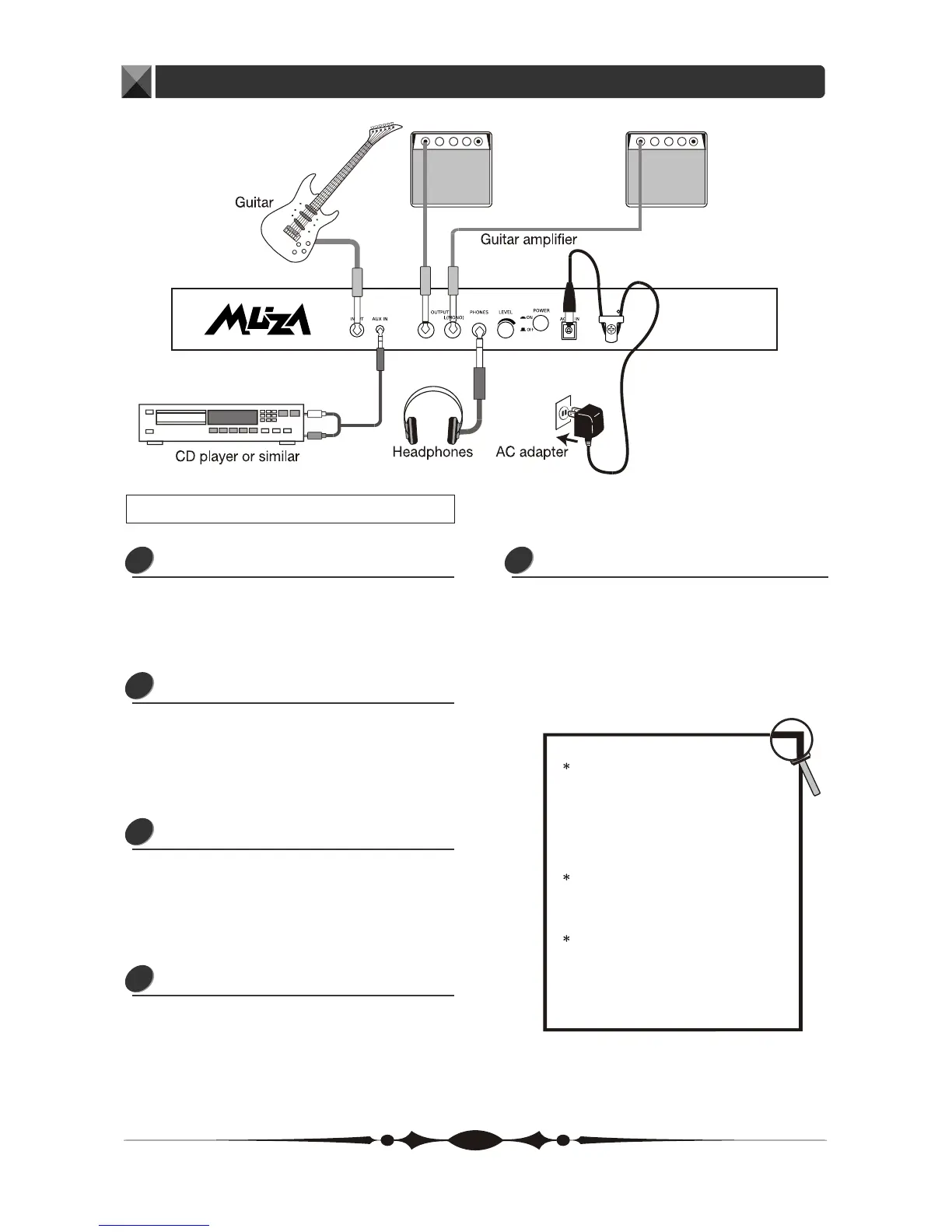
Connecting a Guitar
Plug an audio cord into the INPUT jack.
Then plug the other end of the cord
into LINE OUT of a guitar.
1
Connecting an Audio Source
Plug an audio cord into the AUX IN jack.
Then plug the other end of the cord
into the LINE OUT or the AUX OUT of
a CD or similar devices.
2
Connecting Guitar Amplifier
Plug two audio cords into the OUTPUT
jack, then plug the other end of the
cords into the AUX IN jack of the two
amplifiers.
3
Connecting Headphone
Plug a pair of headphone into the
PHONES jack to monitor the sound.
4
Connecting Power Adapter
To power the unit from the AC adapter,
insert the small plug of the adapter
cable into the AC IN jack. Then plug
the adapter into an outlet.
5
7
Connection
To prevent malfunction and/or
damaging the speakers or other
devices, always turn down the
volume, and turn the power of
all devices off before making any
connection.
When outputting in mono, connect
the cord to the OUTPUT L(MONO)
jack.
If you turn on the unit while the
amplifier is already powered up,
damages to the speaker may result.
Always turn the power of the amplifier
off before making any connection.


 To Next Page