TIMER
The timer deactivates the selected cooking zone and warns by “Beeps” after
the previously set time has elapsed. The timer can be set up to a maximum
time of 99 minutes.
Using the timer (The cooking zone must be operating)
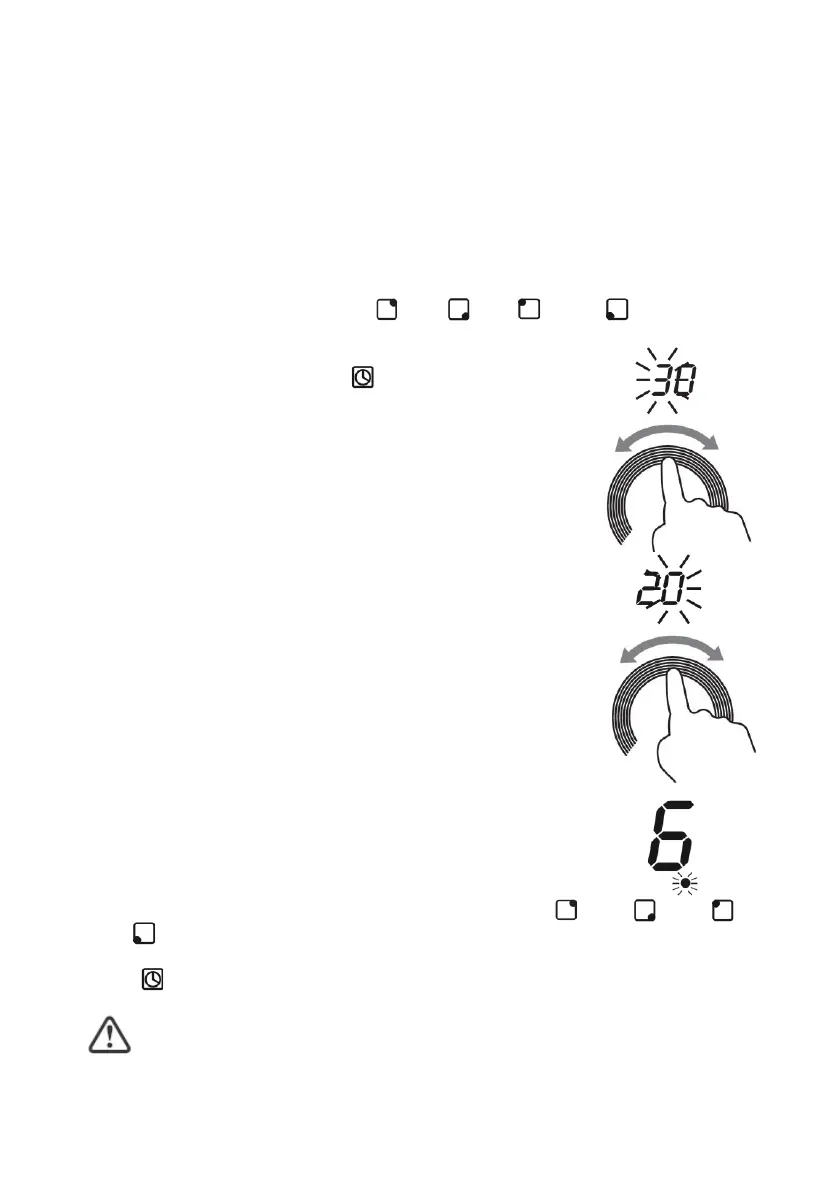
1. Touch the selection button 3 ( ), 4 ( ), 5 ( ) or 6 ( ) corresponding
to the selected cooking zone, the power indicator of the selected cooking
zone will show the power level flashing.
2. Touch the timer button 10 ( ), the display will show
the factory default switch-off time “ 30 ” and the digit “
3 ” corresponding to the tens of minutes flashing.
3. Set the tens of minutes for automatic shutdown using
the power level selector. Touch the selection circle
for power level 2 with your fingertip and make a
circular motion to the right or left to increase or
decrease the tens of minutes respectively.
4. After setting the tens of minutes, allow 3 seconds to
elapse without touching any button and the digit
corresponding to the units of the minutes will begin to
flash.
5. Set the minute units for automatic shut-off using the
power level dial. Touch the power level 2 selection
circle with your fingertip and make a circular motion
to the right or left to increase or decrease the
minutes.
6. Once the time for automatic shutdown is set, allow 2
seconds to elapse without touching any button, a
confirmation “Beep” will sound and the countdown to
automatic shutdown will start. The power indicator of
the timed zone will appear with a flashing dot to
indicate that it is timed.
7. To cancel the timer touch the selection button 3 ( ), 4 ( ), 5 ( ) or
6 ( ) corresponding to the timed cooking zone you want to cancel, when
the power indicator of the cooking zone is flashing touch the timer button
10 ( ).
The cooking zone that is not set with the timer will continue to
operate if it is turned on previously.


 To Next Page