First-Time Setup
Before using the MX3 Hydration Testing System, you must register
and set up your MX3 Account.
A video demonstrating how to load the MX3 Dispenser can be found
at mx3diagnostics.com/resources
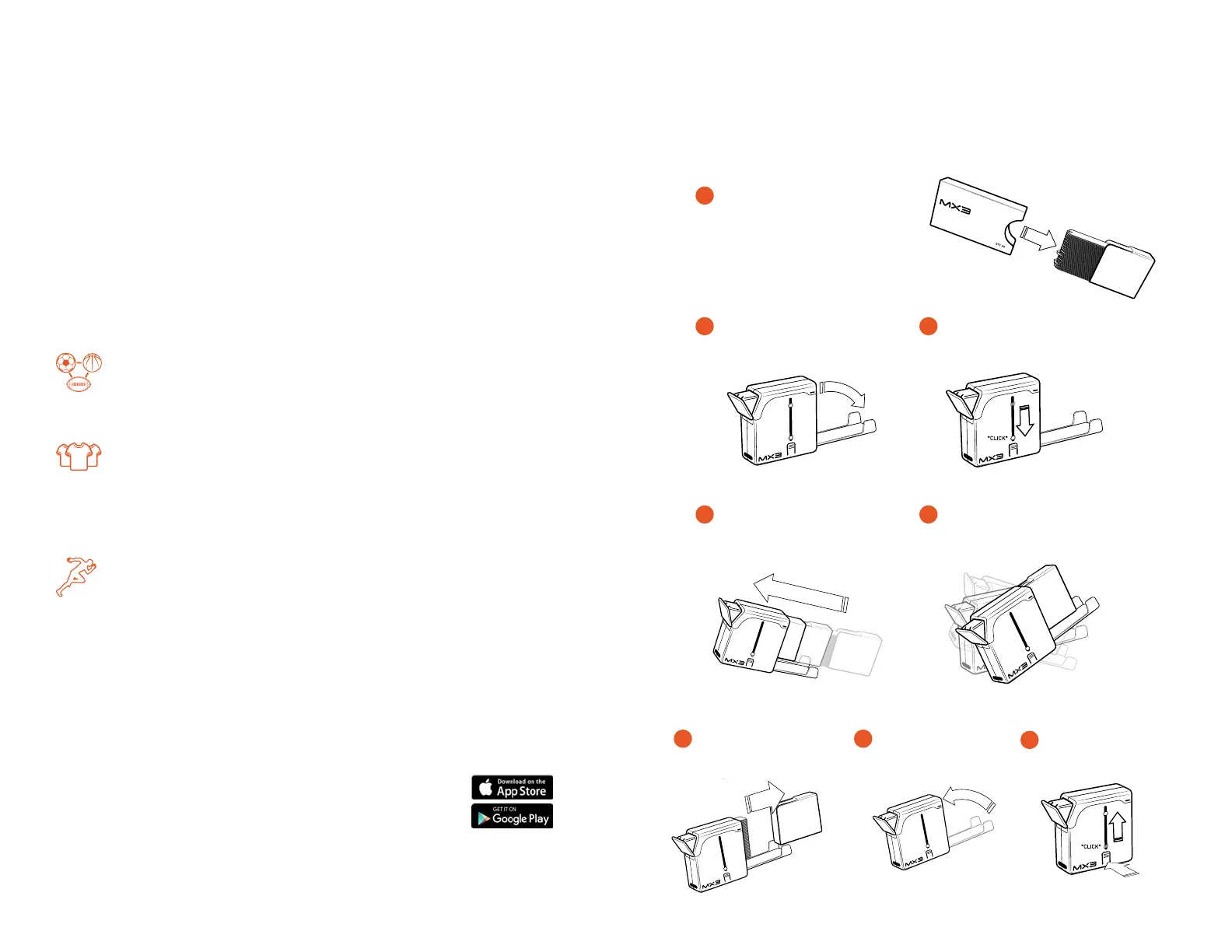
Loading the MX3 Dispenser
10 11
Open Dispenser
Open Test Strips
Keep base tilted up to prevent
strips from sliding out.
Insert Test Strips at
Upward Angle
Remove Test
Strip Holder
Push Tabs to
Release Spring
Push Down Spring
Until It Locks
Tilt Dispenser Up, Allowing Test
Strips to Slide into Dispenser
Close
Dispenser
2
1
4
6
8
3
5
7
Pull Holder with Test Strips
down from MX3 Cover
Test Strips may Fall!!!
Pull Holder with Test Strips
down from MX3 Cover
Test Strips may Fall!!!
Pull Holder with Test Strips
down from MX3 Cover
Test Strips may Fall!!!
Pull Holder with Test Strips
down from MX3 Cover
Test Strips may Fall!!!
Pull Holder with Test Strips
down from MX3 Cover
Test Strips may Fall!!!
Pull Holder with Test Strips
down from MX3 Cover
Test Strips may Fall!!!
Pull Holder with Test Strips
down from MX3 Cover
Test Strips may Fall!!!
Account Registration
To sign up for an account visit portal.mx3diagnostics.com
MX3 offers three account types. Select one that best describes how
you will use your MX3 Hydration Testing System.
App Access/User Registration
If you selected “Large organization/Professional Team”
during account registration, you will need to set up teams,
coaches, trainers and athletes in the MX3 Portal before use.
If you selected “Small Organization/Small Team” during
account registration, you can now access the MX3 Portal or
App using your username and password. You can set up athlete
accounts using either the MX3 Portal or through the MX3 App.
If you selected “Individual” during account registration, you
can now access the MX3 Portal or App using your username
and password. You can also access the MX3 Portal to view
and export past measurement data.
For information on how to set up user accounts and use the MX3
Portal, visit mx3diagnostics.com/resources
Download the MX3 App
To download the MX3 App, search for “MX3
Diagnostics” in the iOS App Store or Google Play Store.


 To Next Page