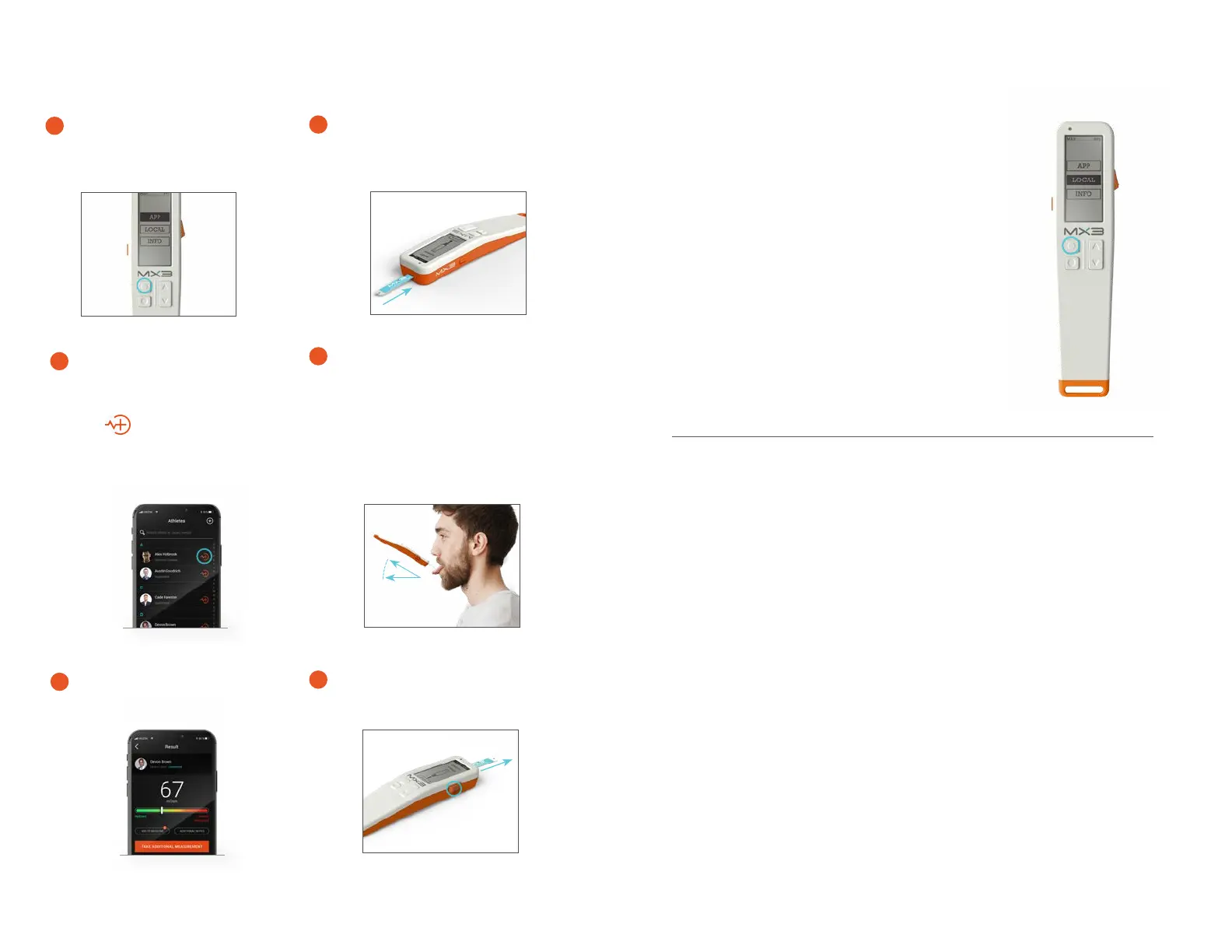
Taking Measurements
Use the scroll buttons to
highlight APP and press
Select.
1
12 13
Result will be displayed on both
the LAB and the MX3 App.
5
Ensure Bluetooth is enabled
on your phone or tablet.
Open the MX3 App and tap
the icon or the Take a
Measurement button to initiate
a measurement.
3
Follow the prompts to connect
your MX3 LAB to the MX3 App.
Insert a Hydration Test strip.
2
Press the Eject Button to eject
the test strip.
6
Swallow saliva in mouth
and generate fresh saliva.*
Tap the tip of the test strip
against the saliva sample at an
approximately 30° angle until a
tone sounds.
4
*See Page 17 (Sample Collection Tips)
30°
The MX3 LAB may also be used in LOCAL
mode to take measurements without using
the App. LOCAL mode measurements are not
recorded or stored in the App or the device
itself, but allows readings to be made when
a smartphone/tablet is unavailable. To take a
measurement in LOCAL mode, turn on the MX3
LAB, scroll to highlight LOCAL, press Select and
follow the process for taking a saliva sample.
The reading will be displayed on the screen.
Local Measurements
For FAQs and Troubleshooting guides visit
mx3diagnostics.com/resources
FAQs and Troubleshooting


 To Next Page