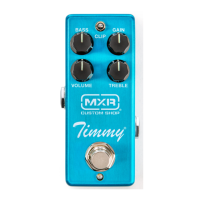
CSP027 | Timmy Overdrive 3
Basic Operation
1. Run a cable from your guitar to CSP027’s INPUT jack
and another cable from CSP027’s OUTPUT jack to your
amplifier.
2. Start with VOLUME and GAIN controls at 12 o’clock
and BASS and TREBLE controls fully clockwise.
3. Turn effect on by depressing the footswitch.
4. Use CLIP switch to select your preferred clipping style:
The Left position provides asymmetrical clipping with
moderate saturation and slight compression for a wide,
dynamic range of sounds.
The Middle position provides symmetrical clipping with
light saturation, high headroom, and high definition for
a big sound.
The Right position provides symmetrical clipping with
heavy saturation and low headroom.
5. Rotate VOLUME knob clockwise to increase overall
volume or counterclockwise to decrease it.
6. Rotate GAIN knob clockwise to increase overdrive
intensity or counterclockwise to decrease it.
7. Rotate BASS knob counterclockwise to reduce bass
frequencies to your taste.
8. Rotate TREBLE knob counterclockwise to reduce high
frequencies to your taste.
The Timmy
®
Overdrive is powered by the Dunlop
ECB003 9-volt adapter, or the DC Brick
™
, Iso-Brick
™
,
and Mini Iso-Brick
™
power supplies. This pedal
cannot be powered by a battery.
Power Directions



 To Next Page