The MXR M305 Tremolo is a guitar effects pedal designed to bring a comprehensive range of tremolo styles to discerning players. This pedal reintroduces the tremolo effect to the MXR line, offering a full historical spectrum of masterfully tuned tremolo styles, combined with a host of features to meet modern performance needs.
Function Description:
The M305 Tremolo pedal produces a pulsating volume modulation effect, characteristic of classic tremolo. It features six distinct tremolo styles:
- MXR: Replicates the classic M159 sound, indicated by a green LED.
- BIAS: A vintage bias waveform that emulates the lush compression of "browned out" tubes, indicated by a red LED.
- REVO: A reverse optical waveform that generates more exaggerated peaks and valleys, indicated by a green LED.
- OPTO: An optical waveform that emulates the smooth pulsating effect found in vintage amplifiers, indicated by a red LED.
- SQR: A square waveform designed for choppy, pronounced effects, indicated by a green LED.
- HARM: Vintage harmonic tremolo, providing a shimmering frequency modulation, indicated by a red LED.
The pedal's core functionality revolves around controlling the speed and intensity of these tremolo effects, as well as offering advanced control options for live performance and studio integration.
Usage Features:
The M305 Tremolo is straightforward to operate, yet offers deep customization.
- Basic Setup: Connect your guitar to the M305's INPUT jack and run a cable from the M305's OUTPUT jack to your amplifier.
- Effect Activation: Turn the effect on by depressing the footswitch. A blue LED indicates when the effect is active.
- Knob Controls:
- SPEED Knob: Adjusts the rate of the tremolo effect. Turning it clockwise increases the rate, while counterclockwise decreases it.
- DEPTH Knob: Sets the intensity of the tremolo effect. Clockwise rotation increases intensity, and counterclockwise decreases it.
- GAIN Knob: This knob serves a dual purpose. It sets the overall output level of the effect, increasing it clockwise and decreasing it counterclockwise. Additionally, pushing the GAIN knob cycles through the different tremolo styles, which are indicated by flashing red or green LEDs in the LED column next to the knob.
- CTR Output Jack: This versatile jack allows for several advanced functions:
- Tap Tempo Switch: When the CTR slide switch is in its left position, you can connect an MXR Tap Tempo Switch to the CTR jack. This allows you to tap your desired rhythm to control the tremolo speed in real-time.
- Expression Pedal: With the CTR slide switch in the left position, an expression pedal (such as the DVP3 Volume (X)™ Pedal) can be connected via a TRS cable. This enables blending between two distinct setting configurations. You can set one configuration with the expression pedal toe-down and another with the heel-down, then smoothly transition between them.
- Stereo Output Function: By setting the CTR slide switch to its right position, the CTR jack can be used as a separate stereo output. An instrument cable from the CTR jack can be run to a separate output source. In this mode, the RING connection on the OUT jack will be muted.
- Stereo Output Mode: The M305 can pan the tremolo effect between two audio outputs. To use this, run a TRS splitter cable from the M305's output jack to your desired output sources. Note that when bypassed, the TRS splitter cable's output RING connection will only receive your guitar signal if the M305 is in Buffered Bypass Mode.
- Stereo Input Mode: For stereo inputs, plug a TRS cable into the IN jack and set the internal STEREO/MONO switch to its LEFT position. For mono inputs, set the internal STEREO/MONO switch to the RIGHT position (factory default). This routes the mono signal to both stereo outputs.
- Envelope Mode: In this mode, the SPEED and DEPTH functions are dynamically controlled by the intensity of your playing. To enter Envelope Mode, push and hold the GAIN knob for 3 seconds. The blue on/off status LED will flash according to the tremolo effect speed, and the red or green tremolo style LED will be solid.
- Setting Max Rate and Sensitivity: While in Envelope Mode, press and hold the GAIN knob. Use the SPEED knob to adjust the maximum effect rate (indicated by flashing green LEDs) and the DEPTH knob to adjust the effect sensitivity (indicated by the number of illuminated red LEDs from zero to three). Release the GAIN knob to save your settings.
- Exiting Envelope Mode: Push and hold the GAIN knob again for 3 seconds. Both on/off status and tremolo style LEDs will flash according to the SPEED setting, indicating default operation. The M305 retains your chosen maximum rate and sensitivity settings even after being turned off and on again.
Maintenance Features:
The M305 Tremolo offers a selectable bypass mode, which can be considered a maintenance or operational feature depending on user preference and setup.
- True Bypass (Default): By default, the M305 uses a true bypass relay. This means when the effect is off, the signal is hardwired directly from input to output, completely bypassing the pedal's circuitry. This ensures no tonal degradation when the effect is not in use.
- Buffered Bypass Mode: To allow the M305 to pass your signal through to a TRS connection when bypassed (useful in Stereo Output Mode), you must set it to Buffered Bypass Mode.
- Entering Buffered Bypass Mode: Rotate all knobs fully counterclockwise, then press and hold the GAIN knob for 5 seconds. All three red LEDs will flash to indicate that Buffered Bypass Mode is engaged.
- Switching Back to True Bypass: Repeat the same process. All three green LEDs will flash to confirm the return to true bypass.
The M305 Tremolo is designed to be a robust and versatile tool for guitarists, offering a wide array of tremolo sounds and flexible control options to integrate seamlessly into various setups and playing styles.

 Need help?
 General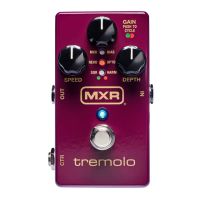

 To Next Page