M305 | Tremolo 5
Advanced Operation
(cont.)
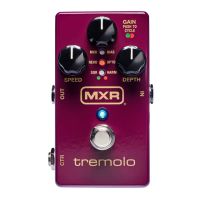
ENVELOPE MODE
While Envelope Mode is engaged, the SPEED and
DEPTH functions are determined by the intensity of
your own playing. To enter Envelope Mode, push and
hold the GAIN knob for 3 seconds. The blue on/off status
LED will now flash according to the tremolo effect speed,
and the red or green tremolo style LED will be solid.
To set the maximum rate and sensitivity of the tremolo
effect, press and hold the GAIN knob. Use the SPEED
knob to adjust the maximum effect rate, indicated by
the green LEDS flashing at the selected rate. Use the
the DEPTH knob to adjust the effect sensitivity, indicated
by the number of illuminated red LEDs from zero (low)
to three (high). Release the GAIN knob to save your
chosen settings.
Note: The M305 will function in Envelope Mode with
your chosen maximum rate and sensitivity settings even
after turning the pedal off and on again. To exit Envelope
Mode, push and hold the GAIN knob again for 3 seconds.
Both on/off status and tremolo style LEDs will flash
according to SPEED setting to indicate default operation.
BUFFERED BYPASS MODE
By default, the M305 uses a true bypass relay, shutting
off the effect and hardwire bypassing the tip connection
signal as soon as you turn the pedal off. To allow the
M305 to pass your signal through to a TRS connection
when bypassed, you must set it to Buffered Bypass
Mode.
To enter Buffered Bypass Mode, rotate all knobs fully
counterclockwise, and press and hold the GAIN knob
for 5 seconds. All three red LEDs will flash to indicate
that Buffered Bypass Mode is engaged. To switch back
to true bypass, repeat the same process. All three green
LEDs will flash to confirm.


 To Next Page