M305 | Tremolo 3
Basic Operation
The Tremolo requires 9 volts (180mA) and can be powered
by the Dunlop ECB003 9-volt adapter or the DC Brick
™
,
Iso-Brick
™
, and Mini Iso-Brick
™
power supplies. This pedal
cannot be powered by a battery.
Power
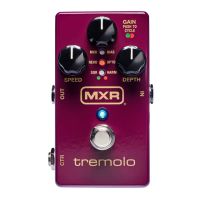
MXR: Classic M159 sound. Indicated by green LED.
BIAS: Vintage bias waveform; emulates lush compression
of browned out tubes. Indicated by red LED.
REVO: Reverse optical waveform; produces more
exaggerated peaks and valleys. Indicated by green LED.
OPTO: Optical waveform; emulates smooth pulsating effect
generated by vintage amplifiers. Indicated by red LED.
SQR: Square waveform for choppy, pronounced effects.
Indicated by green LED.
HARM: Vintage harmonic tremolo for shimmering frequency
modulation. Indicated by red LED.
Tremolo Styles
1. Run a cable from your guitar to the M305’s INPUT
jack and run another cable from the M305’s OUTPUT
jack to your amplifier.
2. Start with all knobs at 12 o’clock. Turn the effect on
by depressing the footswitch.
3. Push the GAIN knob to cycle through tremolo styles,
indicated by red or green LEDs in the LED column.
See TREMOLO STYLES section for a description of
each style.
4. Rotate the GAIN knob clockwise to increase overall
output of effect or counterclockwise to decrease it.
5. Rotate the SPEED knob clockwise to increase
the rate of the tremolo effect or counterclockwise to
decrease it.
6. Rotate the DEPTH knob clockwise to increase the
intensity of the tremolo effect or counterclockwise to
decrease it.


 To Next Page