EasyManua.ls Logo

MYERS Feather - User Manual

MYERS Feather
2 pages
Print Icon
To Next Page IconTo Next Page
Loading...
Myers Pickups / The Feather
A Division of MYERSCO
Patents Pending
Thank you for your order! We appreciate your business. We hope you find hours of enjoyment and that this
product meets and exceeds your expectations. At MYERSCO, we are committed to your complete satisfaction.
If, for any reason, you are not satisfied, please contact us at myersco@me.com or call us at 714-900-0176.
Please give us the opportunity to resolve any issue before leaving any negative feedback online.
“The Feather” Pickup Instructions
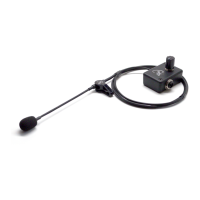
Your pickup arrives COMPLETE. There is nothing you need to do but mount your “Feather” (flexible Micro-
Gooseneck) and plug it in. We recommend using a keyboard amplifier to reach all the highs and lows your
instrument can produce, but most amplifiers will perform fine.
The lithium battery is already installed and ready to go. The included battery should give you hundreds of
playing hours. The battery needed for your pickup is a coin cell CR1220 and can be purchased at almost any
electronic or discount stores where batteries are sold. Please remember to UNPLUG your cord when not
playing to preserve the battery life. There is a miniature switch inside the jack that is activated when the cord
is inserted.
Change the battery by removing the two small screws on the top plate of your pickup. CAREFULLY and gently,
lift the lid so the wires are not pulled too hard. Flip the lid over and place two fingers on the battery housing.
Carefully place a small Phillips head screwdriver (or brass head nail included in your accessories package)
between the battery housing and the battery. Push the tool to the center of the disc of the battery. Replace
the fresh battery with the Positive (+) side upward.
See videos for battery replacement or low gain/feedback at https://www.myerspickups.com/support.
Question and Answer IconNeed help?

Do you have a question about the MYERS Feather and is the answer not in the manual?

Summary

Feather Pickup Instructions

Battery Information

Details on the installed lithium battery, its expected life, type (CR1220), and the importance of unplugging the cord.

Battery Replacement

Step-by-step guide for changing the CR1220 battery, including removing screws and handling the housing.

Support Videos

Links to videos for battery replacement and troubleshooting low gain or feedback issues.

Mounting Your Feather

Pre-Mounting Test

Test the pickup by plugging it in and speaking into the microphone to ensure clear sound before mounting.

Mounting Procedure

Mount the pickup using the 'Saddle-Clip' and attach the belt clip, considering cable direction for player preference.

Manufacturer Disclaimer

MYERSCO is not responsible for instrument damage; experimentation for best placement is recommended.

Overview

The Myers Pickups / The Feather is a versatile and compact pickup system designed to amplify musical instruments, particularly those with a sound hole or where sound is produced. It is a product of MYERSCO and features patented technology.

Function Description:

The primary function of "The Feather" is to capture the acoustic sound of an instrument and convert it into an electrical signal that can be amplified. It utilizes an ultra-light microphone element mounted on a flexible Micro-Gooseneck, allowing for precise positioning to achieve the desired sound. The system is designed for ease of use, arriving complete and ready to be mounted and plugged in. It is recommended for use with a keyboard amplifier to reproduce the full range of highs and lows an instrument can produce, though most amplifiers will work effectively. The pickup system is designed to provide hundreds of hours of playing time on a single battery, ensuring long-lasting performance.

Important Technical Specifications:

  • Microphone Element: Ultra-light, mounted on a flexible Micro-Gooseneck.
  • Mounting Mechanism: Patented "Saddle-Clip" for secure attachment to the instrument.
  • Power Source: Coin cell CR1220 lithium battery (pre-installed).
  • Battery Life: Hundreds of playing hours per battery.
  • Battery Activation: Miniature switch inside the jack, activated when the cord is inserted.
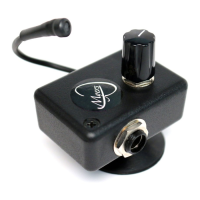
  • Preamp Box: Includes a belt clip for convenient attachment, secured with "VHB" (very high bond) two-sided tape.

Usage Features:

  • Plug-and-Play Design: The pickup arrives complete, requiring no assembly other than mounting and plugging in.
  • Sound Testing: Before mounting, users are advised to test the pickup by plugging it in and speaking into the microphone element. A clear and loud voice indicates proper function. If not, checking and reinstalling the battery is recommended as it may have come loose during transit.
  • Mounting Flexibility: Users are encouraged to experiment with different mounting locations on their instrument to achieve their desired sound. A common preference is to place the pickup element approximately ½" from the sound hole or the primary sound production area.
  • Secure Attachment: The patented "Saddle-Clip" serves a dual purpose: one side secures the clip to the instrument, and the other side securely holds "The Feather" in place.
  • Adjustable Gooseneck: The Flexible Micro-Gooseneck allows for precise adjustment of the microphone's position to optimize sound capture.
  • Belt Clip: A belt clip is included and attaches to the back of the preamp box using provided VHB tape. This feature allows users to position the preamp box conveniently, considering the direction of the cable for right-handed or left-handed players.
  • Battery Preservation: To extend battery life, it is crucial to UNPLUG the cord when the instrument is not being played, as the battery is activated by the cord's insertion into the jack.
  • Amplifier Compatibility: While a keyboard amplifier is recommended for optimal sound reproduction (especially for highs and lows), the pickup is designed to work well with most amplifiers.

Maintenance Features:

  • Battery Replacement: The lithium battery is pre-installed. When replacement is needed, a coin cell CR1220 battery can be purchased from most electronic or discount stores.
  • Battery Replacement Procedure:
    1. Remove the two small screws on the top plate of the pickup.
    2. Carefully and gently lift the lid, ensuring not to pull the wires too hard.
    3. Flip the lid over.
    4. Place two fingers on the battery housing.
    5. Carefully insert a small Phillips head screwdriver (or the included brass head nail) between the battery housing and the battery.
    6. Push the tool towards the center of the battery disc.
    7. Replace the old battery with a fresh one, ensuring the Positive (+) side is facing upward.
  • Support Resources: Videos for battery replacement and troubleshooting low gain/feedback issues are available at https://www.myerspickups.com/support.

Important Considerations:

MYERSCO emphasizes that it is not responsible for any damage to the instrument. Users are strongly advised to experiment first with placement to ensure optimal sound and aesthetics before permanent mounting. Customer satisfaction is a priority, and users are encouraged to contact MYERSCO at myersco@me.com or 714-900-0176 for any issues before leaving negative feedback.

MYERS Feather Specifications

General IconGeneral
BrandMYERS
ModelFeather
CategoryAccessories For Music Instruments
LanguageEnglish

Related product manuals