EasyManua.ls Logo

MYERS The Grip - User Manual

MYERS The Grip
2 pages
Print Icon
To Next Page IconTo Next Page
Loading...
Myers Pickups/The“Grip”
A division of MYERSCO
Thank you for your order! We appreciate your business. We hope you find hours of enjoyment and that this
product meets and exceeds your expectations. At Myersco, we are committed to your complete satisfaction.
If, for any reason, you are not satisfied, please contact us at myersco@me.com or call us at 714-900-0176.
Please give us the opportunity to resolve any issue before leaving any negative feedback online.
Acoustic/Electric Pickup Instructions
Your pickup arrives COMPLETE. There is nothing you need to do but mount it to your instrument and plug it in.
We recommend using a keyboard amplifier to reach all the highs and lows your instrument can produce, but
most amplifiers will perform fine.
The lithium battery is already installed and ready to go. The included battery should give you hundreds of
playing hours. The battery needed for your pickup is a coin cell CR1220 and can be purchased at almost any
electronic or discount stores where batteries are sold. Please remember to UNPLUG your cord when not
playing to preserve the battery life. There is a miniature switch inside the jack that is activated when the cord
is inserted. If you leave it plugged in, the battery will run out very quickly.
Change the battery by removing the two small screws on the top plate of your pickup. CAREFULLY and gently,
lift the lid so the wires are not pulled too hard. Flip the lid over and place two fingers on the battery housing.
Carefully place a small Phillips head screwdriver (or brass head nail included in your accessories package)
between the battery housing and the battery. Push the tool to the center of the disc of the battery. Replace
the fresh battery with the Positive (+) side upward.
See videos for battery replacement or low gain/feedback at
https://www.myerspickups.com/support.
Question and Answer IconNeed help?

Do you have a question about the MYERS The Grip and is the answer not in the manual?

Summary

Acoustic;Electric Pickup Instructions

Product Setup and Usage

Explains the pickup is complete, connection, and amplifier recommendation for optimal performance.

Battery Information and Replacement

Details battery type, preservation, and step-by-step instructions for battery replacement.

Mounting your Pickup

Testing and Placement

Test the pickup for functionality and experiment with different locations for optimal sound.

Suction Cup Mounting

Instructions on using the pre-installed suction cup and cleaning it if it loses grip.

Tape Mounting

Guidance on using the included two-sided tape for mounting the pickup.

Screw Mounting

Steps for using mounting screws, including pre-drilling holes.

Overview

This document describes the "Grip" pickup from Myers Pickups/The Myersco, an acoustic/electric pickup designed to amplify musical instruments.

Function Description:

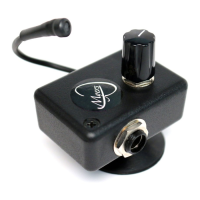
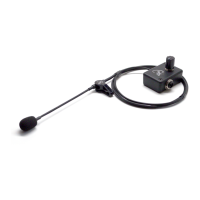
The Myers Pickups "Grip" is an acoustic/electric pickup designed to amplify the sound of musical instruments. It captures the instrument's sound through a miniature microphone element and outputs it via a standard jack, allowing connection to an amplifier. The device is designed to be complete and ready for use upon arrival, requiring only mounting to the instrument and plugging into an amplifier. For optimal sound reproduction, especially for capturing both high and low frequencies, the use of a keyboard amplifier is recommended, though most amplifiers will suffice.

Important Technical Specifications:

  • Battery Type: The pickup uses a coin cell CR1220 lithium battery.
  • Battery Life: The pre-installed battery provides hundreds of hours of playing time.
  • Mounting Options: The pickup offers three primary mounting methods:
    • Suction Cup ("Grip"): Pre-installed, suitable for temporary mounting or moving between instruments, especially those with smooth or glossy finishes.
    • Two-Sided Tape: A permanent mounting option, suitable for instruments that do not accept the suction cup.
    • Mounting Screws: A more permanent method involving drilling small pilot holes into the instrument.
  • Battery Activation: The battery is activated by a miniature switch inside the jack when a cord is inserted.

Usage Features:

  • Ready-to-Use: The pickup arrives fully assembled with the battery installed, requiring no additional setup beyond mounting and plugging in.
  • Pre-Use Testing: Before mounting, users are advised to test the pickup by plugging it in and speaking into the microphone element. A loud and clear voice indicates proper function; otherwise, the battery should be checked or reinstalled.
  • Sound Placement Experimentation: Users are encouraged to experiment with different mounting locations on their instrument to achieve the desired sound. A common recommendation is to place the pickup element approximately ½" from the sound hole or the primary sound production area.
  • Temporary Mounting (Suction Cup): The pre-installed "Grip" suction cup allows for easy attachment and removal, making it ideal for users who wish to move the pickup between instruments or prefer a non-permanent solution. If the suction cup loses holding power, cleaning it with rubbing alcohol is recommended.
  • Permanent Mounting (Two-Sided Tape): For a more permanent attachment, the suction cup can be unscrewed, and the provided two-sided tape can be applied to the back of the pickup and then to the instrument.
  • Permanent Mounting (Screws): For the most permanent attachment, the suction cup and lid can be removed. The pickup is then positioned on the instrument, and mounting holes are marked. Pilot holes (1/8" diameter, 1/4" deep) are drilled into the instrument, and the pickup is secured with the provided wood screws.
  • Cord Unplugging: To preserve battery life, it is crucial to unplug the cord from the pickup when not in use, as leaving it plugged in will quickly drain the battery.
  • Support Resources: Videos for battery replacement and addressing low gain/feedback issues are available on the Myers Pickups support website: https://www.myerspickups.com/support.

Maintenance Features:

  • Battery Replacement: The CR1220 coin cell battery can be replaced by removing two small screws on the top plate of the pickup. The lid should be gently lifted to avoid pulling wires. The old battery can be removed by placing two fingers on the battery housing and using a small Phillips head screwdriver (or the included brass head nail) to push the tool to the center of the battery disc. The new battery should be inserted with the positive (+) side facing upward.
  • Suction Cup Cleaning: If the suction cup loses its holding power, cleaning its inside surface with rubbing alcohol can restore its grip.
  • Battery Availability: Replacement CR1220 batteries are widely available at electronic and discount stores.
  • Disclaimer: Myersco explicitly states that it is not responsible for any damage to the instrument resulting from the use or mounting of the pickup. Users are strongly advised to experiment with placement for sound and aesthetics before permanent installation.

MYERS The Grip Specifications

General IconGeneral
BrandMYERS
ModelThe Grip
CategoryAccessories For Music Instruments
LanguageEnglish

Related product manuals