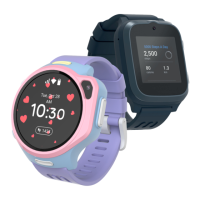
EN | USER MANUAL
Specifications
• 1.4 inch IPS screen with Capacitive touch
• 2MP front camera
• Battery Capability: 650 mAh
• Operational Talk Mode Time: 6 hours
• USB Charging: 5V, 1A
• Storage: 8GB
• Product Weight: 53g
• NANO SIM card
• Positioning: Wi-Fi, GPS, A-GPS
• Wireless Connectivity: GSM, WCDMA, WiFi, GPS
• App Supports iOS 10.0 & Android 5.0 above
SIM Card Installation
1. Turn the device o and eject the SIM card tray from the device.
2. Install the nanoSIM card into the tray with metal contacts facing
up.
3. Insert the SIM card tray back into the SIM card slot.
Note: if your SIM card requires a PIN code input, this feature should
be deactivated before installing the SIM card into myFirst Fone S3.
Deactivate pin code: Install the SIM card into a phone. Navigate to
the SIM card settings. Select the option to disable the PIN code
input requirement. Save the settings into the SIM card. Remove the
SIM card from the phone and install it into myFirst Fone S3.
Please make sure the SIM card is able to connect with the Internet,
receive text messages, and support incoming calls. myFirst Fone S3
supports: 4G LTE: Band 1, Band 3, Band 7, Band 8, Band 20, Band 40,
Band 41. WCDMA: Band 1, Band 5, Band 8. GSM: Band 3, Band 8.
1 2 3
1


 To Next Page