EasyManua.ls Logo

MyGica Capit - User Manual

MyGica Capit
5 pages
Print Icon
To Next Page IconTo Next Page
Loading...
1
Capit User Guide Manual
1 INTRODUCTION
Introduction
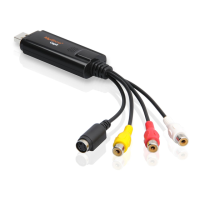
CapIt is a capture equipment specified designed for capturing MPEG, which transmit screened
important images to HDD by connection of AV and S-Video with high resolution as 720*576. You
can edit valuable DV/Digital 8 video recorder, Vidicon, VCR, DVD and camera to burn VCD,
SVCD, DVD, MPEG4, AVI formats directly.
1.1 Features and application
Features:
Small size
Use newest USB2.0 chipset which provides high data transmit rate to ensure video and
audio work long at the same time
Powerful functions , installation easily with USB power
Compatible with all laptop, LCD and USB2.0 port
Supply many kinds of capture formats and MPEG models to make VCD, DVD, WMV
convenient and easy to release on internet
Supply multi-video and S-video inputs.
Deluxe User Interface, software make you do film DIY more easily
1.2 Application scope:
Internet video meeting
Video phone
Video-audio animation transcribing and editing
Make VCD, DVD and Website
Enterprise bulletin and advertisement
1.3 System requirement
Inter Pentium4 1.4G CPU, recommended Pentium4 2.0G or higher
RMA is 128M at least , recommend 256M or higher
A high speed USB2.0 interface
VGA card supports DirectX9.0
CD-ROM (for installation)
300MB HD space(install driver and application ,like CapIt), 600MB to 3GB per hour for recording
1.4 Contents
CapIt
AV cable 3-3
Software CD

Other manuals for MyGica Capit

Question and Answer IconNeed help?

Do you have a question about the MyGica Capit and is the answer not in the manual?

Summary

1. INTRODUCTION

1.1 Features and application

Details the product's capabilities and its areas of use.

1.2 Application scope

Outlines the various industries and scenarios where the capture equipment is applicable.

1.3 System requirement

Specifies the minimum hardware and software needed for proper operation.

1.4 Contents

Lists the items included in the product package.

1.5 Caplt Connection

Illustrates how to connect the capture device to various sources and a PC.

2. Driver and Application Installation

Step-by-step installation guide

Provides a sequential guide for installing the necessary software and drivers.

How to use ShowBiz software

Capture module

Instructions for using the capture module to record video and select settings.

Choose video input

Guide on selecting the video source for capture from available inputs.

Choose video format and location

Steps to select output format and save location for captured videos.

Overview

This document describes the CapIt, a capture equipment designed for converting analog video signals into digital formats.

Function Description

The CapIt is a capture device designed to convert analog video signals from sources like DV/Digital 8 video recorders, Vidicons, VCRs, DVDs, and cameras into digital MPEG format. It transmits the captured images to a hard disk drive (HDD) via AV and S-Video connections. The device allows users to edit captured video and burn it to VCD, SVCD, DVD, MPEG4, or AVI formats.

Important Technical Specifications

  • Resolution: Captures video with a high resolution of 720x576.
  • Interface: Utilizes a USB2.0 chipset for high data transmission rates, ensuring stable video and audio capture.
  • Power: USB powered, simplifying installation.
  • Compatibility: Compatible with all laptops, LCDs, and USB2.0 ports.
  • Capture Formats: Supports various capture formats and MPEG models, making it easy to create VCD, DVD, and WMV files for internet release.
  • Inputs: Features multi-video and S-video inputs.
  • CPU Requirement: Inter Pentium4 1.4G CPU (recommended Pentium4 2.0G or higher).
  • RAM Requirement: 128MB (recommended 256MB or higher).
  • USB Interface: Requires a high-speed USB2.0 interface.
  • VGA Card: Supports DirectX9.0.
  • Optical Drive: CD-ROM (for installation).
  • Hard Drive Space: 300MB for driver and application installation (like CapIt), and 600MB to 3GB per hour for recording.

Usage Features

  • Ease of Use: Features a "Deluxe User Interface" and software designed to simplify video DIY projects.
  • Installation: Easy installation with USB power.
  • Software: Comes with a software CD for installation. The installation process involves installing drivers and an application like "ShowBiz".
  • Video Input Selection: Users can choose between composite video and S-video inputs.
  • Video Format Selection: Allows selection of output formats such as MPEG1, MPEG2, WMV, and AVI.
  • Recording Location: Users can specify the location for recorded files.
  • Editing and Production: The "ShowBiz" software includes modules for editing and producing various media, such as creating DVDs, files, and uploading to YouTube.
  • Application Scope: Suitable for internet video meetings, video phones, video-audio animation transcribing and editing, creating VCDs, DVDs, websites, and enterprise bulletins and advertisements.

Maintenance Features

  • Driver Installation: The manual provides clear steps for driver installation, including prompts for "New Hardware Device" and clicking "Driver Install".
  • Software Installation: Detailed instructions are given for installing the application software, including running "ShowBiz\Setup.exe".
  • System Verification: After installation, users are instructed to check the "Device Manager" in the "System Properties" to confirm that four new device drivers are installed, specifically "USB2.0 Video Device".
  • Troubleshooting: The manual implies that if the device is not recognized, checking the "Device Manager" is a key step.
  • Software Updates: While not explicitly stated as a maintenance feature, the software-based nature of the device suggests that updates could be provided for improved functionality or compatibility.

MyGica Capit Specifications

General IconGeneral
BrandMyGica
ModelCapit
CategoryMedia Converter
LanguageEnglish