Need help?
Do you have a question about the MyGica DVB-T2 T230A and is the answer not in the manual?
Details advanced TV application, DVB-T/T2/World viewing, time shifting, EPG, HDTV, digital radio, and PVR.
Specifies Windows OS, RAM, processor speed, and graphics/sound card requirements for optimal performance.
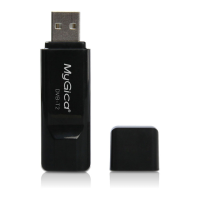
Illustrates connecting the DVB-T2 USB stick and external antenna to the PC for optimal reception.
Detailed steps for installing the necessary device drivers, including handling the 'Found New Hardware' wizard.
Initial steps for installing the main HidTV application software on your computer.
Continues the HidTV software setup, including copying files and confirming installation via desktop icons.
Instructions to check the Control Panel's Device Manager for the newly installed DVB-T/T2/C USB Box driver.
Addresses problems with not locking channels, weak signals, antenna connection, and country selection.
Explains why the number of detected channels may decrease over time, citing antenna position and weather.
Diagnoses screen issues during playback, linking them to weak signal conditions as indicated by the device's light.
Provides guidance on checking sound card settings and volume levels when video plays but audio does not.
Highlights PC performance requirements (CPU, VGA driver) and advises against running high-load software simultaneously.
 General
| Brand | MyGica |
|---|---|
| Model | DVB-T2 T230A |
| Category | Set-top boxes |
| Language | English |

 To Next Page