Zoning systems seem complex, however the MyZone 2
system has been designed to dramatically simplify
the cabling process. The key to its simplicity is in the
way the different processes have been separated.
a. Zone motors connect to the 6P6C
RJ12 damper output sockets.
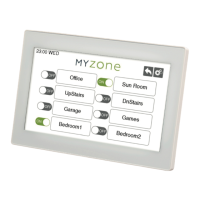
b. MyZone 2 Touch Screen connects
to the touchpad socket.
4.1 Wiring
Shielded cable to all touchpads and sensors is
recommended to minimise the effects of external
interference. Cabling regulations apply.
Cables are to be kept to the maximum
practical distance from any power cables
≥240volts (minimum distance 300mm).
Maximum cable length is not to exceed 20m.
28AWG or higher 6P6C RJ12 cable must be used.
CAB12 (1609219) – six core at cable for
damper motors
CAB20IAS (1609221) – ve core + shield at cable
for all touchpads
Refer to section 5 for crimping instructions.
03 Technical Specications
04 Installation
Number of Zones ZoneBoss 3Nm Belimo 5Nm
2 14.2 VA 12.8 VA
3 19.4 VA 15.8 VA
4 24.5 VA 18.8 VA
5 29.7 VA 21.8 VA
6 34.8 VA 24.8 VA
7 40.0 VA 27.8 VA
8 45.2 VA 30.8 VA
3.1 Electrical Requirements
Power input to system – 24 Volts AC +/- 10%
Line Frequency – 50 Hz
3.2 System Power Consumption
The power consumption data in this table
represents maximum values with all motors
driving and 2 x LCD touchpads with backlighting
on. Typical loads will be less than this.
3.3 Environmental requirements
Operating Temperature – 0°C to 60°C
Altitude – 0m to 2000m
Operating Relative Humidity – 10% to 80%
• Static electricity
• Intense electromagnetic radiation
• Dusty conditions
• Highly corrosive environments
• Excess vibration
3.4 Inputs/Outputs
8 x 6P6C RJ12 Socket
2 x 6P6C RJ12 Socket
8 x Dipswitches – Spill Zone Settings
3.5 Zone Motor Ratings
The MyZone 2 system is specically designed
for operation with 24 volt motors. All dampers
in a MyZone 2 system must have the same
actuator type. Please refer to the relevant
Actuator Data Sheet for more details. MyZone 2
works with three position actuators only.
4 | MyZone 2 Installation Manual


 To Next Page
 Loading...