USING YOUR (CONT’D)
Q: HOW IS MY HEART RATE DISPLAYED ON THE SCREEN IN MY MYZONE® FACILITY?
Once you have created your MYZONE® account at www. myzonemoves.com, your MYZONE® MZ-3 is automatically
detected by the MYZONE® receiver in the facility when *you are within range. On the screen you will have a
dedicated tile that shows your nickname, calories burnt, current heart rate in beats per minute, MYZONE® Effort
Points and in the center, a% of your maximum effort.
679
70%
118
151
Nickname
Calories Burned
Effort Level
MYZONE® Effort Points (MEPs) earned
Heart rate (BPM)
Zone Color
Q: WHAT DO THE BEEPS MEAN?
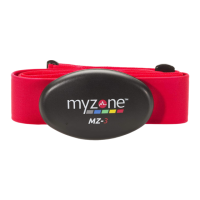
The belt will beep one time when the belt is activated, and 3 times when
there has been 15 seconds of inactivity.
Note: Remember to be within 15 feet of a MYZONE® receiver or your
MYZONE® App to successfully upload your workout.
The battery will need to be recharged every 3-4 months based on usage by
connecting the recharge dongle to a USB port or USB charger.
Q: HOW DOES MY WORKOUT DATA UPLOAD TO MY
MYZONE® ACCOUNT?
Your personal workout data is wirelessly updated to your MYZONE®
account using the MYZONE® App. Simply live stream or upload a stored
workout to the Effort Stream.connecting the recharge dongle to a USB
port or USB charger.
MZ-3
NEED A REAL TIME IMAGE
MZ-3


 To Next Page
 Loading...