EasyManua.ls Logo

NAD 3020B - Alignment Procedures; General Alignment Guidelines; Idling Current Adjustment; DC Offset Adjustment

NAD 3020B
24 pages
Print Icon
To Next Page IconTo Next Page
To Previous Page IconTo Previous Page
Loading...
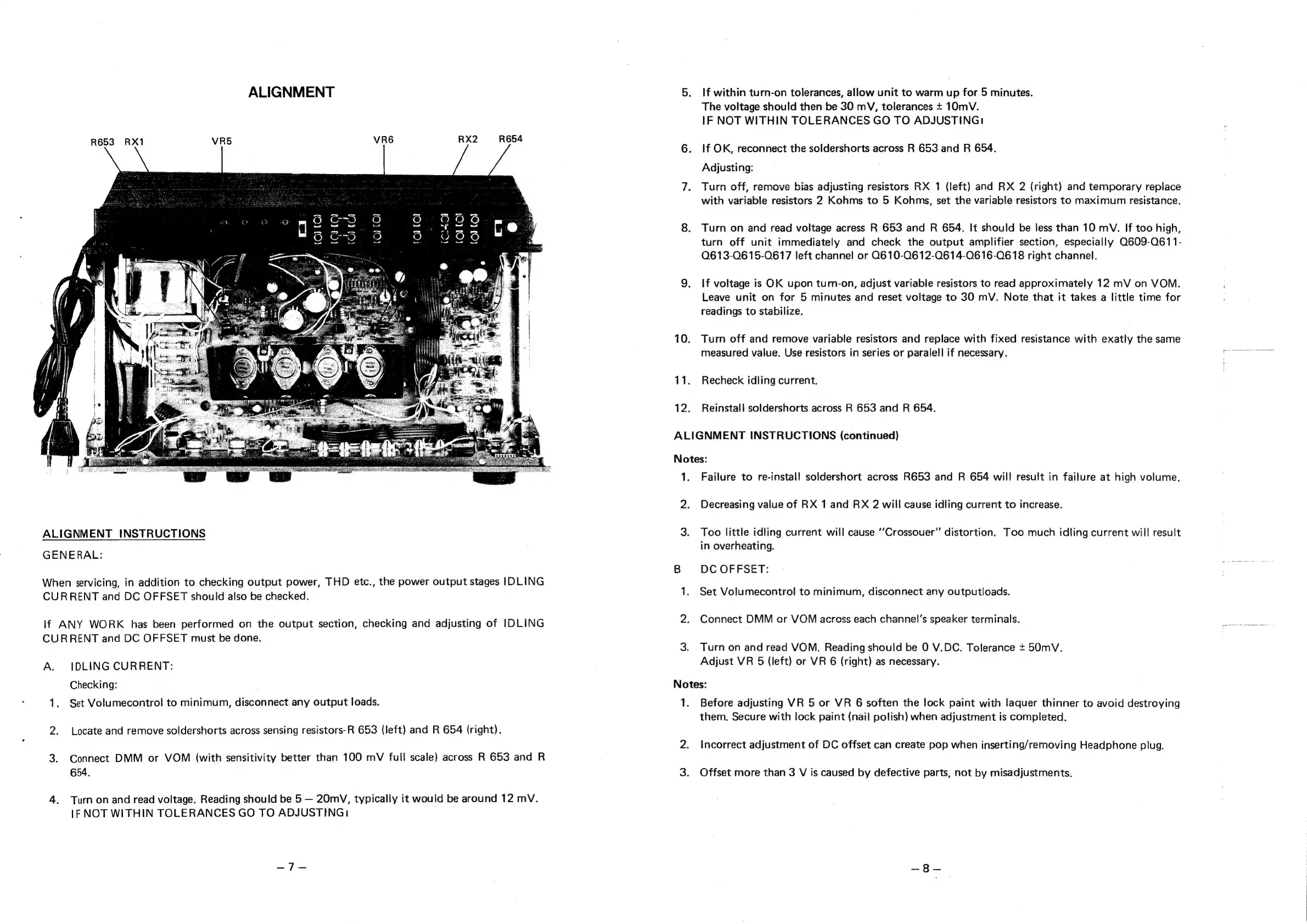
ALIGNMENT
R653
RX1
VR6
RX2
ALIGNMENT
INSTRUCTIONS
GENERAL:
When
servicing,
in
addition
to
checking
output
power,
THD
etc.,
the
power
output
stages
IDLING
CURRENT
and
DC
OFFSET
should
also
be
checked.
if
ANY
WORK
has
been
performed
on
the
output
section,
checking
and
adjusting
of
IDLING
CURRENT
and
DC
OFFSET
must
be
done.
A.
IDLING
CURRENT:
Checking:
1.
Set
Volumecontrol
to
minimum,
disconnect
any
output
loads.
2.
Locate
and
remove
soldershorts
across
sensing
resistors-R
653
(left)
and
R
654
(right).
3.
Connect
DMM
or
VOM
(with
sensitivity
better
than
100
mV
full
scale)
across
R
653
and
R
654.
4.
Turn
on
and
read
voltage.
Reading
should
be
5
20mV,
typically
it
would
be
around
12
mV.
1F
NOT
WITHIN
TOLERANCES
GO
TO
ADJUSTING:
10.
11.
12.
If
within
turn-on
tolerances,
allow
unit
to
warm
up
for
5
minutes.
The
voltage
should
then
be
30
mV,
tolerances
+
10mV.
IF
NOT
WITHIN
TOLERANCES
GO
TO
ADJUSTING:
If
OK,
reconnect
the
soldershorts
across
R
653
and
R
654.
Adjusting:
Turn
off,
remove
bias
adjusting
resistors
RX
1
(left)
and
RX
2
(right)
and
temporary
replace
with
variable
resistors
2
Kohms
to
5
Kohms,
set
the
variable
resistors
to
maximum
resistance.
Turn
on
and
read
voltage
acress
R
653
and
R
654.
It
should
be
less
than
10
mV.
If
too
high,
turn
off
unit
immediately
and
check
the
output
amplifier
section,
especially
Q609-0611-
0613-0615-0617
left
channel
or
Q610-0612-0614-0616-0618
right
channel.
If
voltage
is
OK
upon
turn-on,
adjust
variable
resistors
to
read
approximately
12
mV
on
VOM.
Leave
unit
on
for
5
minutes
and
reset
voltage
to
30
mV.
Note
that
it
takes
a
little
time
for
readings
to
stabilize.
Turn
off
and
remove
variable
resistors
and
replace
with
fixed
resistance
with
exatly
the
same
measured
value.
Use
resistors
in
series
or
paralell
if
necessary.
Recheck
idling
current,
Reinstall
soldershorts
across
R
653
and
R
654.
ALIGNMENT
INSTRUCTIONS
(continued)
Notes:
1.
Failure
to
re-install
soldershort
across
R653
and
R
654
will
result
in
failure
at
high
volume.
2.
Decreasing
value
of
RX
1
and
RX
2
will
cause
idling
current
to
increase.
3.
Too
little
idling
current
will
cause
‘“Crossouer”
distortion.
Too
much
idling
current
will
result
in
overheating.
B
DC
OFFSET:
:
1.
Set
Volumecontrol
to
minimum,
disconnect
any
outputloads.
2.
Connect
DMM
or
VOM
across
each
channel’s
speaker
terminals.
eres
3.
Turn
on
and
read
VOM.
Reading
should
be
0
V.DC.
Tolerance
+
50mV.
Adjust
VR
5
(left)
or
VR
6
(right)
as
necessary.
Notes:
1.
Before
adjusting
VR
5
or
VR
6
soften
the
lock
paint
with
laquer
thinner
to
avoid
destroying
them.
Secure
with
lock
paint
(nail
polish)
when
adjustment
is
completed.
2.
Incorrect
adjustment
of
DC
offset
can
create
pop
when
inserting/removing
Headphone
plug.
3.
Offset
more
than
3
V
is
caused
by
defective
parts,
not
by
misadjustments.

Related product manuals