Need help?
Do you have a question about the NAD D 3020 and is the answer not in the manual?
Read, retain, and follow all instructions and warnings for safe operation.
Avoid water, use proper attachments, ensure ventilation, and protect power cords.
Proper grounding, plugs, power sources, and protection against surges/lightning.
Prevent overloading, liquid entry, object insertion; refer service to qualified personnel.
Perform safety checks post-service; keep away from heat sources.
Notes on battery disposal, recycling, and recording model number.
Details on what's in the box and saving packaging for transport.
Steps for connecting sources, powering up, and selecting audio sources.
Description of Standby, Source, Volume, Display, Phones, Bass EQ.
Description of AUX 1, AUX 2, SUBW, SPEAKERS, and +12V TRIGGER IN.
Connecting USB devices and digital sources like OPTICAL/COAXIAL.
Instructions for connecting the detachable mains power cord.
Explanation of ON/OFF, volume, source selection, and tuner controls.
Step-by-step guide for inserting the battery into the remote control.
Instructions for pairing a Bluetooth device with the amplifier.
How to install the optional dome-shaped feet for stability.
Detailed technical parameters for audio output and quality.
Unit dimensions, weight, and standby power consumption.
Lists the items included with the NAD D 3020 amplifier.
Instructions for connecting external speakers and mains power.
Steps for connecting a Bluetooth device to the amplifier.
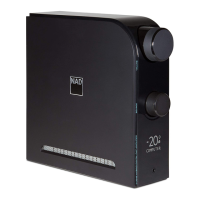
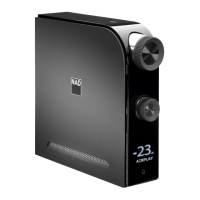
The NAD D 3020 Hybrid Digital Amplifier is a versatile audio component designed to enhance your listening experience with a blend of digital and analog capabilities. This compact amplifier serves as a central hub for various audio sources, delivering powerful and clear sound to your speakers or headphones.
The D 3020 functions primarily as a hybrid digital amplifier, meaning it combines the efficiency and precision of digital amplification with the warmth and musicality often associated with analog designs. It is capable of driving a wide range of loudspeakers, offering a rated power of 30W at 8 ohms, with dynamic power capabilities reaching up to 150W at 2 ohms, ensuring robust performance even with demanding speakers.
The amplifier features multiple input options to accommodate a diverse array of audio sources. For digital audio, it includes two optical inputs (OPT1, OPT2) and one coaxial input, allowing connection to devices such as CD/BD/DVD players, digital cable boxes, and digital tuners. A unique feature is the asynchronous USB 24 bit/96 kHz input, which provides a low-jitter connection for streaming high-resolution audio content directly from a PC or Mac. This USB input requires a Type A to Type B cable and specific driver installation for Windows users, while Mac users with OS X Snow Leopard (version 10.6) or later can use it without additional drivers. The D 3020 also supports Bluetooth connectivity, enabling wireless streaming from compatible devices like smartphones and tablets. For analog sources, there are two auxiliary inputs (AUX 1, AUX 2), with AUX 2 also capable of accepting headphone/digital audio output from a MacBook Pro using the supplied TOSLINK mini-adapter.
Output options include dedicated speaker terminals for connecting a pair of passive loudspeakers, ensuring proper left and right channel separation and polarity. A 3.5mm stereo jack socket is provided for headphone listening, featuring specially designed low-noise circuitry that can accommodate a wide range of headphones, including high-impedance studio models. Inserting a headphone jack automatically mutes the loudspeakers. Additionally, a SUBW output allows for connection to powered subwoofers or power amplifier channels driving passive subwoofer systems, enhancing bass response.
The D 3020 incorporates a Bass EQ feature that boosts overall bass response by at least 6 dB, which can be toggled on or off to suit personal preference or room acoustics. A +12V Trigger In input allows the amplifier to be remotely controlled by other devices equipped with a +12V trigger output, enabling synchronized power on/off functionality within a larger audio system.
The D 3020 is designed for user-friendly operation, both through its front panel controls and a supplied remote control.
The remote control provides convenient access to key functions:
Pairing a Bluetooth device with the D 3020 is straightforward. The amplifier presents a unique device ID (e.g., D3020 010DD3) for identification. Once paired, you can initiate playback from your Bluetooth device.
The D 3020 should be placed on a firm, level surface. It is not recommended to place the unit on soft surfaces like carpets, which could impede ventilation. The amplifier comes with four dome-shaped feet for optional installation, which should be placed as suggested in the manual to ensure stability and balance. Adequate space around the unit (10 cm on left, right, rear, and top panels) is required for proper ventilation to prevent overheating.
Maintaining the D 3020 involves simple care and adherence to safety guidelines to ensure its longevity and optimal performance.
Always unplug the product from the wall outlet before cleaning. Use only a dry cloth for cleaning; liquid or aerosol cleaners should be avoided.
The primary method of isolating the amplifier from the mains supply is to disconnect the mains plug. Ensure the mains plug remains accessible at all times. If the unit will not be used for several months or more, unplug the AC power cord from the outlet.
The remote control uses a 3V CR2025 battery. To replace it, insert a hooked tip into the battery door release hole to slide out the tray. Place the new CR2025 battery into the tray, ensuring the "+" symbol faces upwards, then slide the tray back until it clicks into place.
The manual emphasizes several important safety instructions, including:
It is highly recommended to save the original box and all packaging materials. This provides the safest container for transporting the D 3020 if you need to move it or send it for service.
 General
| Frequency Response | 20Hz - 20kHz |
|---|---|
| Digital Inputs | Optical, Coaxial, USB |
| Analog Inputs | RCA |
| Subwoofer Output | Yes |
| Headphone Output | Yes |
| Bluetooth | Yes |
| Outputs | Speaker, Subwoofer, Headphone |
| USB DAC | Yes |
| Power Output | 30W |
| Total Harmonic Distortion | <0.005 % |
| Signal-to-Noise Ratio | >90dB |
| Inputs | Digital, Analog |
| Type | Hybrid Digital |
| Bluetooth Version | 4.0 |


 To Next Page