REMOTE CONTROL
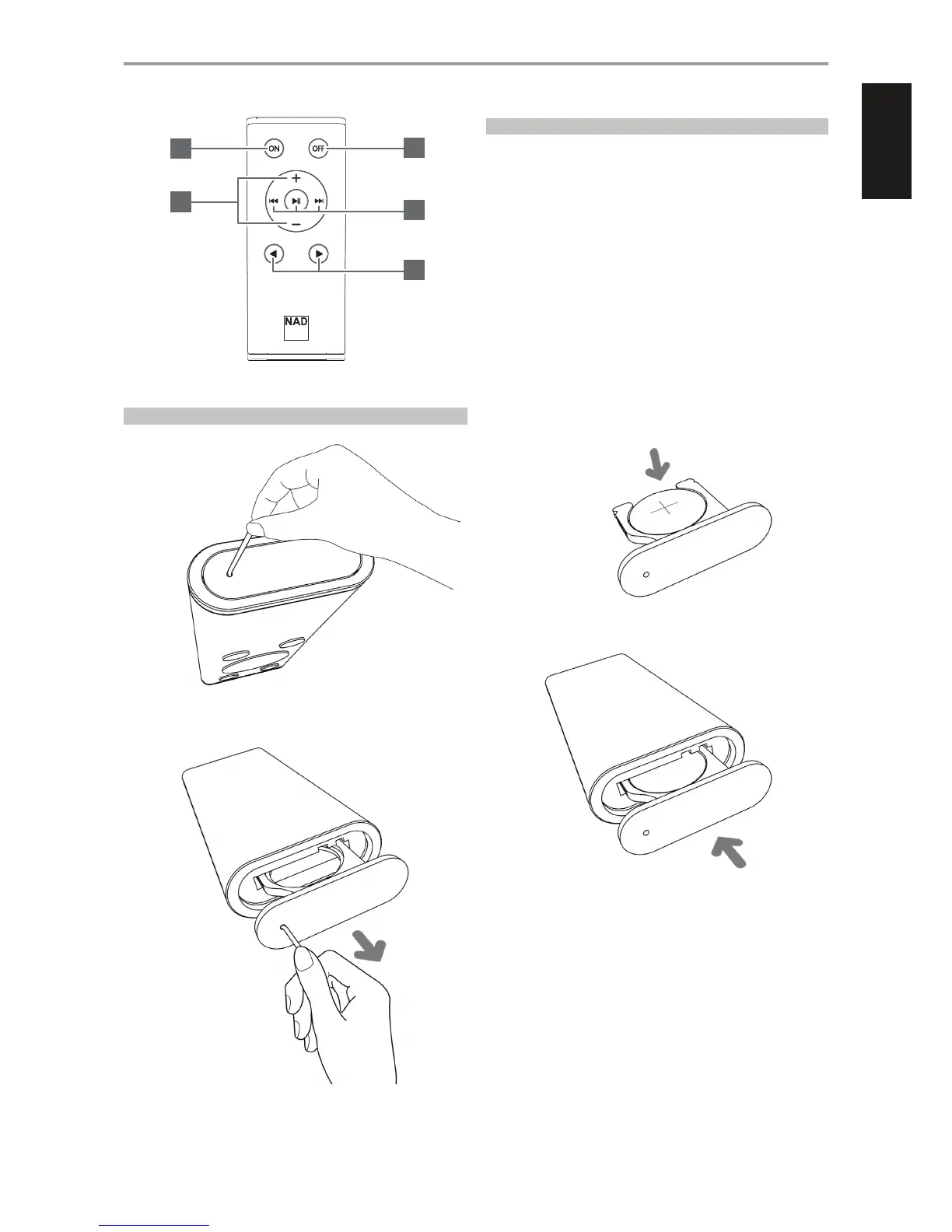
1 ON: Switch D3020 from Standby mode to operating mode.
2 OFF: Switch D3020 to standby mode.
3 +/- : Increase or decrease audio level.
4 t u : Select source.
5 TUNER CONTROLS (applicable for NAD products with Tuner section)
9 0: Step up or down Presets.
4j : Select applicable Tuner bands.
IDENTIFICATION OF CONTROLS
1
3
2
5
4
BATTERY INSERTION PROCEDURE
1 Insert a hooked tip into the battery door release hole.
2 Slide out the battery tray.
3 Place the supplied CR2025 battery into the tray. Ensure the "+" symbol is
facing upwards.
4 Slide the tray back until it clicks into place.
7
ENGLISHPORTUGUÊS FRANÇAISESPAÑOLITALIANODEUTSCHNEDERLANDSSVENSKAРУССКИЙ



 To Next Page