WHAT’S IN THE BOX
Packed with your CI 580 you will nd
• Two detachable mains power cord
• Terminal connector block
• Quick Setup Guide
NOTE
Follow enclosed Quick Setup Guide to help you get started with your
CI580.
SAVE THE PACKAGING
Please save the box and the packaging that came with the CI 580. Should
you move or need to transport your CI 580, this is the safest container to
use. We’ve seen too many otherwise perfect components damaged in
transit for lack of a proper shipping carton. So please, save that box!
INTRODUCTION
GETTING STARTED
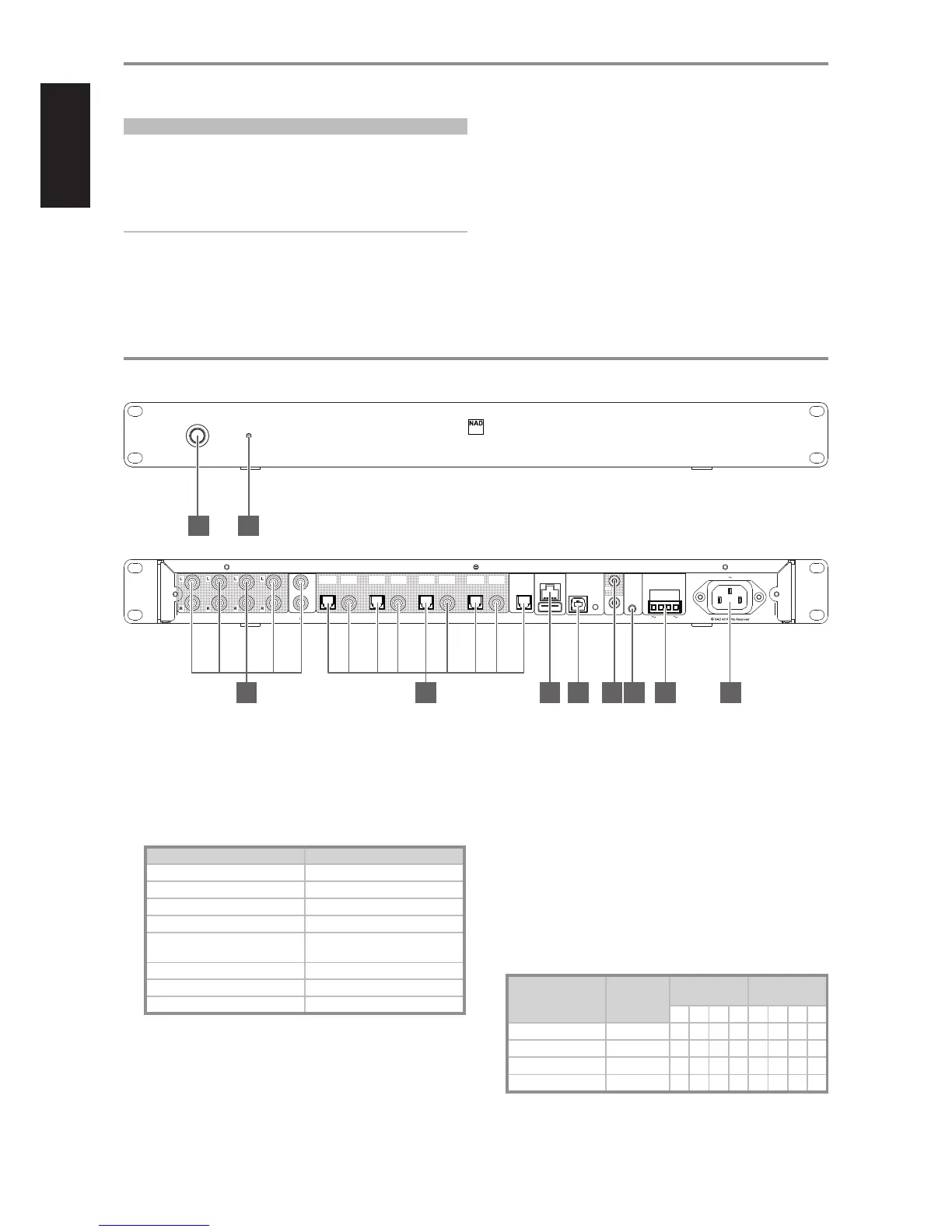
IDENTIFICATION OF CONTROLS
1 STANDBY BUTTON
• Press and hold this button to bring the CI 580 to standby mode.
2 STATUS INDICATOR
• This is an indicator of network connectivity. Below is a table of the
LED blink codes and their corresponding descriptions.
LED BLINK CODE DESCRIPTION
Short red ash, then ashing green Powering up, rebooting
Solid red Booting up
Solid red Cannot boot up; drive error
Solid white Indexing
Solid blue Connected to network – ready to use
with Bluesound App
Flashing green No internet gateway
Alternate ashing red and green Upgrade mode
Flashing red Factory reset in progress
3 ANALOG IN
• Input for line level sources such as CD player, tuner or any
compatible devices. Use a twin RCA-to-RCA lead to connect the
source device’s left and right “Audio Output” to this input. The source
will appear as an “Analog Input” in the navigation drawer of the
BluOS App.
PREAMPLIFIER OUTPUT (1-4)
• Connect any or all preamplier output ports to corresponding audio
input ports of compatible ampliers, receivers or processors.
• Use a twin RCA-to-RCA lead to connect the left and right
“Audio Input” of a power amplier or processor to a particular
PREAMPLIFIER OUTPUT port.
• Audio output for each preamplier output is dependent upon
the current or selected source of the particular Player. This is
congurable via the BluOS App.
• Refer to the sample table below showing selected sources for
particular Players and their corresponding preamplier or optical/
coaxial audio output. The selected Source shown is an example
only. The Source can be any media available from the BluOS App’s
navigation drawer.
SELECTED SOURCE FROM
NAVIGATION DRAWER
PLAYER
PREAMPLIFIER
OUTPUT
OPTICAL/COAXIAL
OUTPUT
1 2 3 4 1 2 3 4
Analog input CI580-XXXX
✓ ✓
Optical input CI580-XXXX-2
✓ ✓
Library CI580-XXXX-3
✓ ✓
Music Streaming Service
CI580-XXXX-4
✓ ✓
© NAD CI580
BluOS Network Music Player CI 580
1 2
© NAD CI580
100-240V 50/60HzSYSTEM INTERRUPT
5V-30V AC/DC
SERVICE
+12VTRIGGER
IR IN
+
-
OPTICAL
IN
LAN/USB
INPREAMPLIFIER OUTPUT DIGITAL PREAMPLIFIER OUTPUT
1 42 3 1 42 3
IN
L
R
OPTICAL
OUT 1
COAXIAL
OUT 1
OPTICAL
OUT 2
COAXIAL
OUT 2
OPTICAL
OUT 3
COAXIAL
OUT 3
OPTICAL
OUT 4
COAXIAL
OUT 4
OUT
IN
3 4 5 6 7 8 9 10
4


 To Next Page
 Loading...