ENGLISH
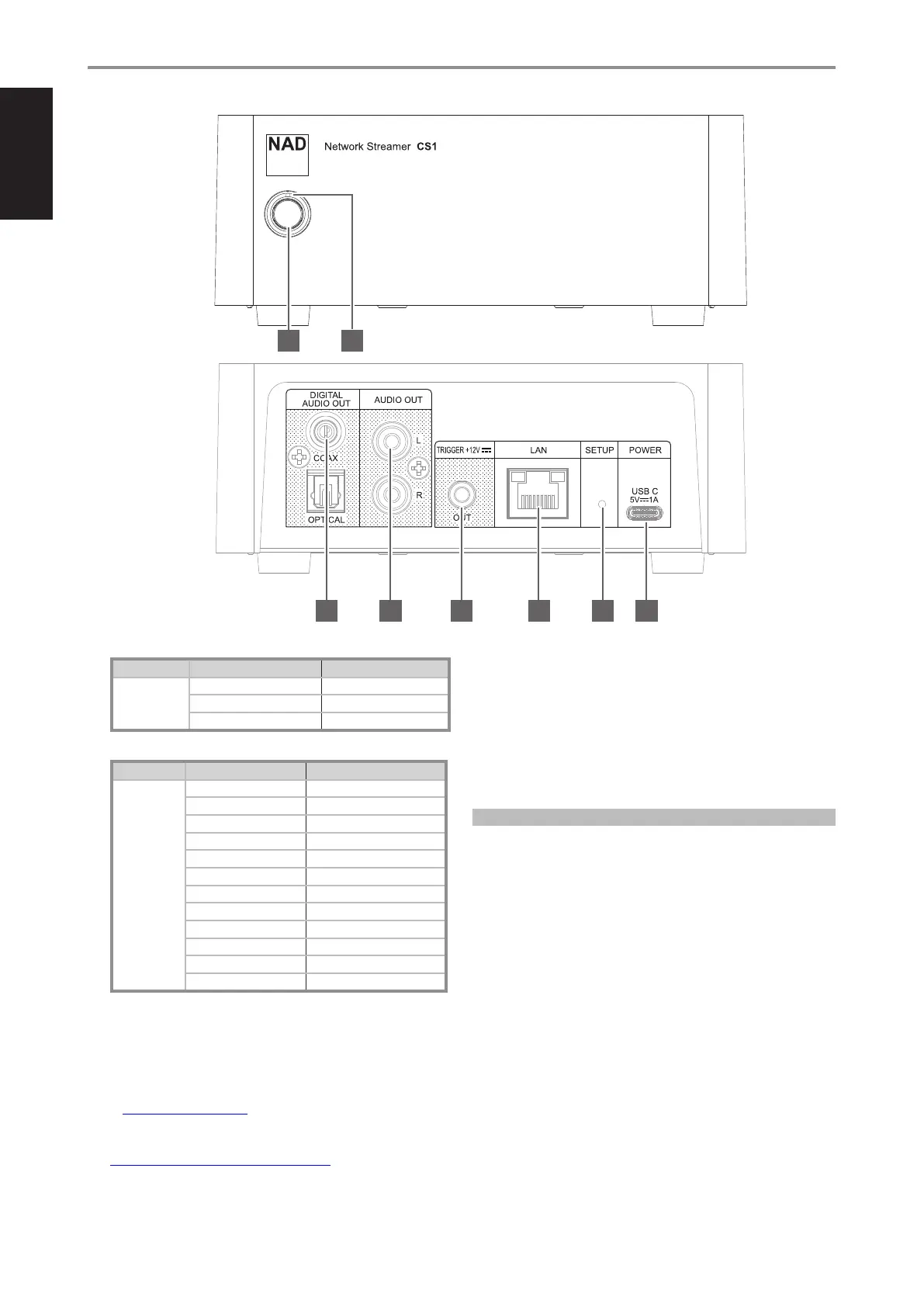
1 STANDBY BUTTON
PART ACTION RESULT
Standby button Short press (less than 1 second) Wake up from standby mode
Press for 2-5 seconds and release Switch to standby mode
Press for more than 5 seconds Hotspot mode
2 POWER INDICATOR
PART LED COLOR DESCRIPTION
Power Indicator Short solid red Initial powering up
Flashing blue Initializing
Flashing red Updating
Flashing purple No Wi-Fi connection
Alternate flashing red and blue Hotspot mode
Flashing blue for 3 seconds Switching to Bluetooth connection
Flashing white for 3 seconds Switching to Google Chromecast
Flashing green for 3 seconds Switching to Spotify Connect
Flashing purple for 3 seconds Switching to Tidal Connect
Amber Standby mode
Solid green Normal operation, Spotify
Solid blue Normal operation
STANDBY MODE
CS1 will go to standby mode if there is no user interface interaction and
no active source for at least 15 minutes.
Spotify Connect
Use your phone, tablet or computer as a remote control for Spotify. Go
to www.spotify.com/connect to learn how.
Note: The Spotify software is subject to third party licences found here:
www.spotify.com/connect/third-party-licences
3 OPTICAL/COAXIAL
• Connect to the compatible optical and coaxial digital input of
preamplifiers, integrated amplifiers, receivers, and other applicable
external devices that will drive corresponding speakers.
4 AUDIO OUT
• Connect to compatible analog audio input of preamplifiers,
integrated amplifiers, receivers, and other applicable external
devices that will drive corresponding speakers.
ABOUT VOLUME CONTROL
Some of the apps for mobile devices will allow adjusting volume
through the Volume Up/Down buttons on the controlling phone or
tablet for the NAD CS1 analog audio output.
Although this can be very convenient, in many cases there will also be
a separate volume control on the amplifier or receiver the NAD CS1 is
connected to. When using the mobile device’s volume control, ensure
the volume level of the amplifier or receiver the CS1 is connected to is
not set too high.
In order to achieve the highest level of audio quality, it is
recommended to set the volume control of the phone or tablet to
maximum and then adjust the volume level on the amplifier or receiver
the NAD CS1 is connected to.
5 +12V TRIGGER OUT
• The +12V TRIGGER OUT is used for controlling external equipment
equipped with a +12V trigger input.
• Connect this +12V TRIGGER OUT to the other equipment’s corresponding
+12V DC input jack using a mono cable with 3.5mm male plug.
• This output will be 12V when the CS1 is ON and 0V when at
standby mode.
IDENTIFICATION OF CONTROLS
FRONT AND REAR VIEW
1
3
2
4 5 6 7 8
6


 To Next Page