8
Introduction
ENGLISH FRANÇAIS
DEUTSCH
NEDERLANDS
ESPAÑOL
ITALIANO
PORTUGUÊS
SVENSKA
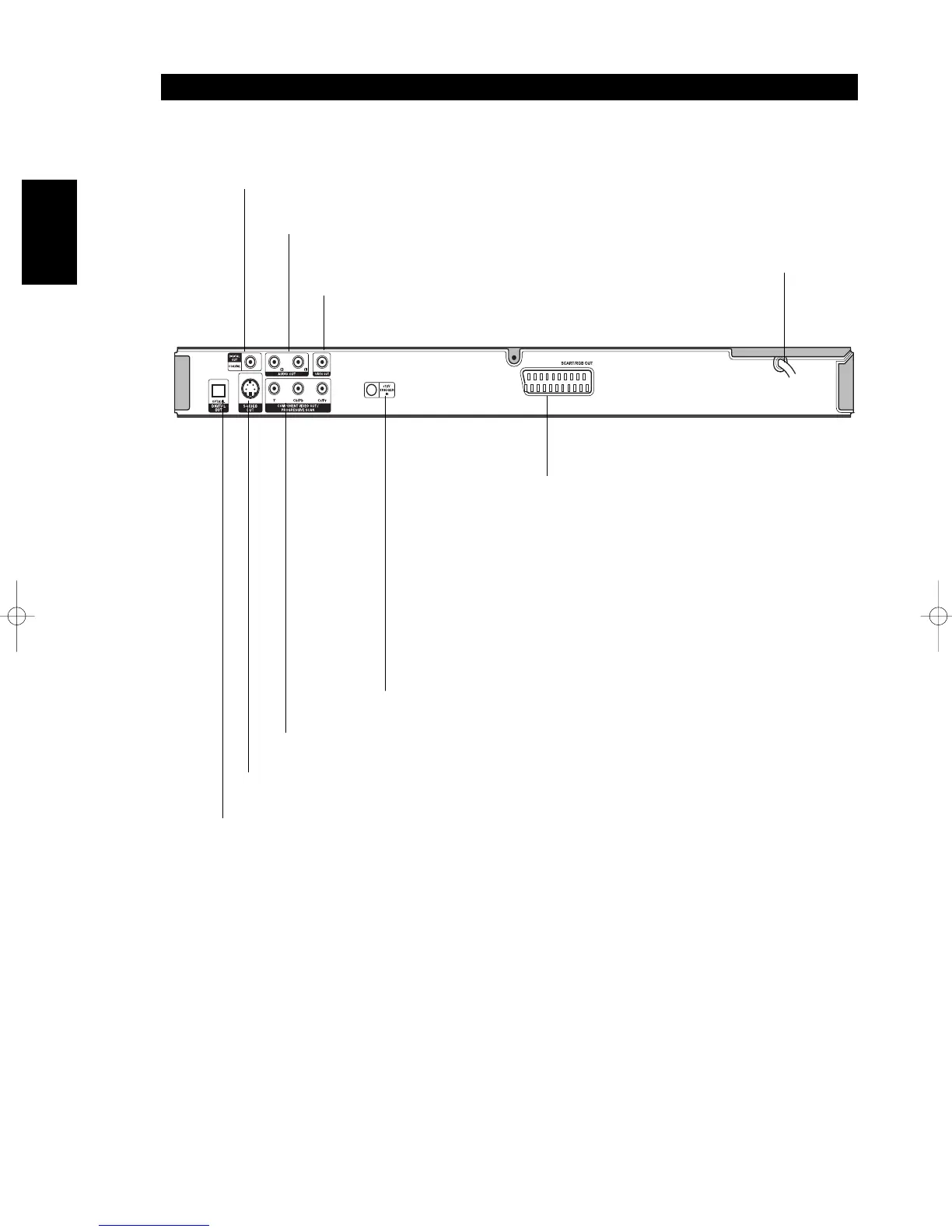
REAR PANEL
COAXIAL (Digital audio out jack)
Connect to digital (coaxial) audio equipment.
AUDIO OUT (Left/Right)
Connect to an amplifier, receiver,
or stereo system.
VIDEO OUT
Connect to a TV with video inputs.
OPTICAL (Digital audio out jack)
Connect to digital (optical) audio equipment.
AC Power Cord
Plug into the power source.
S-VIDEO OUT
Connect to a TV with S-Video inputs.
COMPONENT/PROGRESSIVE SCAN VIDEO OUT
Connect to a TV with Y Cb/Pb Cr/Pr inputs.
12V TRIGGER IN
By connecting this DVD player to another NAD audio
component or system controller equipped with a 12V trigger
output, you can remotely operate the T514C power ON/OFF.
SCART/RGB OUT
Connect to a TV with SCART jack.
T514C_NAD_English_Finalv5.1.qxd 2/24/2005 11:18 AM Page 8


 To Next Page