EasyManua.ls Logo

Nakamichi 730 - Page 5

Nakamichi 730
19 pages
Print Icon
To Next Page IconTo Next Page
To Previous Page IconTo Previous Page
Loading...
®oG
®
@
©
i
Stered
DolbyFM
Hr-blend
FMNute
ace
i i
(10)
Tape
Monitor
Sensor
Group:
When
you
touch
the
‘’Source”
sensor,
you
can
listen
to
the
source
you've
selected
on
the
function
sensor
group.
When
you
touch
either
“Tape
1"
or
‘Tape
2,"
you
can
listen
to
the
corresponding
tape
deck,
regardless
of
the
source
selected
on
the
function
sensor
group.
With
a
three-head
tape
deck,
the
tape
monitor
feature
allows
you
to
audition
a
tape
recording
as
it
is
being
made.
(11)
Tone
Controls:
The
bass
control
alters
the
relative
volume
of
low
frequency
program
material.
The
treble
control
does
the
same
for
high
frequency
material.
You
can
use
these
controls
to
com-
Pensate
for
room
acoustics
and
deficiencies
in
the
program
material,
and
to
adjust
the
sound
quality
to
your
preference.
s0amt
Jom"
2000"
|
Threvrod
i
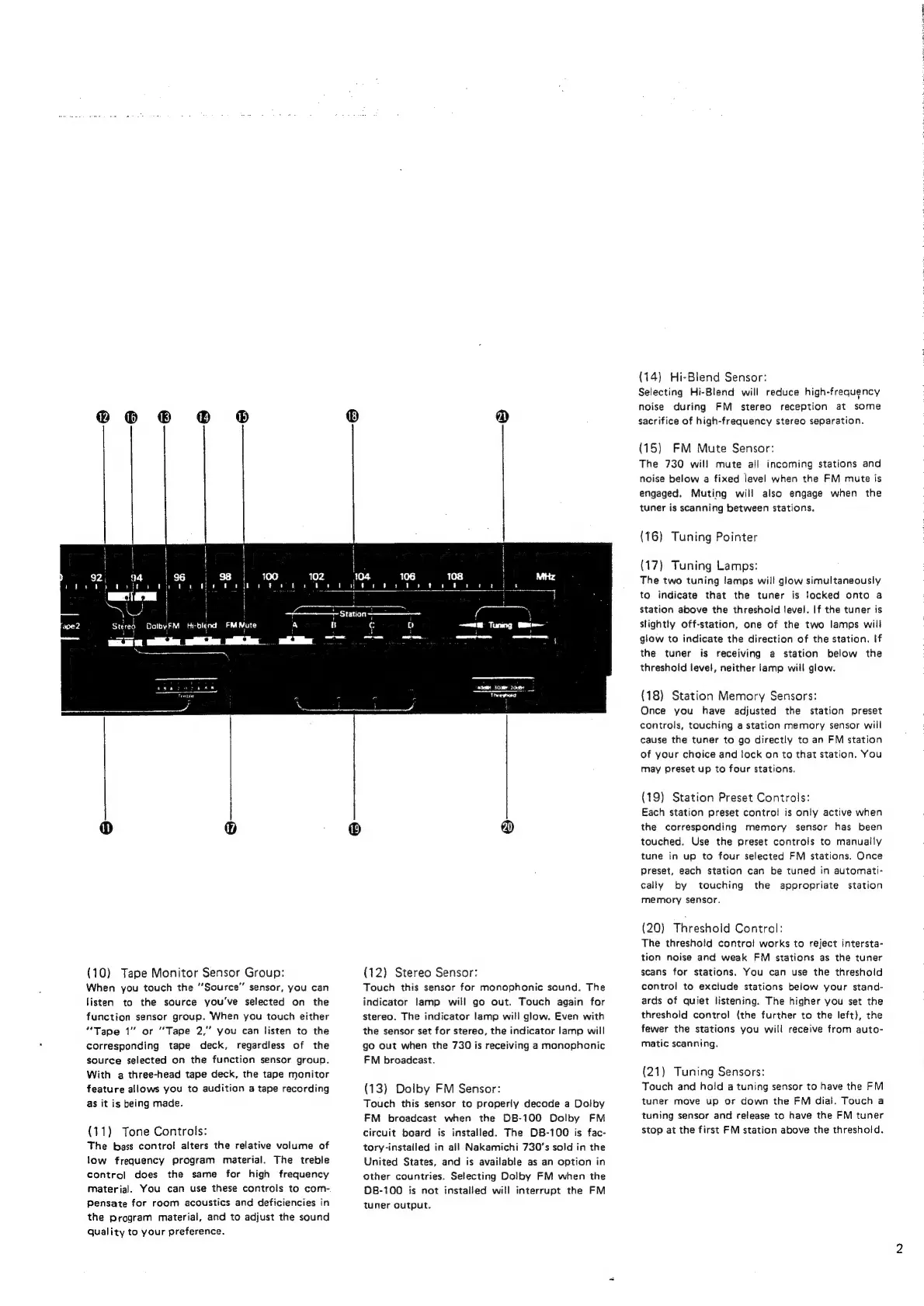
(12)
Stereo
Sensor:
Touch
this
sensor
for
monophonic
sound.
The
indicator
lamp
will
go
out.
Touch
again
for
stereo.
The
indicator
lamp
will
glow.
Even
with
the
sensor
set
for
stereo,
the
indicator
lamp
will
go
out
when
the
730
is
receiving
a
monophonic
FM
broadcast.
(13)
Dolby
FM
Sensor:
Touch
this
sensor
to
properly
decode
a
Dolby
FM
broadcast
when
the
DB-100
Dolby
FM
circuit
board
is
installed.
The
DB-100
is
fac-
tory-installed
in
all
Nakamichi
730’s
sold
in
the
United
States,
and
is
available
as
an
option
in
other
countries.
Selecting
Dolby
FM
when
the
DB-100
is
not
installed
will
interrupt
the
FM
tuner
output.
(14)
Hi-Blend
Sensor:
Selecting
Hi-Blend
will
reduce
high-frequency
noise
during
FM
stereo
reception
at
some
sacrifice
of
high-frequency
stereo
separation.
(15)
FM
Mute
Sensor:
The
730
will
mute
all
incoming
stations
and
noise
below
a
fixed
level
when
the
FM
mute
is
engaged.
Muting
will
also
engage
when
the
tuner
is
scanning
between
stations.
(16)
Tuning
Pointer
(17)
Tuning Lamps:
The
two
tuning
lamps
will
glow
simultaneously
to
indicate
that
the
tuner
is
locked
onto
a
station
above
the
threshold
!evel.
If
the
tuner
is
slightly
off-station,
one
of
the
two
lamps
will
glow
to
indicate
the
direction
of
the
station.
If
the
tuner
is
receiving
a
station
below
the
threshold
level,
neither
lamp
will
glow.
(18)
Station
Memory
Sensors:
Once
you
have
adjusted
the
station
preset
controls,
touching
a
station
memory
sensor
will
cause
the
tuner
to
go
directly
to
an
FM
station
of
your
choice
and
lock
on
to
that
station.
You
may
preset
up
to
four
stations.
(19)
Station
Preset
Controls:
Each
station
preset
control
is
only
active
when
the
corresponding
memory
sensor
has
been
touched.
Use
the
preset
controls
to
manually
tune
in
up
to
four
selected
FM
stations.
Once
Preset,
each
station
can
be
tuned
in
automati-
cally
by
touching
the
appropriate
station
memory
sensor.
(20)
Threshold
Control:
The
threshold
contro!
works
to
reject
intersta-
tion
noise
and
weak
FM
stations
as
the
tuner
scans
for
stations.
You
can
use
the
threshold
control
to
exclude
stations
below
your
stand-
ards
of
quiet
listening.
The
higher
you
set
the
threshold
control
(the
further
to
the
left),
the
fewer
the
stations
you
will
receive
from
auto-
matic
scanning.
(21)
Tuning
Sensors:
Touch
and
hold
a
tuning
sensor
to
have
the
FM
tuner
move
up
or
down
the
FM
dial.
Touch
a
tuning
sensor
and
release
to
have
the
FM
tuner
stop
at
the
first
FM
station
above
the
threshold.
i
'