EasyManua.ls Logo

Nakamichi 730 - Important Precautions for Use; Installation and Ventilation Guidelines; Power Switch and Muting Procedures; Headphone Use and Battery Maintenance

Nakamichi 730
19 pages
Print Icon
To Next Page IconTo Next Page
To Previous Page IconTo Previous Page
Loading...
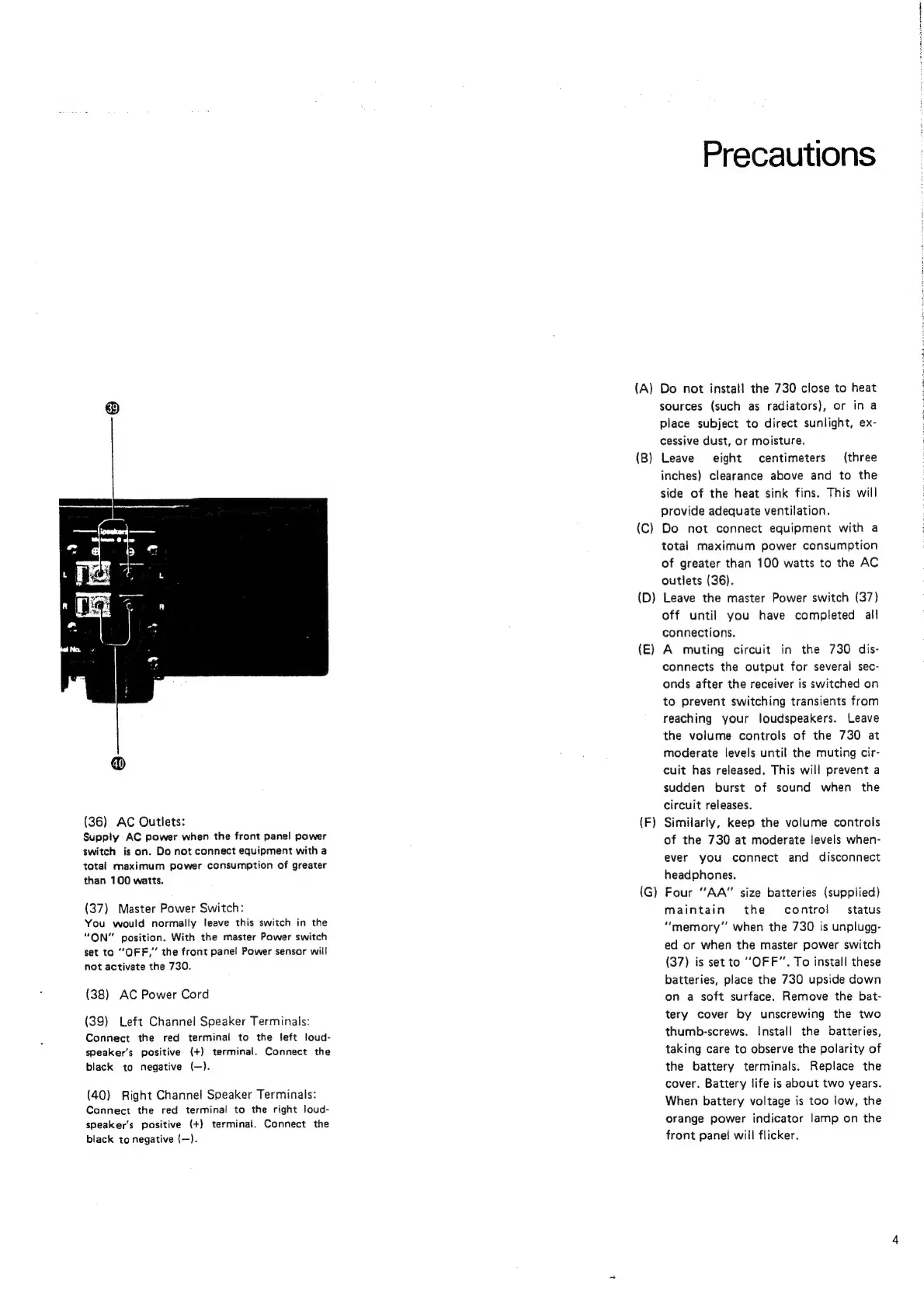
(36)
AC
Outlets:
Supply
AC
power
when
the
front
panel
power
switch
is
on.
Do
not
connect
equipment
with
a
total
maximum
power
consumption
of
greater
than
100
watts.
(37)
Master
Power
Switch:
You
would
normally
leave
this
switch
in
the
“ON”
position.
With
the
master
Power
switch
set
to
“OFF,”
the
front
panel
Power
sensor
will
not
activate
the
730.
(38)
AC
Power
Cord
(39)
Left
Channel
Speaker
Terminals:
Connect
the
red
terminal
to
the
feft
loud-
speaker's
positive
(+)
terminal.
Connect
the
black
to
negative
(—).
(40)
Right
Channel
Speaker
Terminals:
Connect
the
red
terminal
to
the
right
loud-
speaker's
positive
(+}
terminal.
Connect
the
black
to
negative
(—}.
Precautions
(A)
Do
not
install
the
730
close
to
heat
sources
(such
as
radiators),
or
in
a
place
subject
to
direct
sunlight,
ex-
cessive
dust,
or
moisture.
(B)
Leave
eight
centimeters
(three
inches)
clearance
above
and
to
the
side
of
the
heat
sink
fins.
This
will
provide
adequate
ventilation.
(C)
Do
not
connect
equipment
with
a
total
maximum
power
consumption
of
greater
than
100
watts
to
the
AC
outlets
(36).
Leave
the
master
Power
switch
(37}
off
until
you
have
completed
all
connections.
(E)
A
muting
circuit
in
the
730
dis-
connects
the
output
for
several
sec-
onds
after
the
receiver
is
switched
on
to
prevent
switching
transients
from
reaching
your
loudspeakers.
Leave
the
volume
controls
of
the
730
at
moderate
levels
until
the
muting
cir-
cuit
has
released.
This
will
prevent
a
sudden
burst
of
sound
when
the
circuit
releases.
Similarly,
keep
the
volume
controls
of
the
730
at
moderate
levels
when-
ever
you
connect
and
disconnect
headphones.
(G)
Four
“AA”
size
batteries
(supplied)
maintain
the
contro!
—
status
“memory”
when
the
730
is
unplugg-
ed
or
when
the
master
power
switch
(37)
is
set
to
“OFF”.
To
install
these
batteries,
place
the
730
upside
down
on
a
soft
surface.
Remove
the
bat-
tery
cover
by
unscrewing
the
two
thumb-screws.
Install
the
batteries,
taking
care
to
observe
the
polarity
of
the
battery
terminals.
Replace
the
cover.
Battery
life
is
about
two
years.
When
battery
voltage
is
too
low,
the
orange
power
indicator
lamp
on
the
front
pane!
will
flicker.
(D
(F
i
i
i