EasyManua.ls Logo

Nakamichi 730 - Nakamichi 730 Receiver Controls and Features

Nakamichi 730
19 pages
Print Icon
To Next Page IconTo Next Page
To Previous Page IconTo Previous Page
Loading...
Controls
and
Features
The
730
Receiver
incorporates
touch
sensors.
Most
of
the
functions
of
the
730
can
be
controiled
by
simply
touching
the
appropriate
sensor.
Lamps
immediately
under
the
sensors
glow
to
indicate
the
control
status
of
the
730.
An
internal
memory
retains
the
contro!
status
when
the
receiver
is
switched
off
or
disconnect-
ed
from
an
AC
outlet.
Thus,
if
the
receiver
is
tuned
to
a
specific
FM
station
at
a
specific
volume
when
you
turn
it
off,
it
will
still
be
at
that
station
and
volume
the
next
time
you
turn
it
on.
Please
note
that
the
touch
sensors
rely
on
some
residual
moisture
on
the
tips
of
your
fingers.
If
your
hands
are
extremely
cold
—
as
they
might
be
during
the
winter
months
when
you
first
come
in
from
outdoors—you
may
need
to
rub
or
otherwise
moisten
your
finger-
tips.
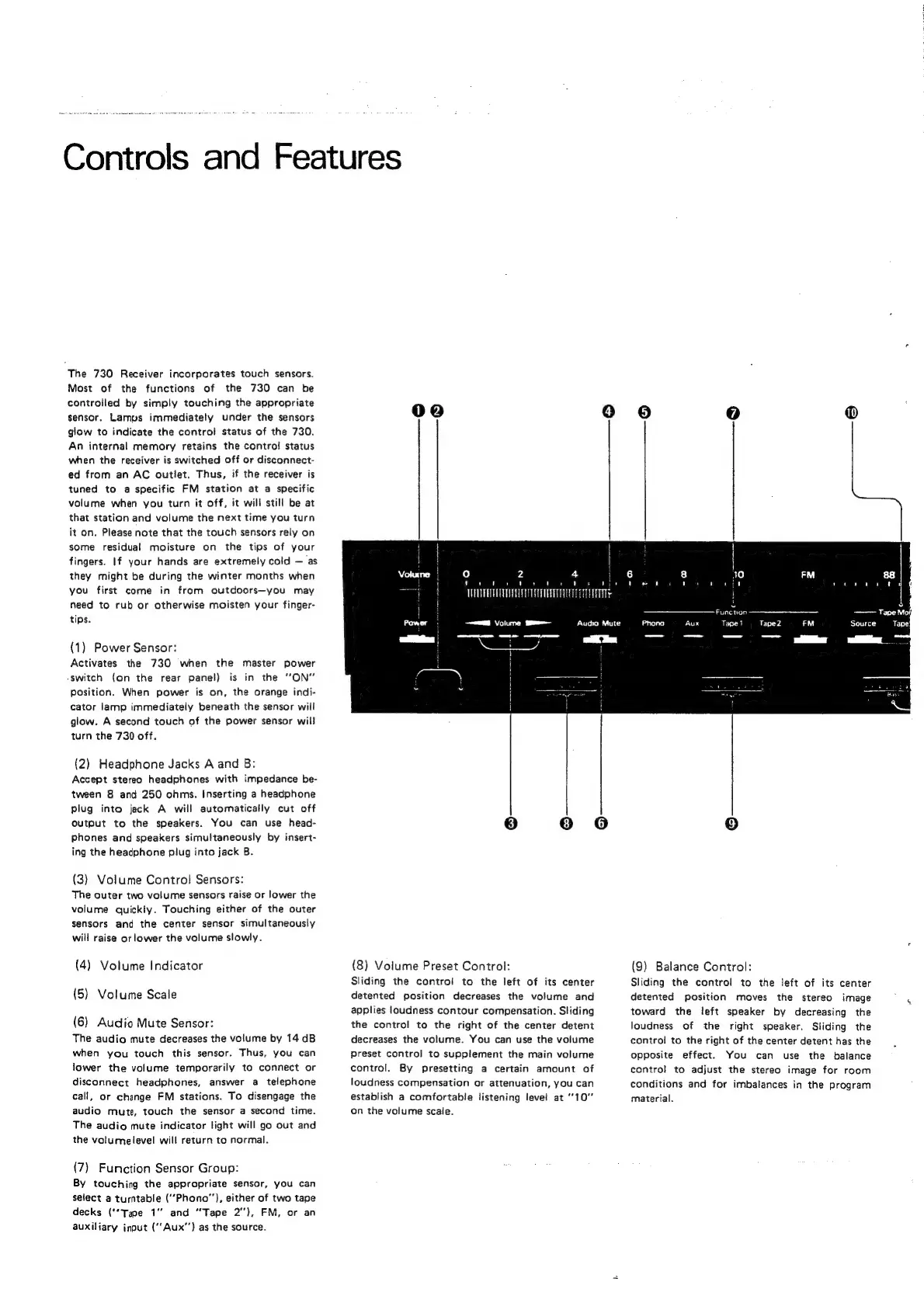
(1)
Power
Sensor:
Activates
the
730
when
the
master
power
-switch
(on
the
rear
panel)
is
in
the
“ON”
Position.
When
power
is
on,
the
orange
indi-
cator
lamp
immediately
beneath
the
sensor
will
glow.
A
second
touch
of
the
power
sensor
will
turn
the
730
off.
(2)
Headphone
Jacks
A
and
B:
Accept
stereo
headphones
with
impedance
be-
tween
8
and
250
ohms.
Inserting
a
headphone
plug
into
jack
A
will
automatically
cut
off
Output
to
the
speakers.
You
can
use
head-
phones
and
speakers
simultaneously
by
insert-
ing
the
headphone
plug
into
jack
B.
(3)
Volume
Contro!
Sensors:
The
outer
two
volume
sensors
raise
or
lower
the
volume
quickiy.
Touching
either
of
the
outer
sensors
and
the
center
sensor
simultaneously
will
raise
or
lower
the
volume
slowly.
(4)
Volume
Indicator
(5)
Volume
Scale
(6)
Audio
Mute
Sensor:
The
audio
mute
decreases
the
volume
by
14
dB
when
you
touch
this
sensor.
Thus,
you
can
lower
the
volume
temporarily
to
connect
or
disconnect
headphones,
answer
a
telephone
call,
or
change
FM
stations.
To
disengage
the
audio
mute,
touch
the
sensor
a
second
time.
The
audio
mute
indicator
light
will
go
out
and
the
volume
level
will
return
to
normal.
(7)
Function
Sensor
Group:
By
touching
the
appropriate
sensor,
you
can
select
a
turntable
(“Phono”),
either
of
two
tape
decks
("Tape
1°
and
‘Tape
2”),
FM,
or
an
auxiliary
input
(‘Aux’)
as
the
source.
00
4)
2
4
'
'
'
’
'
'
'
'
'
'
TUT
ERECTA
TTT
TTT
3-
(8)
Volume
Preset
Control:
Sliding
the
control
to
the
left
of
its
center
detented
position
decreases
the
volume
and
applies
loudness
contour
compensation.
Sliding
the
control
to
the
right
of
the
center
detent
decreases
the
volume.
You
can
use
the
volume
Preset
control
to
supplement
the
main
volume
control.
By
presetting
a
certain
amount
of
loudness
compensation
or
attenuation,
you
can
establish
a
comfortabie
listening
levet
at
10”
on
the
volume
scale.
qin
Function
Tape
1
(9)
Balance
Control:
Sliding
the
control
to
the
left
of
its
center
detented
position
moves
the
stereo
image
toward
the
left
speaker
by
decreasing
the
loudness
of
the
right
speaker.
Sliding
the
control
to
the
right
of
the
center
detent
has
the
opposite
effect.
You
can
use
the
balance
contro!
to
adjust
the
stereo
image
for
room
conditions
and
for
imbalances
in
the
program
material.
i
j