EasyManua.ls Logo

Nakamichi CD-45z - User Manual

Nakamichi CD-45z
19 pages
Print Icon
To Next Page IconTo Next Page
Loading...
R
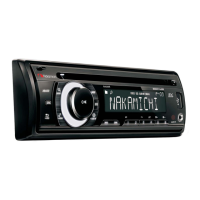
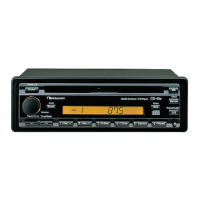
CD-45z
Mobile Receiver / CD Player
Owner’s Manual
Nakamichi Mobile Sound System

Other manuals for Nakamichi CD-45z

Questions and Answers

  • D
    Denise MartinJul 30, 2025
    What to do if Nakamichi Car Receiver controls aren't working?
    • D
      David DouglasJul 30, 2025
      If the controls on your Nakamichi Car Receiver aren't working or it's malfunctioning, check to see if the car battery is exhausted. You can also try pushing the reset button.
  • S
    Sarah ReedAug 5, 2025
    Why is there no radio reception on my Nakamichi Car Receiver?
    • C
      cynthiagarciaAug 5, 2025
      If you're not getting any radio reception on your Nakamichi Car Receiver, check the antenna connection. If you are using a window antenna, ensure that the antenna booster is working properly.
  • C
    Christina FordAug 9, 2025
    What does E-MECHA mean on a Nakamichi CD-45z Car Receiver?
    • M
      Melissa StokesAug 9, 2025
      If 'E-MECHA' appears on your Nakamichi Car Receiver, try switching the program source, pressing the eject button, or turning the unit off. If the problem persists, press the reset button.
  • E
    Erica BraunAug 14, 2025
    What does E-DISC mean on a Nakamichi CD-45z?
    • J
      Jason FloydAug 14, 2025
      If 'E-DISC' is displayed on your Nakamichi Car Receiver, here are a few things to try: 1. Ensure the CD is inserted correctly. 2. Clean the CD. 3. Try a different CD.
  • V
    Victor BowmanAug 19, 2025
    How to stop ignition noise during radio reception on Nakamichi Car Receiver?
    • S
      Sandy LopezAug 19, 2025
      If you're hearing ignition noise during radio broadcast reception on your Nakamichi Car Receiver, securely connect the ground cable. If the noise persists, try choosing a different ground point.
  • D
    desiree91Aug 25, 2025
    What does 'NO DISC' mean on a Nakamichi CD-45z Car Receiver?
    • M
      Michael WiseAug 26, 2025
      If your Nakamichi Car Receiver displays 'NO DISC', load one or more CDs, close the disc tray or load CDs, insert the disc magazine or load CDs.

Summary

Installation

Dashboard installation

Instructions for mounting the unit in a car dashboard using the supplied mounting sleeve and securing it.

Precaution concerning side fastening holes

Warning about using screws no longer than M5x8mm to prevent internal unit damage during installation.

Basic Operation Steps

Power on;off

How to turn the unit on by pressing the power button or activating via tuner/CD insertion.

Volume control

Guide to adjusting audio volume by turning the volume controller clockwise or counterclockwise.

Selecting a program source

How to switch between operation modes like tuner, CD, CD changer, and AUX using the source selector.

Reset button

How to use the reset button to resolve operational issues when controls do not respond.

CD Playback

CD Changer Control

CD playback pause

How to pause CD playback from the changer, indicated by 'PAUSE', and resume it.

FM;AM Reception

Auto seek

Automatically searching for the next strong radio station by pressing the auto seek button.

Manual memory

Storing favorite radio stations to preset buttons by selecting band and frequency, then holding button.

Memory tuning

Recalling stored radio stations by selecting the band and pressing the desired preset station button.

Troubleshooting

CD changer;CD player error messages

Explanation of error messages displayed by the CD player/changer and their corresponding countermeasures.

Nakamichi CD-45z Specifications

Amplifier Section IconAmplifier Section
maximum power output43 W x 4 (4 ohms)
frequency response15 - 30, 000 Hz ±1 dB
total harmonic distortion0.1% (4 ohms, 1 kHz, 3 W x 4)
CD Player Section IconCD Player Section
sampling frequency44.1 kHz
signal-to-noise ratioBetter than 95 dB
total harmonic distortion0.005% (1 kHz)
Power IconPower
power source14.4 V DC, negative ground (10.8 - 15.6 V allowable)
current consumption9.0 A (At rated power output)
power supply3 V DC (1.5 V x 2)
Weight and Dimensions IconWeight and Dimensions
installation dimensions178 (W) x 50 (H) x 158 (D) mm / 7 (W) x 1-15/16 (H) x 6-1/4 (D) inches
massApprox. 1.5 kg / 3 lbs. 5 oz.
remote control dimensions49 (W) x 26 (H) x 110 (D) mm / 1-15/16 (W) x 1 (H) x 4-5/16 (D) inches

Related product manuals