EasyManua.ls Logo

Nakanishi E2280 - User Manual

Nakanishi E2280
60 pages
Print Icon
To Next Page IconTo Next Page
Loading...
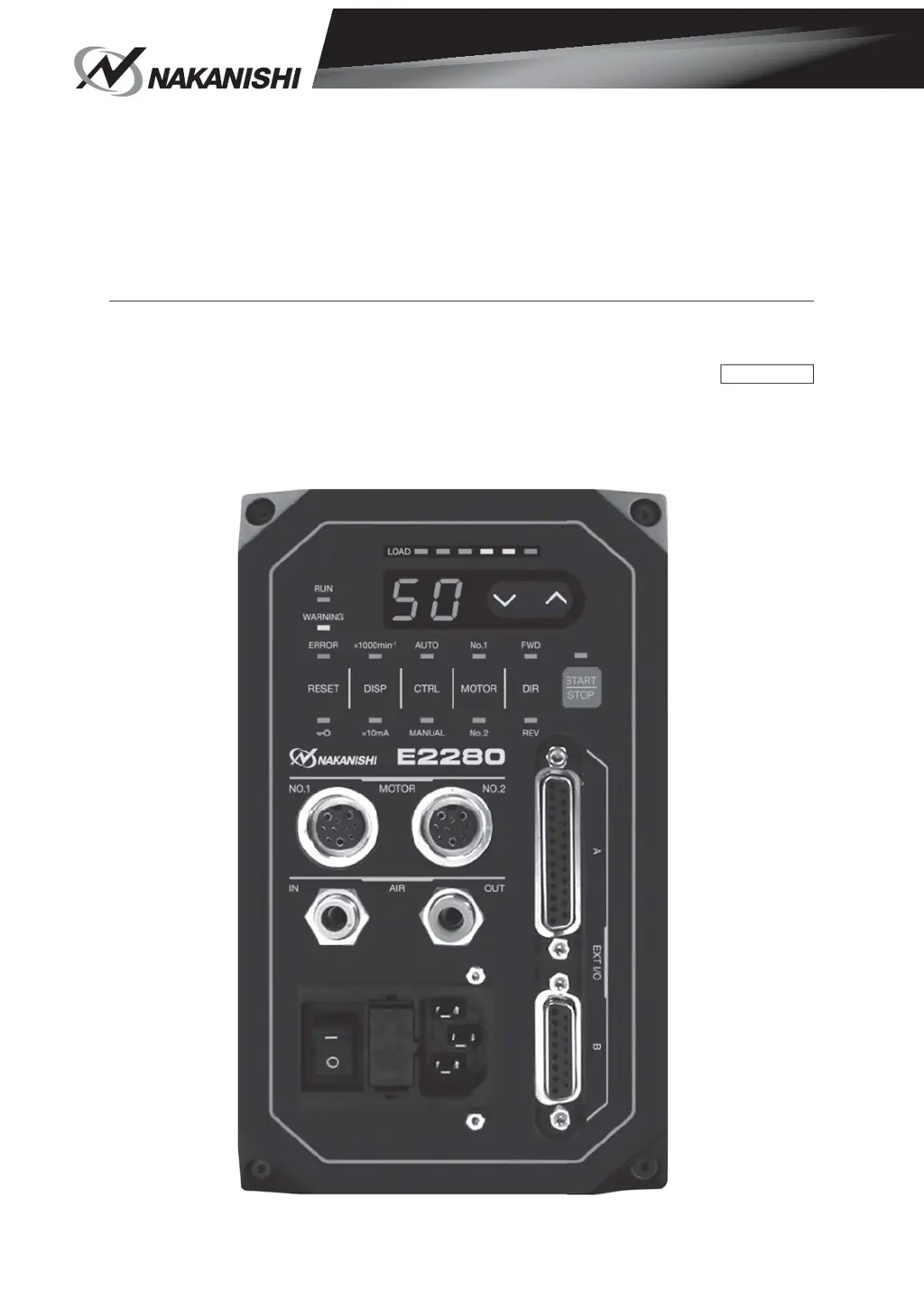
E2280
CONTROLLER
取扱説明書
/
OPERATION MANUAL
日本語 :P1-P55/English:P57-P114/French:P117-P121
OM-K0681

Questions and Answers

  • M
    Mary FreemanAug 12, 2025
    What to do if the Nakanishi E2280 motor does not rotate?
    • S
      shannon45Aug 12, 2025
      If the motor does not rotate, several issues could be the cause: * Ensure the main power switch on the front of the controller is turned ON and the power cord is correctly inserted. Also, check the fuse. * Verify the motor cord is securely connected to both the motor and the controller. * If the error code "EL" is displayed, it indicates an incompatible motor spindle is connected. Connect a compatible motor spindle after releasing the error code. * Make sure the connected motor is selected, either Motor Connector No. 1 or No. 2. * If the control button is set to Manual mode, either use the Start/Stop button or switch the control button to Auto mode.
  • D
    Danielle VillaAug 17, 2025
    How to fix high run-out on a Nakanishi E2280 Controller?
    • Q
      qwilliamsAug 17, 2025
      High run-out can be caused by several factors: * A bent tool: Replace the tool. * Incorrectly installed collet nut: Secure the collet and collet nut correctly. * Worn collet and collet nut: Replace the collet and collet nut. * Contaminants: Clean the collet, collet nut, and the inside of the taper and spindle.
  • P
    phillAug 20, 2025
    What to do if the Nakanishi E2280 motor rotating speed cannot be set?
    • M
      Megan MedinaAug 20, 2025
      If you cannot set the motor rotating speed on the control panel, it might be because the display button is set to "X 10mA". Push the display button and select "X 1000min-1" to light up the corresponding LED.
  • O
    owenchristopherAug 25, 2025
    What to do if Nakanishi E2280 buttons on the control panel don't work?
    • G
      Garrett PettyAug 25, 2025
      If no buttons on the control panel are working, it's likely that the Key Hold function is activated. You can deactivate this by pressing and holding the Error Reset Button (RESET) for 3 seconds. This should re-enable the control panel buttons.
  • D
    danielsalbertAug 27, 2025
    What to do if Nakanishi Controller displays "E7" and the motor won't start?
    • D
      David BrownAug 28, 2025
      If the controller displays "E7" when starting the motor and the motor doesn't rotate, this indicates low air pressure. Adjust the air pressure to 0.25 - 0.3MPa (36.3 - 43.5psi).
  • J
    Jasmine SmithAug 31, 2025
    What to do if I cannot set the increase or decrease of the motor rotation speed on the Nakanishi E2280?
    • R
      Regina GuerraAug 31, 2025
      If you're unable to adjust the motor rotation speed, it's possible that a fixed motor speed is set in the parameters. You need to cancel the parameters for "Fixed Motor Speed Setting" and "Maximum Motor Speed Setting."
  • V
    Vanessa CollinsSep 4, 2025
    Why the Nakanishi E2280 Controller motor speed cannot be set to its maximum?
    • M
      martinezcoleSep 4, 2025
      The motor speed might not reach its maximum because the required speed value exceeds the motor's maximum, or an upper limit has been set. Set the maximum rotation speed to a value less than the motor rotation speed set in the parameter. Also, check the setting of parameter or , or check the setting of parameter .
  • S
    seanjenkinsSep 7, 2025
    What to do if the Nakanishi E2280 Controller displays "EE" and the motor won't rotate?
    • K
      Kimberly WeberSep 8, 2025
      If the controller displays "EE" and the motor does not rotate, the Emergency Stop Signal is likely 'OFF (Open)'. You should check the setting of the parameter.

Summary

1. CAUTIONS FOR HANDLING AND OPERATION

DANGER Warnings

Critical warnings about potential death or serious injury from electrical hazards.

General WARNINGs

Safety hazards that could result in bodily injury or device damage.

5. FEATURES

8. TORQUE CHARACTERISTICS

9. CONTROL PANEL FEATURES

10. POWER CORD CONNECTION

11. REPLACING FUSES

13. MOTOR CORD CONNECTION

14. AIR HOSE CONNECTION

15. OPERATION PROCEDURES

Control Panel Overview

Explanation of control panel buttons, LEDs, speed indicator, and load monitor.

16. EXTERNAL INPUT; OUTPUT CONNECTOR

Connector A Safety and Pin Assignments

Safety warnings and pin assignments for Connector A.

16-2 External Input; Output Connector B

17. PROTECT FUNCTION

Warning Function Details

Explains warning LED behavior and warning codes (A0-A5).

18. SETTING OF OPERATING PARAMETERS

Entering Parameter Setting Mode

Procedure to enter the parameter setting mode.

Parameter Type Overview

Overview of available parameters, their contents, and default settings.

18-4 Setting procedures

Procedure for P Setting

Step-by-step guide to set the error output mode.

20. TROUBLESHOOTING

Control Panel and Motor Operation Issues

Troubleshooting for control panel issues and motor operation problems.

Nakanishi E2280 Specifications

General IconGeneral
BrandNakanishi
ModelE2280
CategoryController
LanguageEnglish

Related product manuals