EasyManua.ls Logo

Nalco TRASAR 1 - User Manual

Nalco TRASAR 1
29 pages
Print Icon
To Next Page IconTo Next Page
Loading...
© 2012 Ecolab Inc. Manufactured in the USA
OM-0249 www.ecolab.com
US Patent # 7 550 746 (other patents pending)
Operation Manual
Retain this manual for operation, and
servicing information.
TRASAR 1
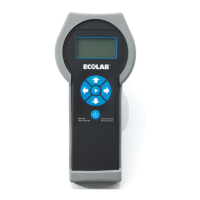
Handheld Fluorometer

Questions and Answers

  • N
    Nathan HarperAug 3, 2025
    What to do if Nalco TRASAR 1 give erroneous readings?
    • W
      watsonangelaAug 3, 2025
      If your Nalco Measuring Instruments give you erroneous readings, first, re-analyze the sample to verify the suspected result. Then, analyze a fresh sample taken from the same sample point; if the new sample reads differently than the first, run the sample again to verify the result. Also, recalibrate the instrument and retest the samples. Finally, check the pump/product to ensure the product is being delivered to the system.
  • K
    Kevin RiveraAug 13, 2025
    Why do I get error codes on my Nalco TRASAR 1 Measuring Instruments?
    • R
      Richard MasonAug 13, 2025
      Error codes on Nalco Measuring Instruments can result from several causes. The screen might show a low battery and no number. It could also be due to an incorrect calibration solution, or dirty or broken optics. Another cause is when the reference channel returns exactly zero, a divide by zero has occurred in an earlier step, or the calibration has been deleted. Finally, it can be caused by an incorrect zero solution, or dirty or broken optics.
  • K
    Katie GonzalezAug 22, 2025
    How to fix a blank screen on Nalco TRASAR 1?
    • J
      James CuevasAug 22, 2025
      If the screen on your Nalco Measuring Instruments goes blank, turn the unit off and then on again. The screen should then return.

Summary

System Introduction

Principle of Operation

Describes how the TRASAR 1 Handheld Fluorometer measures product concentration using fluorescent molecules and temperature compensation.

Specifications

Set-Up

Set-up

Details the initial setup procedure for the TRASAR 1 handheld unit, including inspecting the case and inserting the battery.

Operation

Turn On

Explains how to turn the TRASAR 1 Handheld Fluorometer on and off, and its initial display sequence.

Calibrate

Outlines the requirements and frequency for calibrating the TRASAR 1 Handheld Fluorometer.

Sample Measurement

Explains the procedure for performing a sample measurement using the TRASAR 1 Handheld Fluorometer.

Troubleshooting

Erroneous readings

Lists common causes and troubleshooting steps for when the TRASAR 1 Handheld Fluorometer provides incorrect readings.

Error codes

Explains specific error codes displayed by the TRASAR 1 Handheld Fluorometer and their meanings.

Maintenance

Nalco TRASAR 1 Specifications

General IconGeneral
Power:1 - 9 volt battery - Suppled
Auto Shutdownafter 5 minutes
Enclosure:Suitable for indoor/outdoor use
Environment:Temperature: 41-104°F [5-40°C]
Relative Humidity:90%
Background Concentration0-50% of nominal product concentration.
Accuracy:± 10% (for ± 3 sigma)
Dynamic Range:0.05-2.00 ppm Fluorescent Tracer from 10% to 400% of nominal product concentration
Weight and Dimensions IconWeight and Dimensions
Dimensions:8.5” x 3.8”
Weight:1.1 lb

Related product manuals