HOW TO SET UP THE SCOOTER
Dashboard power supply
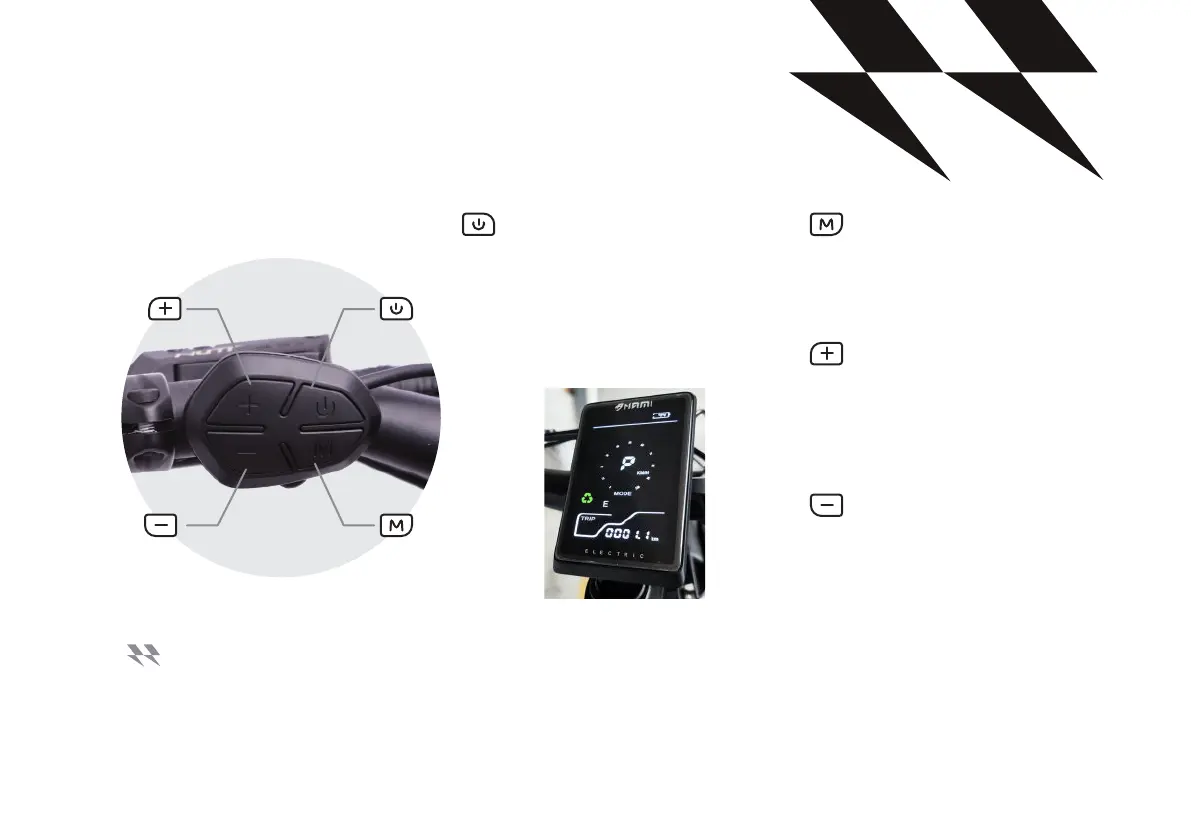
PEDESTRIAN MODE:
To activate pedestrian mode,
press the button for 3 seconds.
To deactivate pedestrian mode,
press the button for 3 seconds. This
mode limits the speed to 6 km/h in
pedestrian zones.
MODE BUTTON:
press for 3 seconds, activate the
USB port in the dashboard, so that
the USB mark shows up.
BUTTON:
press for 1 second to activate the
turbo. Press once to change driving
mode.
BUTTON:
When the resettable information
is displayed, press + and -
simultaneously for 1second to reset
the value.
The dashboard is delivered with a control unit located on the handlebar with 4 buttons:
YOUR SCOOTER HAS AN ELECTRONIC KEY ALREADY ACTIVATED WHEN SWITCHING ON THE ORIGINAL CODE IS 0000
THE + AND - SIGNS ON THE LEFT SWITCH WILL BE USED TO ADJUST THE VALUE PRESS THE M BUTTON TO VALIDATE
THE INITIAL POSITION AND SKIP NEXT ONCE THE CODE IS ENTERED, ACTIVATE IT BY PRESSING THE M BUTTON.
SO THAT UNAUTHORIZED PERSONS DO NOT USE THE SCOOTER, USE THE ELECTRONIC KEY.
USER MANUAL - EN
15



 To Next Page