6
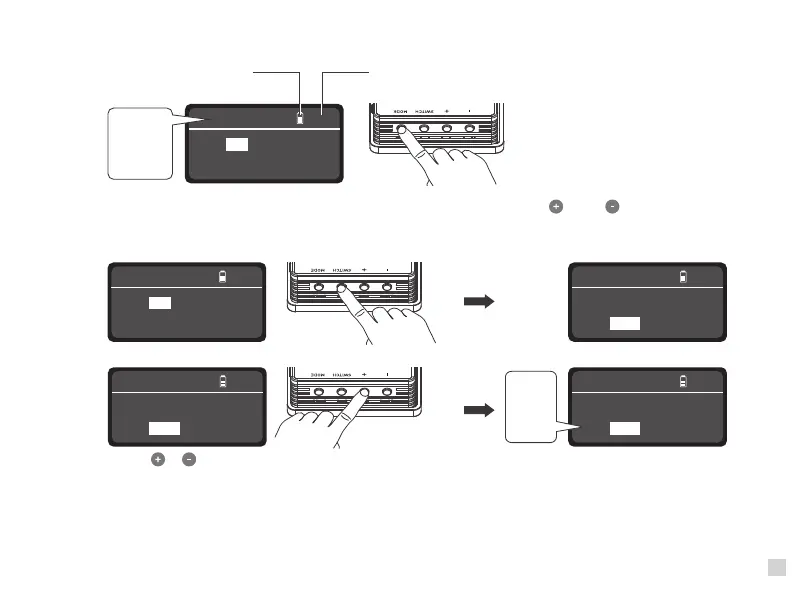
①In CCT Mode: press “Switch” button to select from DIM, CCT and G/M, press" " and " " to adjust the value
of DIM, CCT and G/M.
DIM range: 0% --- 100% CCT range: 2700K --- 7500K G/M range: -50 --- +50.
2. "Mode" button: Press to switch between modes - CCT, HSI, Effects and Menu.
CCT
CCT: 5600K G/M:0
DIM: 100%
6.0h
Battery indicator Time remaining
CCT
HSI
EFFECT
MENU
CCT
DIM: 100%
6.0h
CCT: 5700K G/M:0
Note: In effect mode, the adjustable range of DIM, CCT and G/M are the same as CCT mode.
Press "Switch" button to select from DIM, CCT and G/M.
Press " " " " to choose needed value.
2700K
.
.
.
.
.
7500K
CCT
CCT: 5600K G/M:0
DIM: 100%
6.0h
CCT
DIM: 100%
6.0h
CCT: 5600K G/M:0
CCT
DIM: 100%
6.0h
CCT: 5600K G/M:0


 To Next Page