[ěÍĞ«ĩèĄþr«þÍø
[ěÍĞ«ĩèþàě«þÍøĄßĩåÍĞĄÂĄĩ
ĮŘĄþə@þÉèëĩĄĞ [ěÍĞ«ĩèĄþĢ«þÉ7ĮþÃĩèĄþĢ
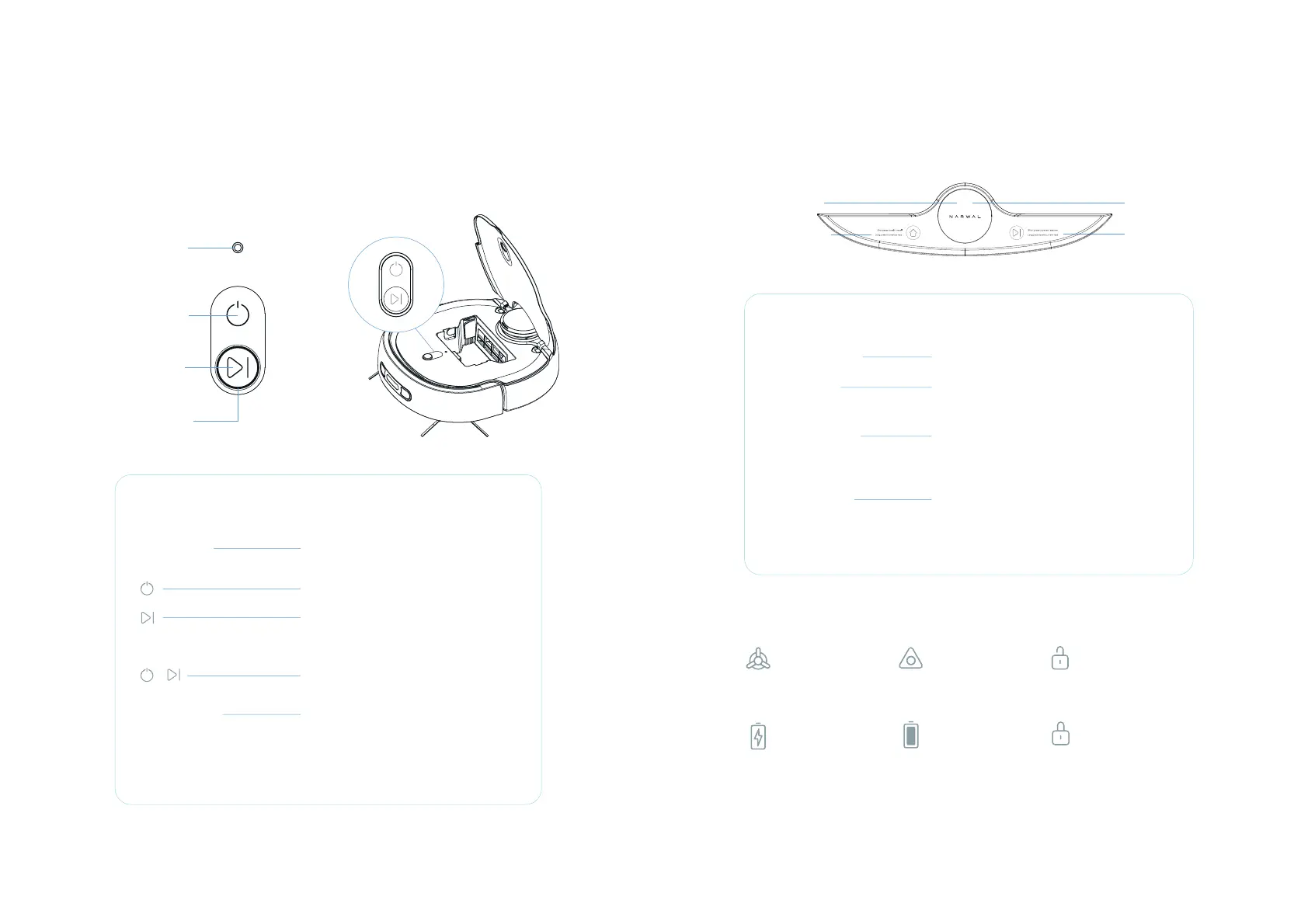
uÍĢÍĩÂĮŘĄþ Press and hold for 3 seconds to reset the
robot
Press and hold for 2 seconds to start/stop
a.
Press and hold for 2 seconds to end current
task
b.Short press to pause/resume
rĞÍĢĢÂĄĩåÂĮŘĄþĢ«þÉåĄøÉߥĞȢĢɎ&þĩÍĞ
þÍĩłĄĞöÃĄþŖàĮĞ«ĩèĄþýĄÉÍĄĞĞÍĢÍĩèɫ7è
Steady white:
Stand-by
Steady purple:
Working
Breathing purple:
Suspended
Breathing red:
Fault
Loop indicator
uÍĢÍĩÂĮŘĄþ
rĄłÍĞʊĢĮěěøň
yĩ«ĞĩÂĮŘĄþ
Loop indicator
Product Introduction
Produc
t Introduction
17 18
[ěÍĞ«ĩèþàě«þÍøĄßĩåÍÉĄÃöèþàĢĩ«ĩèĄþ
@Ã
Ą
þĢĄþĩåÍ[O&"ĢÃĞÍÍþ
ĮŘĄþə@þÉèëĩĄĞ
7ĮþÃĩèĄþÂĮŘĄþ
7ĮþÃĩèĄþÂĮŘĄþ
˃yĩ«ĞĩÂĮŘĄþ
Loop indicator
yĩ«ĞĩÂĮŘĄþ
Short press: Recall to/Exit from the base station
Press and hold for 2s: Start creating a map
Short press: Start/Pause a task
Press and hold for 2s: Forcibly end the current
ĩ«Ģö«þÉàĄĢĩ«þÉɫÂňrĞÍĢĢÂĄĩåÂĮŘĄþĢߥĞ
2s: Enable or disable the child lock
Steady white:
Stand-by
Breathing purple:
Suspended
Steady purple:
Working
Breathing red:
Fault
[ěÍĞ«ĩèĄþĢ«þÉ7ĮþÃĩèĄþĢ
Shows the current
cleaning state
8CEWWOKEQP
Indicates the robot
properly contacts with
the charging electrodes
of the base station
%JCTIKPIKEQP
Shows the current
«ŘÍĞňøÍŁÍø
$CVVGT[KEQP
Shows the current
cleaning state
/QRKEQP
Indicates that the panel of
the base station has
been locked
%JKNFNQEMKEQP
Indicates that the panel
of the base station has
been enabled
%JKNFNQEMKEQP
Loop indicator
OLED screen
yĩ«ĞĩÂĮŘĄþ 7ĮþÃĩèĄþÂĮŘĄþ


 To Next Page