Need help?
Do you have a question about the Natec KANGAROO DUAL and is the answer not in the manual?
Key features like USB 3.0, UASP, SATA support, and capacity.
Details the docking station, cables, adapter, and manual.
Lists required USB ports and compatible operating systems.
Illustrates how to connect drives and shows ports.
How to clone HDD/SSD without a PC using Source and Destination disks.
Detailed steps for initiating and executing the disk cloning process.
Understanding LED lights that show cloning progress (25%, 50%, 75%, 100%).
Important notes on drive heat, time, and data loss during cloning.
Using the docking station to connect drives to a PC for data access or backup.
Utilizing the OTB button for quick data backups to an external drive.
Guidance on preparing hard drives, including warnings about data loss.
Explains NTFS, FAT32 for Windows and HFS+, FAT32 for Mac.
Step-by-step instructions for creating partitions and formatting drives in Windows.
Answers to common user questions regarding drive recognition and setup.
Information on CE, RoHS, WEEE compliance and the 24-month warranty.
 General
| Package type | Box |
|---|---|
| Material | Aluminum |
| On/off switch | Yes |
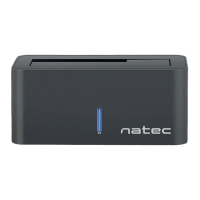
| Product color | Black |
| LED indicators | Status |
| Maximum data transfer rate | 5 Gbit/s |
| Cables included | USB |
| Mac operating systems supported | Mac OS 9.0, Mac OS 9.1, Mac OS 9.2, Mac OS X 10.0 Cheetah, Mac OS X 10.1 Puma, Mac OS X 10.10 Yosemite, Mac OS X 10.11 El Capitan, Mac OS X 10.12 Sierra, Mac OS X 10.13 High Sierra, Mac OS X 10.14 Mojave, Mac OS X 10.15 Catalina, Mac OS X 10.2 Jaguar, Mac OS X 10.3 Panther, Mac OS X 10.4 Tiger, Mac OS X 10.5 Leopard, Mac OS X 10.6 Snow Leopard, Mac OS X 10.7 Lion, Mac OS X 10.8 Mountain Lion, Mac OS X 10.9 Mavericks |
| Windows operating systems supported | Windows 10, Windows 2000, Windows 7, Windows 8, Windows Vista, Windows XP |
| USB 3.2 Gen 1 (3.1 Gen 1) ports quantity | 1 |
| Storage media type | HDD, SSD |
| Storage drive interface | Serial ATA, Serial ATA II, Serial ATA III |
| Maximum storage capacity | 8 TB |
| Storage drive sizes supported | 2.5, 3.5 \ |
| Number of storage drives supported | 2 |
 Weight and Dimensions
| Depth | 95 mm |
|---|---|
| Width | 129 mm |
| Height | 75 mm |


 To Next Page