EasyManua.ls Logo

NATIVE UNION MM03 - User Manual

NATIVE UNION MM03
21 pages
To Next Page IconTo Next Page
Loading...
1
1
1
2
3
4
5
6
WELCOME
Thank you for buying the MM03 handset, you will love this new experience.
For the most updated information, be sure to check our website at www.nativeunion.com
WHAT YOU GET IN THIS PACKAGE
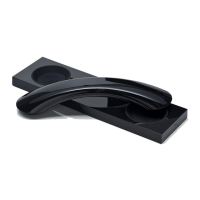
1. MM03 Bluetooth
®
wireless handset
2. MM03 base
3. One Multi-country AC adaptor with wire and micro
USB with 4 exchangeable adaptor plugs
for Europe, UK, North America, Asia and Australia.
4. Micro-USB / USB Cable
5. Instruction Manual
6. One silicon mobile phone mat

Other manuals for NATIVE UNION MM03

Question and Answer IconNeed help?

Do you have a question about the NATIVE UNION MM03 and is the answer not in the manual?

NATIVE UNION MM03 Specifications

General IconGeneral
Product TypeHandset
Connectivity TechnologyWired
ColorBlack
Cable Length1.2 m
Connector3.5mm
Color OptionsBlack
CompatibilityUniversal

Summary

What You Get In This Package

Location of Controls

Important Safety Instructions

Connecting to Your Mobile Phone

Charge Your MM03 Handset

Instructions for charging the MM03 handset using the provided AC adaptor and base.

Turn Your MM03 Handset On

Procedure to power on the MM03 handset by pressing the MFB button.

Turn Your MM03 Handset Off

Procedure to power off the MM03 handset by pressing the MFB button.

Pairing Handset with Mobile Phone

Detailed steps for pairing the MM03 handset with a Bluetooth-enabled mobile phone.

Using Your MM03 with Your Mobile Phone

Making a Call

Instructions on how to initiate a phone call using the MM03 handset.

Answering an Incoming Call

How to answer or swap calls on the MM03 handset.

Disconnecting a Call

Procedure to end an active phone call using the MM03.

Other Functions

Syncing Your iPhone

Steps to synchronize your iPhone with your computer using the MM03 base.

Rejecting Incoming Calls

Volume Control

Redial Last Number

End and Accept Waiting Call

Hold and Accept Waiting Call

Voice Activated Dialing

Mute Microphone

Clear Paired Device List

Choose MM03 Ringtone

Connecting to Computers

Automatic Reconnection

Pairing an Additional Device

Multipoint Connection

Setting the Primary Phone

Methods to force the MM03 to switch its primary phone connection.

Multiple Calls in Multipoint

Troubleshooting

No Connection Troubleshooting

Steps to resolve issues when the MM03 fails to connect with a mobile phone.

Specifications

Limited Warranty

Regulatory Compliance

FCC and Environmental Information