Need help?
Do you have a question about the NATIVE UNION POP BLUETOOTH and is the answer not in the manual?
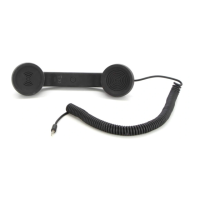
Includes the main POP Bluetooth handset device.
Cable for charging the POP Bluetooth handset.
A protective felt mat included with the product.
Provides initial setup instructions for quick operation.
Comprehensive guide for using the POP Bluetooth device.
It takes 3-4 hours to fully charge the handset using the micro-USB cable.
Device battery performance: up to 8 hours talk time, up to 100 hours standby.
LED indicators for charging (red) and low battery (flashing red).
Procedure to power the device on/off using button press (4 seconds).
Press and hold button for 5 sec until red/blue LED flashes alternately.
Activate Bluetooth on your device within 1 meter of handset.
Device searches automatically or manually for available Bluetooth devices.
Select "POP Bluetooth" and enter password "0000" if prompted.
Blue LED flashes every 4 seconds indicating a successful connection.
The Bluetooth wireless signal range is up to 10 metres from your mobile device.
Procedure for automatic reconnection when device returns within range.
Dial the number as usual to make a call.
Click the button to answer or end an incoming or ongoing call.
Click button, hear alert, then state name to call (device dependent).
Double click the button to redial the last number called.
Press and hold the button for 2 seconds to reject an incoming call.
Use '+' and '-' buttons to adjust volume during an active call.
Use '+' and '-' buttons to adjust ringer volume in standby mode.
Press '+' and '-' buttons together to mute/unmute the microphone.
Details Bluetooth version, frequency range, power class, and battery type.
Read instructions, avoid water, clean with dry cloth, prevent hearing damage.
Device complies with FCC Part 15 rules for radio frequency interference.
Guidance on proper disposal of old electrical and electronic equipment.
 General
| Brand | NATIVE UNION |
|---|---|
| Model | POP BLUETOOTH |
| Category | Handsets |
| Language | English |


 To Next Page