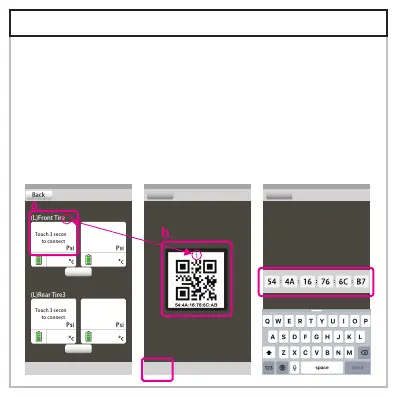
Scan QR code
camra on
Back
Back
Enter QR code
Touch 3 seconds
to connect
Touch 3 seconds
to connect
Touch 3 seconds
to connect
Touch 3 seconds
to connect
(L)Front Tire1 (R)Front Tire2
(L)Rear Tire3 (R)Rear Tire4
Back
setting
setting
5-4.Pairing the sensor
Pairing the sensor on your App, please follow serial
number and pair in order.
A.Press 3 sec for pairing mode.
B.Scan QR code with your phone for pairing, or enter the
serial number below QR code for pairing.


 To Next Page