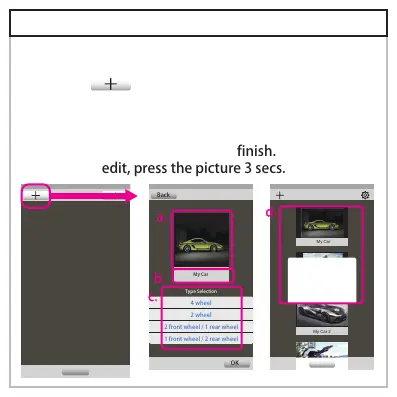
5-3.Build up new vehicle info
Press “ ” enter vehicle info
A.Press picture area to choose picture from database or
to take a photo.
B.Name your vehicle by pressing name area
C.Choose vehicle spec, then press finish.
D.To redo or edit, press the picture 3 secs.
使用說明
車輛選擇
4 wheel
2 wheel
2 front wheel / 1 rear wheel
1 front wheel / 2 rear wheel
Back
OK
My Car
Type Selection
My Car
My Motor
Photo
My Car 2
Instructions
Vehicle selection
Select
Edit / Delete
Vehicle data
DeleteEdit



 To Next Page